Reference design
Agent-run lawn care: a ZenSched reference design
Running a 1–2 person lawn care company means juggling customer lists, weekly schedules, and invoices—often with pen-and-paper or generic spreadsheets. What if an AI assistant could handle the scheduling, track GPS-verified visits, and maintain your customer records—without forcing you into a heavy enterprise field service management suite?
This reference design shows how a small lawn crew can deploy an AI agent to manage their workflow using ZenSched as the live schedule of record and a local SQLite database for customers, rates, and invoices.
The problem: drowning in weekly who-to-mow lists
Small lawn companies face a recurring cycle: figure out which customers are due this week, schedule the crew, track which properties got serviced, and generate invoices. Missed visits mean lost revenue. Double-booking or forgetting a biweekly customer creates chaos.
Traditional field service management software is built for large operations with dispatchers, multiple crews, and complex routing. For a tiny company, the overhead—both in cost and learning curve—often outweighs the benefit.
The solution: split responsibility between ZenSched and local data
This architecture divides work cleanly:
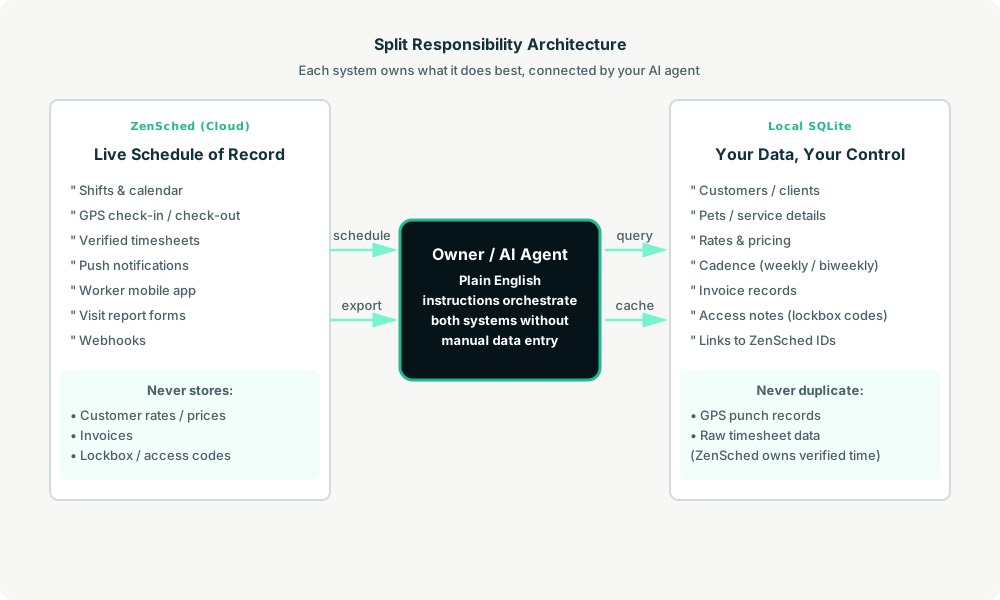
- ZenSched: Live schedule, GPS-verified check-ins/check-outs, timesheets, push notifications to the worker app. ZenSched never stores your customer rates or invoices.
- Local SQLite database: Customer records, service rates, cadence (weekly, biweekly, monthly), invoice records, and links to ZenSched location and event IDs. Never duplicate punch records or timesheets locally—ZenSched owns verified time data.
The agent orchestrates both: it reads from SQLite to know who’s due, creates shifts in ZenSched, and records event IDs back into SQLite for later reconciliation.
Day-to-day workflow
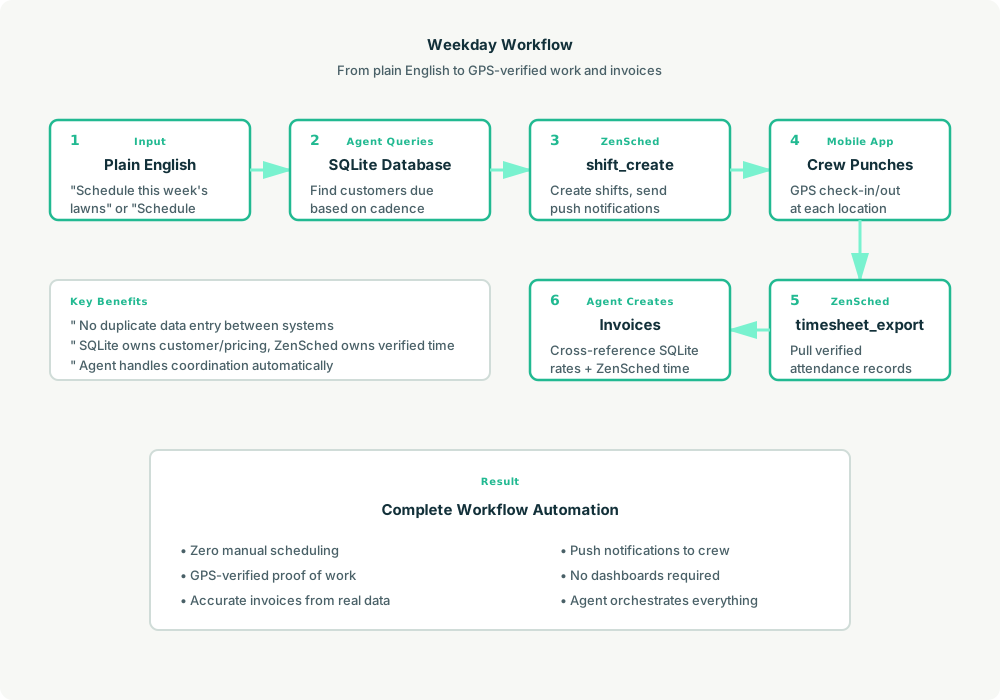
A typical Monday morning looks like this:
- Owner to agent (plain English): “Schedule this week’s lawns.”
- Agent reads SQLite: Query customers due this week based on their cadence and last service date.
- Agent creates shifts on ZenSched: For each customer, call
shift_createwith the location ID and worker ID. ZenSched sends push notifications to the crew. - Crew gets to work: Workers use the ZenSched mobile app to see their day, navigate to each property, and punch in/out with GPS verification.
- Reconciliation: At the end of the week, the agent calls
timesheet_exportfrom ZenSched to pull verified attendance records, cross-references with SQLite customer data, and generates invoices.
No dashboards. No manual data entry. Just plain English instructions to the agent and GPS-verified proof of work.
Setup summary
Getting started takes about 15 minutes:
- Install an MCP client: Claude Desktop or Cursor IDE both support MCP.
- Connect ZenSched MCP: Add
https://mcp.zensched.com/mcpto your MCP config. - Connect easy-sqlite-mcp: Set up a local SQLite MCP server for customer data (available on npm).
- Paste the reference skill: The zensched-lawn-kit repository includes a
SKILL.mdfile that teaches the agent the complete workflow. Paste it into your agent’s context or attach it as a resource. - Create your ZenSched account: Call
account_createthrough the agent to get yourzsc_API key (no email required). - Fund when needed: Start with 200 free MCP calls per day. When you need GPS verification, geocoding, or worker invites, add prepaid balance. The $5 activation deposit is credited to your account.
For step-by-step details, see the ZenSched quickstart and the lawn-kit repository.
Metering: what you pay for
ZenSched uses transparent per-action pricing:
- 200 free MCP calls/day for basic operations
- GPS check-in/check-out: $0.10 each (metered verification)
- Address geocoding: $0.03 per location
- Worker invite: $0.25 (one-time email to onboard a crew member)
- Form submissions: $0.05–$0.15 depending on media (photos, signatures)
- Processed timesheets: $0.10 per worker per payroll period (optional; raw data exports are free)
The $5 activation unlocks paid meters and becomes spendable balance. No monthly subscription. No per-seat fees. You pay for the outcomes your agent needs.
What you get
With this setup, you gain:
- Verified attendance for every property visit, timestamped and GPS-pinned
- Exportable timesheets for payroll or invoicing
- Agent-owned CRM and billing stored locally in SQLite (your data, your control)
- Push notifications to crew members for upcoming shifts
- Webhook support for real-time event delivery (optional)
You skip the dashboards, dispatcher overhead, and enterprise feature bloat that larger FSM platforms require.
Who this is for (and who it’s not for)
Ideal for:
- Tiny lawn care crews (1–5 people) who want automation without complexity
- Agent builders exploring field service use cases
- Small service businesses (pool maintenance, pet care, cleaning) with similar patterns
Not a replacement for:
- ServiceTitan, Jobber, or Housecall Pro if you need multi-department dispatch, customer portals, complex routing, or integrated payment processing
- Companies that require a human-facing dashboard for daily operations
This is agent-first infrastructure. The operator talks to the agent, and the agent talks to ZenSched.
Get started
- Clone the zensched-lawn-kit repository
- Connect the ZenSched MCP server
- Read the quickstart guide
Build a workflow that works for your crew. Let your agent handle the scheduling.
Ready to build your own workflow?
Clone the reference kit and connect ZenSched to your AI agent.