Reference design
Agent-run LPG cylinder delivery routes: a ZenSched reference design
The restaurant GM texts: “You didn’t come.” Tonight’s empty count does not match the cash in the pouch. Pertamina MAP, Indane, and CRM Gaseras already own the official book — but when a warung wants proof the tabung was swapped, the evidence is a reconstructed WhatsApp thread. What if an AI assistant could roll today’s route from plain English, GPS-check the driver in at the door, capture fulls in, empties out, and a seal photo on a Stop Record form, and answer “who skipped a restaurant this week” — without putting gate codes into a vendor cloud, and without pretending to be your official MAP, OMC portal, CRE volumetric, or DOE LTO filing?
This reference design shows how a 1–6 driver LPG or butane cylinder delivery route can deploy an AI agent using ZenSched as the live schedule of record (with a Stop Record form on the phone) and a local SQLite database for customers, drop points, cylinder balances, and invoices.
Honest framing: proof-of-exchange, not the official cylinder book
Read this before you clone the kit.
- The Stop Record is not Pertamina MAP / MyPertamina subsidy recording, an Indane / Bharatgas / HP Gas OMC portal, CRE volumetric or CFDI 4.0, a DOE LTO or RA 11592 cylinder-swapping registry, or a MITECO price filing. The generator and dealer must record the sale in the oil-company app or permit binder. The kit collects cylinder size, fulls in, empties out, payment, and a seal/receipt photo — useful proof for the owner and the customer, not the system of record an ESDM / CRE / DOE inspector expects.
- It is not LPG Guru, CRM Gaseras, or CTMS. No GST/CFDI e-invoice engine, no RFID serial tracking from plant to kitchen, no route optimizer, no consumer booking app. Keep those where they are.
- Gate codes, WhatsApp numbers, and deposit notes stay only in local SQLite (
stops.access_notes,customers.deposit_notes). ZenSched locations are labeled by stop code + street address —S-1 · Jl. Kemang Raya 12— not by customer name or access detail. - Receipt photos can carry a burned-in stamp (opt-in). Set
"stamp_photos": trueon the photo field inform_create/form_update. The kit enables this on the Stop Record receipt field. - There is no signature field on purpose. On ZenSched a signature replaces Submit — submitting the form must not look like the customer signed a legal receipt.
- Meters are always USD. Rupiah, pesos, euros, or rupees live only in SQLite. ZenSched bills in US dollars on a prepaid balance.
- The owner types to Claude or ChatGPT on a laptop — not inside WhatsApp. Orders still arrive as voice notes in WhatsApp Business. Spain and bilingual owners are the most plausible wedge until a WhatsApp-native agent exists.
- Android on Google Play; iOS on the App Store.
The kit’s SKILL.md makes that split a hard rule the AI will refuse to break.
The problem: “was Budi at 14 Jalan Merdeka, and did he leave a full?”
Small LPG shops already have a stack: MAP or the OMC portal if the book is locked to an oil major; otherwise WhatsApp Business, a paper tally of filled vs empty, cash in a pouch, and Google Maps. When a restaurant GM or the owner at dusk asks for proof, the evidence is a reconstructed day.
The daily loop is the same whether you drive the truck or dispatch three drivers:
- Was Budi at Warung Sari, and did he leave two full 12 kg and take two empties?
- What size went in, how many empties came back, and can you show a seal photo?
- Which weekly HoReCa stops are due today across the book?
- Paying drivers without reconstructing the WhatsApp chat every Saturday.
- Coverage when a truck is down and the voice notes spike at 4 pm.
Not on that list: consumer booking apps, 40-truck routing, RFID plant-to-depot serials, or replacing Pertamina MAP / Indane.
The solution: split responsibility between ZenSched and local data
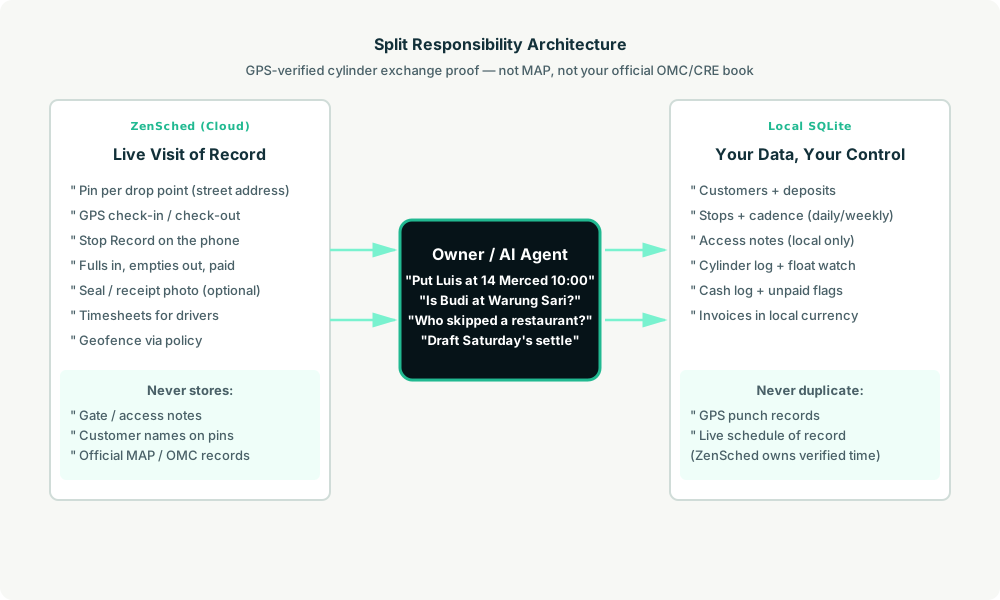
- ZenSched: Live pin per drop point, GPS-verified check-in and check-out (geofence enforced via policy, not per location), driver app + push, one Stop Record form per stop (cylinders delivered, empties collected, paid, optional receipt photo). Household and HoReCa stops reuse the same form.
- Local SQLite database: Customers, stops (daily / weekly / on-demand cadence), cylinder types and prices in local currency, drivers, completed visits with Stop Record summaries, cash log, float watch, invoices. Links to ZenSched location, event, and shift IDs. After one metered form read, punches and summaries are cached locally.
The agent orchestrates both: it reads which stops are due from stops_due, creates shifts on ZenSched labeled by street address, and writes verified arrival plus Stop Record answers back into SQLite for billing and Saturday’s settle.
Privacy: access notes never cross
Everything sensitive lives only in local tables: customers.customer_name, phones, customers.deposit_notes, stops.access_notes (gate, dog, “call first”). ZenSched receives the stop code + street address for the GPS pin and the Stop Record answers — never a customer name in a location title, never a gate code in an event name. If you ask the agent to put access notes into ZenSched, it should refuse.
Day-to-day workflow
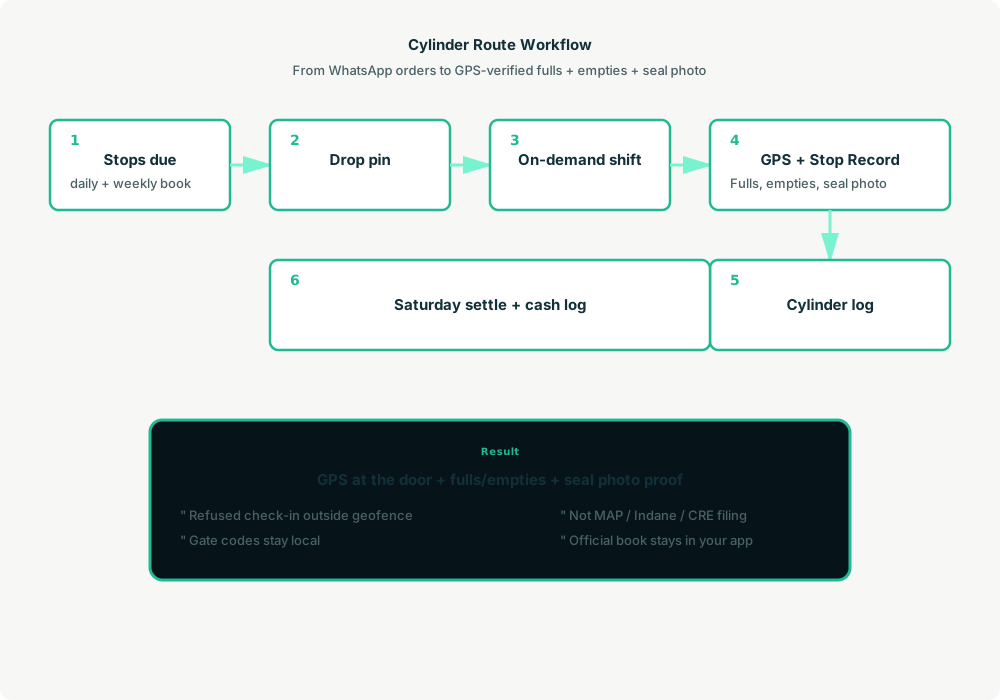
- You to agent (plain English): “WhatsApp just came in — put Luis at 14 Merced today 10:00–10:20.”
- Agent reads SQLite:
stops_duefor the next 7 days by driver and route. - Agent creates shifts on ZenSched: One
location_createper new drop point ($0.03 geocode), rolling event (≤60 days, renewed automatically),form_createonce for the Stop Record,form_assign,shift_createper scheduled stop. Luis gets a push. - The driver does the work: Open the ZenSched app, GPS check-in at the pin, fill the Stop Record (fulls, empties, paid, receipt photo), check-out.
- Operations: “Is Luis at 14 Merced?” “Who skipped a restaurant this week?” “How many 12 kg at Bu Sari yesterday?” Agent answers from SQLite after one metered read.
- Money: Cash log and invoices from local visit summaries. Plain-text settle under customer terms. Official MAP / OMC / CRE / DOE / MITECO filing stays in the app you already have.
No dashboards. No asking you to run SQL. Talk to the agent.
Stop Record on the phone
The driver opens the ZenSched mobile app, checks in at the door, then fills the Stop Record before leaving:
- Cylinders delivered (count)
- Empties collected (count)
- Paid (Cash / Account / Unpaid)
- Receipt photo (optional, with
"stamp_photos": true) - Notes
Household refills and weekly restaurant swaps reuse the same form — filled_in=1 vs filled_in=4. A separate official log does not exist in ZenSched.
Setup summary
Getting started takes about 15 minutes:
- Install an MCP client: Claude Desktop, Cursor, or Muse Code.
- Connect ZenSched MCP: Add
https://mcp.zensched.com/mcpto your MCP config. - Connect easy-sqlite-mcp: Point
SQLITE_PATHat a locallpg-ops.dbon an encrypted, backed-up folder. - Paste the reference skill: The zensched-lpg-routes-kit includes
SKILL.md,schema.sql, and a quickstart. Load the schema once (one statement per execute). - Create your ZenSched account: Call
zensched_guide, thenaccount_createfor azsc_key. Invite drivers at $0.25 each once. - Fund when needed: Metered GPS, geocode, and form reads draw from prepaid balance. The $5 activation deposit is credited to your account.
Dense kampung / vecindad / barangay blocks need a wider policy radius (policy_update), not org-wide remote_checkin — that turns GPS proof off for every stop. Events cap at 60 days; the kit rolls a new event per drop point automatically when the window expires.
Worker app: Android on Google Play and iOS on the App Store.
For step-by-step details, see the ZenSched quickstart and the lpg-routes kit.
Metering: what you pay for
ZenSched uses transparent per-action pricing (see pricing):
- GPS check-in/check-out: $0.10 each (about $0.20 per stop)
- Address geocoding: $0.03 per new drop point (once)
- Worker invite: $0.25 per driver (once)
- Form submission reads: $0.05 basic / $0.15 with photos — read once, cache locally
- Processed timesheet export: $0.10 per worker per pay period
Worked example from the vertical pitch: 3 drivers × 40 stops/day × 21 days ≈ 2,520 visits/month with a receipt photo on every stop.
| Pattern | Approx. monthly | Per stop |
|---|---|---|
| GPS + Stop Record with photo (kit default) | about $882 | about $0.35 |
| GPS + checklist only (no photo read) | about $630 | about $0.25 |
| GPS-only proof per stop | about $504 | about $0.20 |
Read the incumbent comparison honestly. At 2,520 photo-logged visits, ZenSched (about $882/month) loses a pure-price fight to LPG Guru (about $48), CRM Gaseras Básico ($99), and even CRM Gaseras Avanzado ($799). LPG Guru and CRM Gaseras include GST/CFDI-style billing, stock, and a driver app ZenSched does not. Do not tell an ESDM / CRE / DOE inspector “it’s in ZenSched” instead of your official MAP / OMC book. Do not offer photo-every-stop on subsidized 3 kg Indonesia — $0.35 is a large fraction of a thin-margin ticket.
What you get
- Geofenced check-in at the door
- Stop Record: fulls, empties, paid, receipt photo
- Local cylinder log and cash log for the owner
- Household and HoReCa on one form
- AI dispatch from plain English
- About 15 minutes to stand up
What you don’t get
- No official MAP / OMC / CRE / DOE / MITECO filing
- No GST / CFDI / e-Faktur / GST invoice engine
- No RFID / serial cylinder register
- No WhatsApp Business inbox or route optimizer
- Not a replacement for LPG Guru if GST billing is daily work
Who this is for
Ideal for: 1–6 driver independents on WhatsApp + a notebook, Bright Gas 12 kg and commercial routes beside (not instead of) the official app, operators who want GPS proof and AI dispatch and will type to Claude on a laptop.
Not for: Pertamina MAP pangkalan on subsidized 3 kg as the only book, IOCL / BPCL / HPCL agencies locked to the OMC portal, or shops whose deliverable is the official sale record the oil company already mandates.
Get started
- Kit: github.com/zenschedmcp/zensched-lpg-routes-kit
- Docs: zensched.com/docs/quickstart
- MCP:
https://mcp.zensched.com/mcp - Related: Agent-run septic pumping & grease-trap service · Agent-run portable toilet & dumpster routes · Agent-run vending & micro-market routes
Ready to build your own workflow?
Clone the reference kit and connect ZenSched to your AI agent.