Reference design
Agent-run vending routes: a ZenSched reference design
The plant GM calls Tuesday. “Were you at Building C’s snack machine, and did you fill it?” You call Luis. He is on the next stop. The route sheet might say he hit 40 machines, the coin bag is light on one account, and VendSoft is $487 whether the basement unit got skipped or not. What if an AI assistant could roll next week’s due machines, put a GPS check-in on the driver’s phone at Worthington Plant 2 snack, capture restock counts, coin collected, sold-out slots, a temperature reading, and a photo of the glass on a Restock form, and answer “who missed a weekly this week” — without putting commission splits, badge codes, or dock notes into a vendor cloud, and without pretending to be Nayax, Cantaloupe, VendSoft, or your official health-department temperature log?
This reference design shows how a 1–4 driver vending or micro-market route shop can deploy an AI agent using ZenSched as the live schedule of record (with a Restock form on the phone) and a local SQLite database for host accounts, machines, routes, cadence, coin-log extracts, and invoices.
Honest framing: proof-of-service, not a VMS or card reader
Read this before you clone the kit.
- The Restock form is not your official HACCP / Food Code temperature log. FDA Food Code §4-204.111/112, EC 852/2004, and Japan’s Food Sanitation Act require specific fields, retention, and inspector access on their forms. The kit collects the temperature the driver reads off the gauge — useful proof for a facility manager, not the system of record a sanitarian expects.
- It is not Nayax, Cantaloupe, VendSoft, or Route4Me. No cashless acquiring, no DEX/MDB telemetry import, no warehouse pick lists, no machine P&L dashboard, no route optimizer. Keep your card reader and VMS where they are.
- Commission splits, badge codes, loading-dock notes, and host P&L detail stay only in local SQLite. ZenSched locations and events are labeled
Worthington – Plant 2 snack— street address for the geofence, not commission terms. - Machine photos can carry a burned-in stamp (opt-in). Set
"stamp_photos": trueon the photo field inform_create/form_update. The kit enables this on the Restock machine photo field. - There is no signature field on purpose. On ZenSched a signature replaces Submit — submitting the form must not look like signing a legal document.
- Android on Google Play; iOS on the App Store.
The kit’s SKILL.md makes that split a hard rule the AI will refuse to break.
The problem: “were you there?” and “did you fill it?”
Small route shops already have a stack: Nayax or Cantaloupe if they bought the card reader; VendSoft if they bought the office suite; otherwise paper route sheets, a coin bag, DEX printouts in a folder, and Google Maps. When a facility manager or a health inspector asks for proof, the evidence is a text thread and a binder.
The weekly loop is the same whether you drive the van or dispatch four drivers:
- Did Luis restock Plant 2’s snack machine on Tuesday?
- What went in, what came out in coin, and can you show a photo of the glass?
- Micro-market as a longer stop — same proof, not a kiosk OS.
- Paying drivers without reconstructing paper tickets every Friday.
- Coverage when a van is down mid-week.
Not on that list: cashless settlement, DEX coil-level inventory, warehouse pre-kitting, or a 400-truck dynamic router.
The solution: split responsibility between ZenSched and local data
This architecture divides work cleanly:
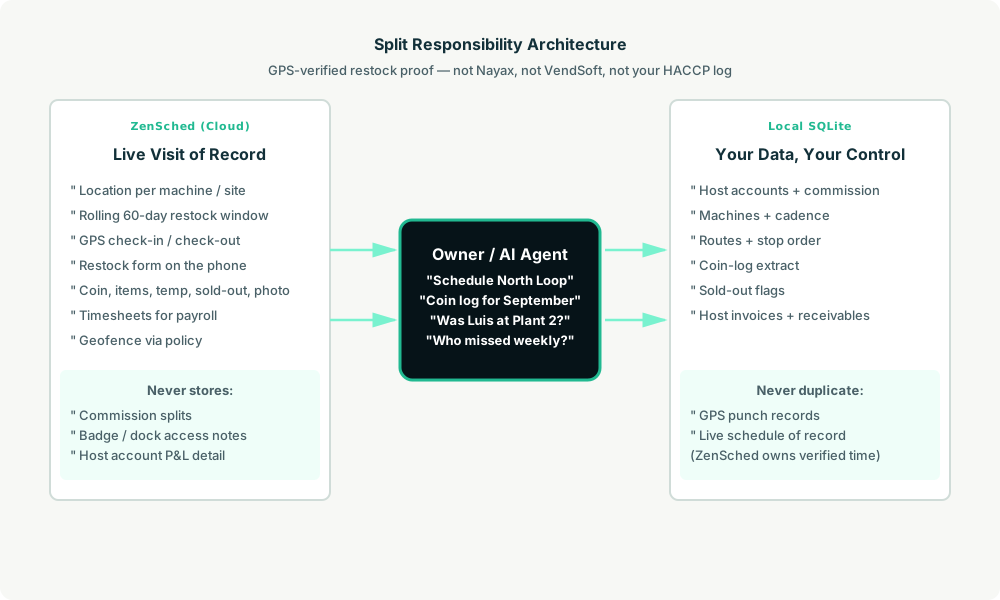
- ZenSched: Live machine/site pin, GPS-verified check-in and check-out (geofence enforced via policy, not per location), driver app + push, one Restock form per stop (coin collected, items restocked, temperature OK, sold-out, up to 2 machine photos). ZenSched never stores commission splits or dock access notes.
- Local SQLite database: Host accounts, machines with cadence (weekly / biweekly / monthly / quarterly / on-demand), routes, completed visit summaries, coin-log extract, sold-out flags, host invoices. Links to ZenSched location, event, and shift IDs. After one metered form read, punches and restock summaries are cached locally.
The agent orchestrates both: it reads which machines are due from machines_due, creates shifts on ZenSched labeled by site, and writes verified arrival plus Restock answers back into SQLite for coin logs and host billing.
Privacy: commission notes never cross
Everything sensitive lives only in local tables: accounts.commission_notes, machines.access_notes (badge codes, dock hours, manager cell). ZenSched receives the street address for the GPS pin and the Restock form answers — never a commission split in a location title, never a dock code in an event name. If you ask the agent to put access notes into ZenSched, it should refuse.
The machine address is geocoded (required for geofencing). Restock photos live on ZenSched as part of the form.
Day-to-day workflow
A typical route week looks like this:
- You to agent (plain English): “Schedule North Loop this week — Luis on Tuesday, Maria on Thursday.”
- Agent reads SQLite:
machines_duefor the next 7 days by route. - Agent creates shifts on ZenSched: One
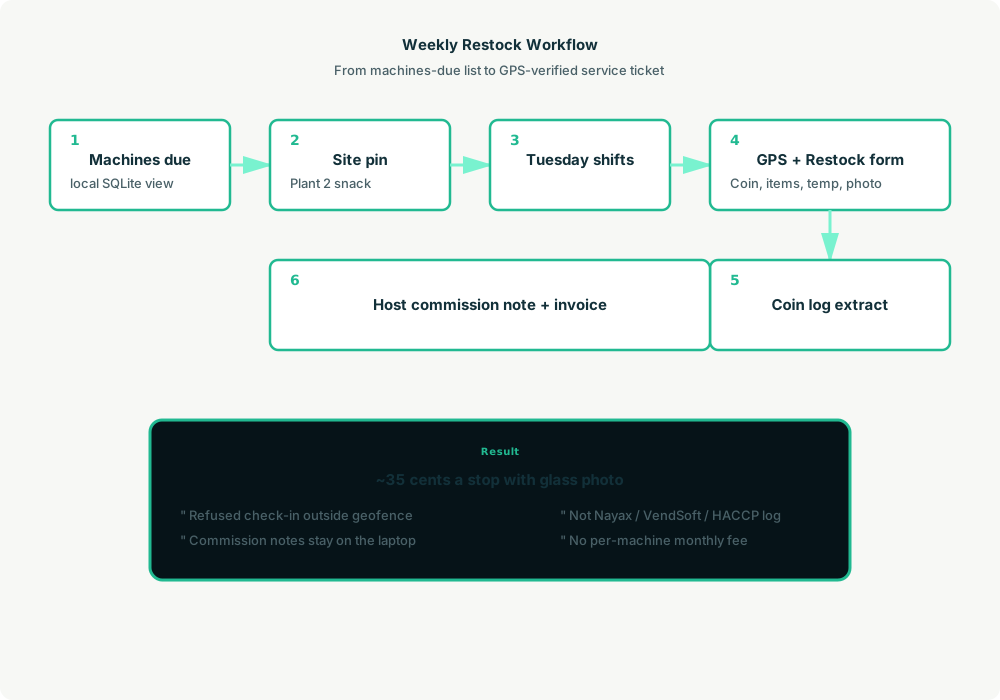
location_createper new site ($0.03 geocode; second machine at same address reuses the pin), rolling event (≤60 days, renewed automatically),form_createonce for the Restock form,form_assign,shift_createper stop. Luis gets a push. - The driver does the work: Open the ZenSched app, GPS check-in at the pin, fill the Restock form (coin, items, temp if food unit, sold-out, glass photo), check-out.
- Operations: “Coin log for September.” “Who missed a weekly this week?” “Was Luis at Plant 2 Tuesday?” Agent answers from SQLite after one metered read.
- Money: Host invoices and commission notes from local visit summaries. Plain-text invoices under account terms.
No dashboards. No asking you to run SQL. Talk to the agent.
Restock form on the phone
The driver opens the ZenSched mobile app, checks in at the machine or micro-market site, then fills the Restock form before leaving:
- Coin / cash collected
- Items restocked (textarea — not a SKU pick list)
- Temperature OK (Yes / No / N/A — shown when machine is refrigerated or food)
- Sold-out (None / Partial / Full)
- Machine photo (up to 2, with optional
"stamp_photos": true) - Notes
Micro-market restocks reuse the same form — not a kiosk OS replacement.
Setup summary
Getting started takes about 15 minutes:
- Install an MCP client: Claude Desktop, Cursor, or Muse Code.
- Connect ZenSched MCP: Add
https://mcp.zensched.com/mcpto your MCP config. - Connect easy-sqlite-mcp: Point
SQLITE_PATHat a localvending-ops.dbon an encrypted, backed-up folder. - Paste the reference skill: The zensched-vending-kit includes
SKILL.md,schema.sql, and a quickstart. Load the schema once (one statement per execute). Machine photo fields set"stamp_photos": trueso exported JPEGs carry readable date, time, and GPS when captured in-app. - Create your ZenSched account: Call
zensched_guide, thenaccount_createfor azsc_key. Invite drivers at $0.25 each once. - Fund when needed: Metered GPS, geocode, and form reads draw from prepaid balance. The $5 activation deposit is credited to your account.
Hospital campuses and large plants need a wider policy radius (policy_update), not org-wide remote_checkin — that turns GPS proof off for every machine. Events cap at 60 days; the kit rolls a new event per machine automatically when the window expires. A second machine at the same address reuses the pin — no second geocode charge.
Worker app: Android on Google Play and iOS on the App Store.
For step-by-step details, see the ZenSched quickstart and the vending kit.
Metering: what you pay for
ZenSched uses transparent per-action pricing (see pricing):
- GPS check-in/check-out: $0.10 each
- Address geocoding: $0.03 per new site (once; same-address machines reuse the pin)
- Worker invite: $0.25 per driver (once)
- Form submission reads: $0.05 basic / $0.15 with photos — read once, cache locally
- Processed timesheet export: $0.10 per worker per pay period
Worked example from the vertical pitch: 2 drivers × 40 stops/day × 21 days ≈ 1,680 visits/month with a glass photo every stop → about $588/month, or ~$0.35 per stop (GPS in + GPS out + media read). GPS-only proof is ~$0.20/stop ($336/month at that volume). A 1-driver book at ~525 visits/month is ~$184/month with photos.
Read the incumbent comparison honestly. At 1,680 photo-logged visits ZenSched is above VendSoft Business (~$487) and above Route4Me ($199–398) — the sell at volume is enforced GPS proof and AI dispatch, not a discount. It is clearly cheaper than Nayax or Cantaloupe per-device software — and those products take cards and read DEX, which ZenSched does not. Do not tell a sanitarian “it’s in ZenSched” instead of your official temperature book.
What you get
- Geofenced check-in and check-out at the machine, with distance from the pin
- A Restock form on the phone: coin, items, temperature OK, sold-out, machine photos (optional burned-in stamp)
- “Was Luis at Plant 2 snack Tuesday?” from the agent in plain English
- Coin-log extract and sold-out flags from local visit summaries
- Host invoices and commission notes from the same stops
- About 15 minutes to stand up; the agent is the dispatcher
What you don’t get (be blunt)
- No cashless acquiring, card settlement, or DEX/MDB telemetry import
- No warehouse pick lists, SKU catalog, or spiral map
- No route optimizer or drive-time matrix
- No official HACCP / Food Code / 852/2004 temperature book
- No calorie labeling (21 CFR 101.8)
- Not a replacement for Nayax, Cantaloupe, or VendSoft if those are your daily work
Who this is for (and who it’s not for)
Ideal for:
- 1–4 driver independent route shops on paper sheets + coin bags
- Canteen / Aramark alumni going independent with a van and a binder
- Operators who already talk to Claude, Cursor, or Muse and want restock proof without another $200–500/month seat or $8–20 per machine
Not a replacement for:
- Shops whose daily work is pick lists, warehouse pre-kit, and machine P&L in VendSoft
- Operators locked to Nayax or Cantaloupe as payment and telemetry system of record
- Nationals running Seed Pro at 200+ machines
This is agent-first infrastructure. The operator talks to the agent, and the agent talks to ZenSched.
Get started
- Kit: github.com/zenschedmcp/zensched-vending-kit
- Docs: zensched.com/docs/quickstart
- MCP:
https://mcp.zensched.com/mcp - Related: Agent-run dry-out monitoring · Agent-run pest control routes · Agent-run retail merchandising audits
Ready to build your own workflow?
Clone the reference kit and connect ZenSched to your AI agent.