Reference design
Agent-run pest control routes: a ZenSched reference design
The property manager texts at 4:30. “Were you at Building C Tuesday, and what did you put down?” You call Luis. He is on the next stop. The truck binder might have the chemical line, the sticker photo is in a group chat, and GorillaDesk is $199 whether the route ran clean or not. What if an AI assistant could roll next week’s due stops, put a GPS check-in on the tech’s phone at 1842 Palmetto Court, Tampa, capture pests seen, products, amount, and a sticker photo on a Treatment Record, and answer “who missed a monthly this week” — without putting customer names, gate codes, or license numbers into a vendor cloud, and without pretending to be your official state pesticide-use log or an NPMA-33 termite graph?
This reference design shows how a 1–8 technician pest-control shop (residential monthly routes, commercial accounts, termite inspections) can deploy an AI agent using ZenSched as the live schedule of record (with a Treatment Record on the phone) and a local SQLite database for customers, properties, cadence, chemical-log extracts, payroll, and invoices.
Honest framing: proof-of-treatment, not the official chemical book
Read this before you clone the kit.
- The Treatment Record is not an official pesticide-use log. US restricted-use records (7 CFR 110) and state structural logs require specific fields, retention, and customer copies on their forms. The kit collects product names, amount, target pests, site, and evidence photos for proof you can forward to a property manager or realtor — filing and inspector access stay in your binder or PestPac.
- Termite inspect reuses the Treatment Record — it is not NPMA-33, not a WDO graph, not AS 4349.3. Set
pests_seento Termites and attach photos. Produce the lender’s wood-destroying-organism report in the tool you already use. - Customer names, phones, gate codes, crawl-hatch notes, and applicator license numbers stay only in local SQLite. ZenSched locations and events are labeled by street address (
1842 Palmetto Court, Tampa), not customer name. The tech sees the address on the phone; you translate locally. - There is no signature field on purpose. On ZenSched a signature replaces Submit — submitting the form must not look like signing a legal document.
- iOS is on the App Store (link); Android on Google Play.
The kit’s SKILL.md makes that split a hard rule the AI will refuse to break.
The problem: “were you there?” and “what did you put down?”
Small pest shops already have a stack: GorillaDesk or Jobber if they bought the office suite; otherwise Google Calendar, paper tickets, sticker photos in a group text, and QuickBooks. When a restaurant GM or a realtor asks for proof, the evidence is a text thread and a truck binder.
The weekly loop is the same whether you drive the route or dispatch four techs:
- Did the monthly at 14 Oak happen on Tuesday?
- What went down — pests seen, product, amount, sticker or bait-station photo?
- Payroll without reconstructing paper tickets every Friday.
- Coverage when a truck is down mid-week.
- Termite inspection as a paid visit with GPS proof — separate from the official WDO paperwork.
Not on that list: door-to-door funnels, 40-truck routing, or replacing PestPac’s state reporting module.
The solution: split responsibility between ZenSched and local data
This architecture divides work cleanly:
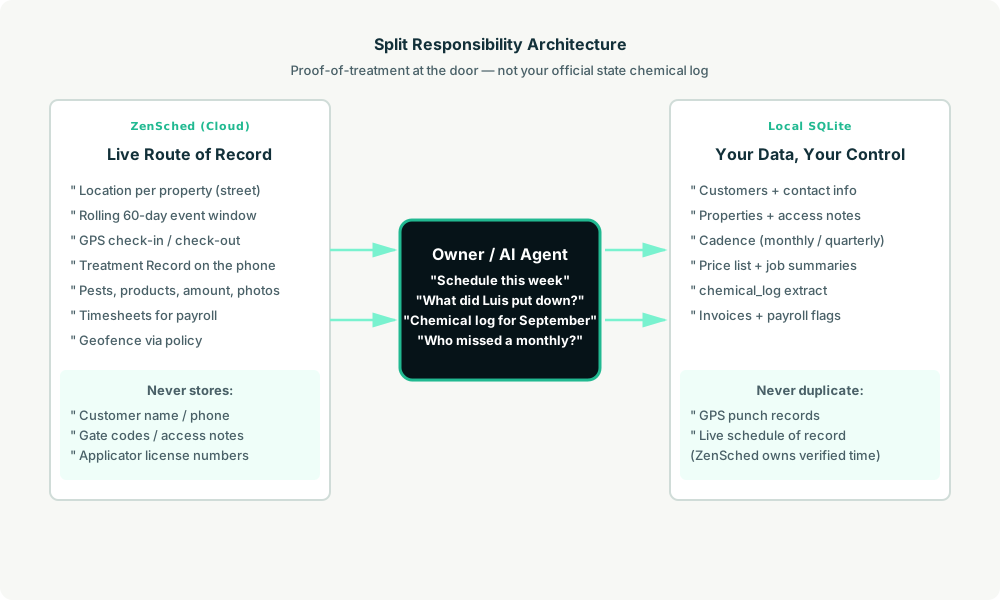
- ZenSched: Live property pin, GPS-verified check-in and check-out (geofence enforced via policy, not per location), technician app + push, one Treatment Record per account (pests seen, products, amount, areas, up to 3 evidence photos, conditions, follow-up). ZenSched never stores customer names, gate codes, or license numbers.
- Local SQLite database: Customers, properties with access notes, service cadence (weekly / biweekly / monthly / quarterly), price list, completed job summaries,
chemical_logextract, invoices. Links to ZenSched location, event, and shift IDs. After one metered form read, punches and treatment summaries are cached locally.
The agent orchestrates both: it reads who is due from customers_due, creates shifts on ZenSched labeled by street address, and writes verified arrival plus the Treatment Record back into SQLite for payroll and billing.
Privacy: names and gate codes never cross
Everything sensitive lives only in local tables: customers.customer_name, contact_phone, properties.access_notes (gate code, crawl hatch, dogs), and technicians.license_no. ZenSched receives the street address for the GPS pin and the Treatment Record answers — never a customer surname in a location title, never a gate code in location_create notes. If you ask the agent to put access notes or license numbers into ZenSched, it should refuse.
Give gate codes and crawl-hatch directions to techs yourself (text, call, your own channel).
Day-to-day workflow
A typical route week looks like this:
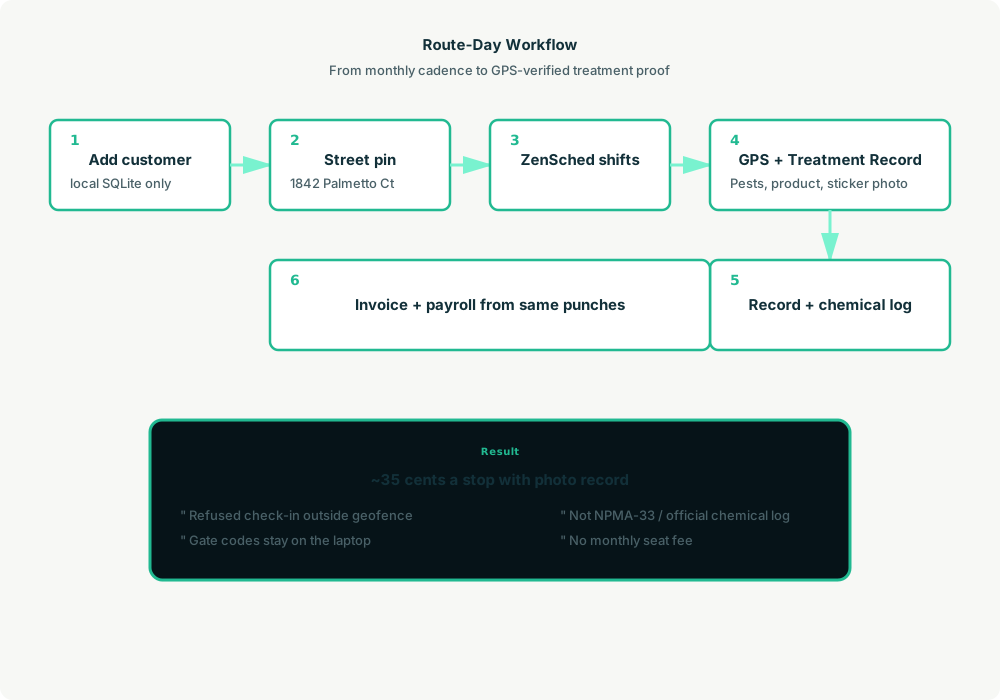
- You to agent (plain English): “Add Rosa Delgado, 1842 Palmetto Court, monthly general pest $89, dogs in backyard — gate code stays local.”
- Agent writes SQLite: Customer, property, access notes, next service date — all local.
- Agent creates the window on ZenSched: One
location_createif the address is new ($0.03 geocode), one rolling event (≤60 days),form_createonce for the Treatment Record,form_assign,shift_createper due stop. Luis gets a push. - The tech does the work: Open the ZenSched app, GPS check-in at the property, treat, fill the Treatment Record (pests, products, amount, sticker photo), check-out.
- Operations: “Who missed a monthly this week?” “Chemical log for September.” “Draft Rosa’s invoice.” Agent answers from SQLite after one metered read.
- Money: Payroll from the same punches. Plain-text invoices from completed stops.
No dashboards. No asking you to run SQL. Talk to the agent.
Treatment Record on the phone
The technician opens the ZenSched mobile app, checks in at the address, then fills the Treatment Record before leaving:
- Pests seen (ants, roaches, rodents, termites, spiders, mosquitoes, other, none)
- Products used (owner’s example list — Alpine WSG, Talstar, bait stations, etc.)
- Amount applied
- Areas treated (interior, exterior, both, attic, crawl)
- Evidence photos (up to 3 — sticker, bait stations, activity)
- Conditions and follow-up
There is no signature field — Submit stays a normal button. Termite inspections reuse this same form; they do not create a second WDO form.
Setup summary
Getting started takes about 15 minutes:
- Install an MCP client: Claude Desktop, Cursor, or Muse Code.
- Connect ZenSched MCP: Add
https://mcp.zensched.com/mcpto your MCP config. - Connect easy-sqlite-mcp: Point
SQLITE_PATHat a localpest-ops.dbon an encrypted, backed-up folder. - Paste the reference skill: The zensched-pest-control-kit includes
SKILL.md,schema.sql, and a quickstart. Load the schema once (one statement per execute). Evidence photos can use"stamp_photos": trueon the photo field so exported JPEGs carry readable date, time, and GPS when captured in-app. - Create your ZenSched account: Call
zensched_guide, thenaccount_createfor azsc_key. Invite techs at $0.25 each once. - Fund when needed: Metered GPS, geocode, and form reads draw from prepaid balance. The $5 activation deposit is credited to your account.
Apartment complexes and downtown restaurants need a wider policy radius (policy_update), not org-wide remote_checkin — that turns GPS proof off for every residential stop too. For bad-GPS commercial accounts, put them on their own brand and policy. Events cap at 60 days; the kit rolls a new event per property automatically.
Worker app: Android on Google Play and iOS on the App Store.
For step-by-step details, see the ZenSched quickstart and the pest-control kit.
Metering: what you pay for
ZenSched uses transparent per-action pricing (see pricing):
- GPS check-in/check-out: $0.10 each
- Address geocoding: $0.03 per new property (once; recurring accounts reuse the pin)
- Worker invite: $0.25 per technician (once)
- Form submission reads: $0.05 basic / $0.15 with photos — read once, cache locally
- Processed timesheet export: $0.10 per worker per pay period
Worked example from the vertical pitch: 3 techs × 8 stops/day × 21 weekdays = 504 visits/month with a photo Treatment Record every stop → about $176/month, or ~$0.35 per visit (GPS in + GPS out + media read). GPS-only is ~$0.20. Checklist-only (no photos) is ~$0.25. On a $55 monthly stop that is 0.6% of revenue.
Read the incumbent comparison honestly. At 504 visits ZenSched is a little above GorillaDesk Basic (~$149) and at or under GorillaDesk Pro / Jobber Connect (~$199) — but GorillaDesk and Jobber include quotes, invoicing, and routing ZenSched does not. The case at parity is enforced GPS proof + AI dispatch, not a discount. GPS-only undercuts every subscription in the table. Do not tell a Department of Agriculture auditor “it’s in ZenSched.”
What you get
- Geofenced check-in and check-out at each property, with distance from the pin
- A Treatment Record on the phone: pests, products, amount, areas, evidence photos, follow-up
- “Were you at Building C Tuesday?” from the agent in plain English
- A local
chemical_logextract you file next to your real state forms - Payroll hours from the same punches
- About 15 minutes to stand up; the agent is the dispatcher
What you don’t get (be blunt)
- No official FIFRA / state pesticide-use log or NPMA-33 / WDO graphing
- No quoting engine, card payments, or PDF invoices (kit drafts plain text)
- No route optimisation or customer portal
remote_checkinis a last resort and turns GPS proof off for the whole policy- Not a PestPac or ServiceTitan replacement for compliance reporting
Who this is for (and who it’s not for)
Ideal for:
- Owner-operators and 2–8 tech independents on Calendar + texts who lose disputes with property managers
- Shops that want proof-of-treatment and AI dispatch instead of another $200–$400/month office seat
- Operators who already talk to Claude, Cursor, or Muse and want monthly cadence to become phone shifts
Not a replacement for:
- Shops whose daily work is quotes, recurring card billing, and route optimisation in GorillaDesk or Jobber
- Operators who already run PestPac as the official chemical system of record — keep it; use ZenSched only as a field proof layer if at all
- Franchisees locked to ServiceTitan / FieldRoutes
This is agent-first infrastructure. The operator talks to the agent, and the agent talks to ZenSched.
Get started
- Kit: github.com/zenschedmcp/zensched-pest-control-kit
- Docs: zensched.com/docs/quickstart
- MCP:
https://mcp.zensched.com/mcp - Related: Agent-run lawn care · Agent-run mobile phlebotomy · Agent-run property preservation
Ready to build your own workflow?
Clone the reference kit and connect ZenSched to your AI agent.