Reference design
Agent-run mobile phlebotomy: a ZenSched reference design
Riverstone Benefits calls at 10:15. “Did Priya finish the 9am Maple draw?” You text Priya. She is between stops. The cooler is in the car and the paper slip might still be there. What if an AI assistant could run next week’s standing homebound route, put a GPS check-in on the phlebotomist’s phone at Draw 88 - Maple, collect tube count and cooler temp on a Draw Record, and answer “who flagged a redraw this week” — without putting patient names, MRNs, or test menus into a vendor cloud, and without pretending to be a LIMS or a HIPAA-covered scheduler?
This reference design shows how a 1–8 phlebotomist mobile draw shop (cash-pay, employer panels, clinical-trial sites, concierge practices) can deploy an AI agent using ZenSched as the live schedule of record (with a Draw Record on the phone) and a local SQLite database for patients, labs, standing schedules, payroll, and invoices billed by patient code.
Honest framing: this is not a LIMS and not a BAA
Read this before you clone the kit.
- ZenSched does not sign a HIPAA Business Associate Agreement. Patient name, date of birth, MRN, phone, fasting notes, special-draw notes, and door codes stay only in local SQLite. ZenSched receives a de-identified label (
Draw 12 - Maple), the street address for the GPS pin, punches, and the Draw Record (tube count, cooler temp, fasting flag, outcome, complications — no test names). That split reduces what a third party sees; it does not make a covered-entity lab outreach program compliant. Cash-pay, employer, and trial-site shops that keep the chart elsewhere are the intended buyer. - It is not a LIMS. No accessioning, no test catalog, no result reporting, no Quest/Labcorp/ BioReference HL7 interface. Orders and results live in the lab’s system or on paper requisitions.
- Cooler temp on the form is an operational attestation, not a calibrated logger, not 21 CFR Part 11, not forensic chain-of-custody. Labs that need a NIST probe still need the probe.
- The default Draw Record has no photo (basic read $0.05). Optional tube-label photos trip the media meter ($0.15). Plan pricing accordingly.
The kit’s SKILL.md makes that split a hard rule the AI will refuse to break.
The problem: “did the draw happen?” and a cooler in the car
Small mobile phlebotomy shops already have a stack: Green Health or Mobile Phlebotomy App if they bought scheduling plus a BAA; otherwise Google Calendar, Route4Me, paper requisitions, “I’m here” texts, and Excel invoices. When the lab or trial coordinator asks who drew and when, the evidence is a text thread and a paper slip.
The weekly loop is the same whether you draw yourself or dispatch four phlebs:
- Did the 9am Maple draw happen before the fasting window closed?
- What left the house in the cooler — tube count, temp, complications?
- Payroll and contractor payouts without arguing over phantom stops.
- An invoice the lab will pay with patient codes, not names or test menus.
- Coverage when someone calls out at 6:40.
Not on that list: accessioning specimens, posting results, or replacing the lab’s order interface.
The solution: split responsibility between ZenSched and local data
This architecture divides work cleanly:
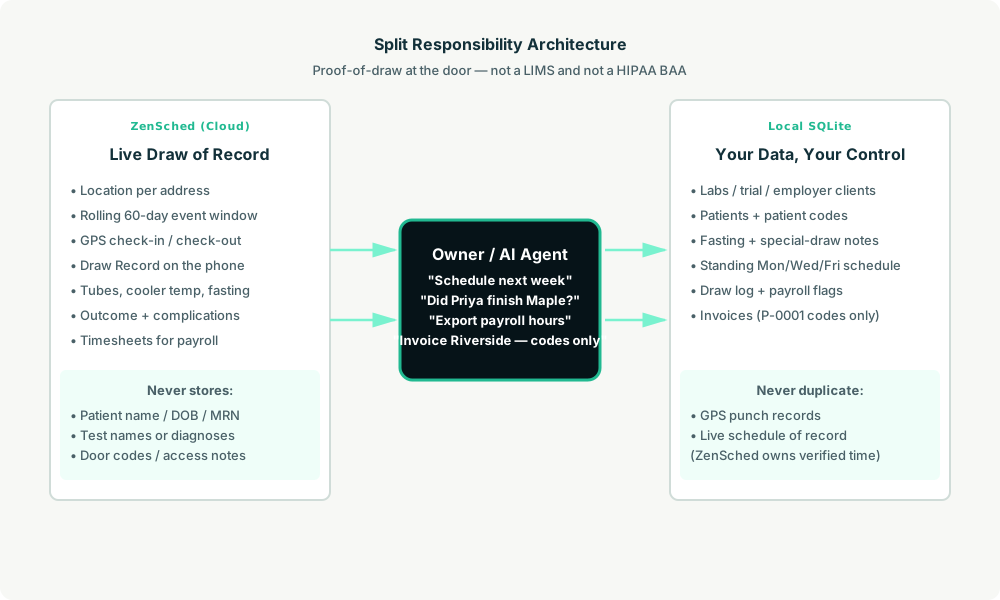
- ZenSched: Live draw address pin, GPS-verified check-in and check-out (geofence enforced), phlebotomist app + push, one Draw Record per account (tube count, cooler temp °C, fasting Yes/No/Not required, outcome Successful/Partial/Unable, complications). ZenSched never stores patient names, MRNs, diagnoses, test names, or door codes.
- Local SQLite database: Labs and trial/employer clients, patients (
P-0001codes), addresses with access notes, optional standing Mon/Wed/Fri schedule, draw log, payroll hours, invoices to the lab with line items keyed by patient code only. Links to ZenSched location, event, and shift IDs. After one metered form read, punches and outcomes are cached locally.
The agent orchestrates both: it expands standing slots for next week, creates shifts on ZenSched labeled Draw {id} - {street token}, and writes verified arrival plus the Draw Record back into SQLite for payroll and lab billing.
Privacy: names and test menus never cross
Everything that identifies a patient’s health condition lives only in local tables: patients.patient_name, dob, mrn, fasting_notes, special_draw_notes, and addresses.access_notes. The only string ZenSched receives about a patient is addresses.zensched_label — e.g. Draw 12 - Maple, never a surname or initials. If you ask the agent to put an MRN, test menu, diagnosis, or door code into ZenSched — including cancellation reasons phlebotomists can see — it should refuse.
Give fasting instructions and hard-stick notes to phlebs yourself (text, call, your own channel). The Draw Record form header repeats: do not write patient names or test names.
Day-to-day workflow
A typical draw week looks like this:
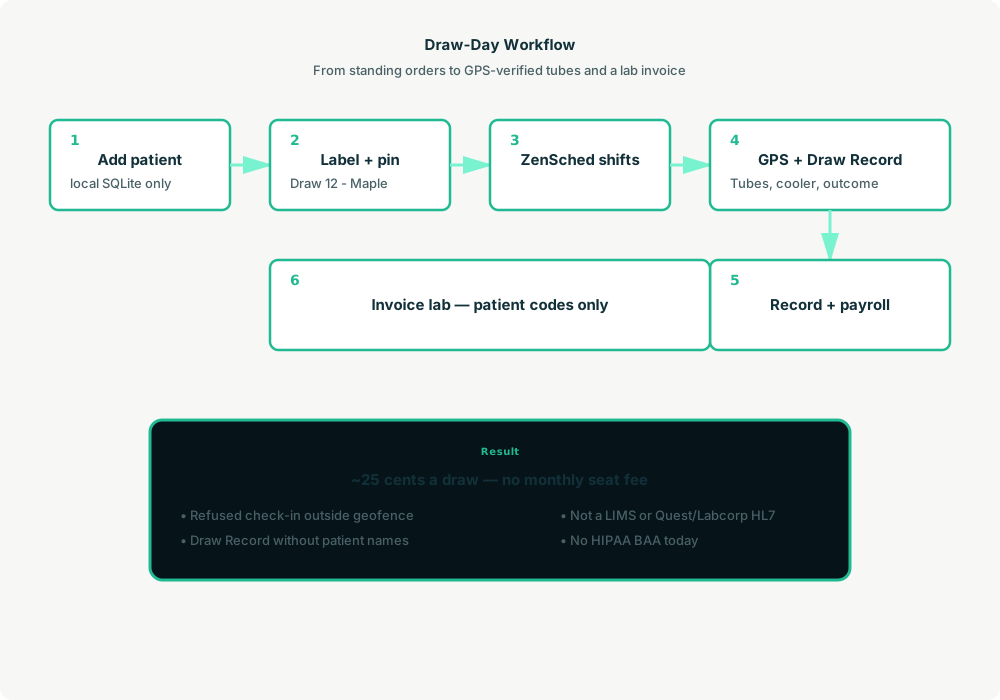
- You to agent (plain English): “Add patient P-0142 locally — Priya knows her as Maple. Standing Mon/Wed/Fri 9:00–9:45 through November.”
- Agent writes SQLite: Patient, address, access notes, standing
draw_schedulerow — all PHI local. - Agent creates the window on ZenSched: One
location_createif the address is new ($0.03 geocode), one rolling event (≤60 days),form_createonce for the Draw Record,form_assign,shift_createper slot. Priya gets a push. - The phlebotomist does the work: Open the ZenSched app, GPS check-in at the door, draw, fill the Draw Record (tubes, cooler temp, fasting, outcome), check out.
- Complications first: “Any Unable draws or hematomas this week?” Agent leads with flagged outcomes before the happy path.
- Money: “Export payroll hours.” “Invoice Riverside — codes only.” Plain-text invoice lines: date,
P-0142, tube count, flat draw fee — no names.
No dashboards. No asking you to run SQL. Talk to the agent.
Draw Record on the phone
The phlebotomist opens the ZenSched mobile app (iOS App Store | Google Play), checks in at the address, then fills the Draw Record before leaving:
- Tube count (required)
- Cooler temperature °C
- Fasting: Yes / No / Not required
- Draw outcome: Successful / Partial / Unable (with reason if unable)
- Complications: None / Hematoma / Faint / Other (with notes if other)
There is no signature field — Submit stays a normal button. The form does not collect patient names, MRNs, or test names. Optional tube-label photos are off by default; enabling them adds the media meter.
Setup summary
Getting started takes about 15 minutes:
- Install an MCP client: Claude Desktop, Cursor, or Muse Code.
- Connect ZenSched MCP: Add
https://mcp.zensched.com/mcpto your MCP config. - Connect easy-sqlite-mcp: Point
SQLITE_PATHat a localphleb-ops.dbon an encrypted, backed-up folder (this file holds PHI — treat it like a filing cabinet). - Paste the reference skill: The zensched-phlebotomy-kit includes
SKILL.md,schema.sql, and a quickstart. Load the schema once (one statement per execute). If you enable tube-label photos, the kit sets"stamp_photos": trueon that field so exported JPEGs carry readable date, time, and GPS (gallery picks without EXIF may show date/time only). - Create your ZenSched account: Call
zensched_guide, thenaccount_createfor azsc_key. Invite phlebotomists at $0.25 each once. - Fund when needed: Metered GPS, geocode, and form reads draw from prepaid balance. The $5 activation deposit is credited to your account.
Courtyard apartments and SNF campuses need a wider policy radius (policy_update), not org-wide remote_checkin — that turns GPS proof off for every home draw too. Events cap at 60 days; the kit rolls a new event per address automatically.
Worker app: Android on Google Play and iOS on the App Store.
For step-by-step details, see the ZenSched quickstart and the phlebotomy kit.
Metering: what you pay for
ZenSched uses transparent per-action pricing (see pricing):
- GPS check-in/check-out: $0.10 each
- Address geocoding: $0.03 per new home (once; standing patients reuse the pin)
- Worker invite: $0.25 per phlebotomist (once)
- Form submission reads: $0.05 basic (default Draw Record, no photo) / $0.15 with photos — read once, cache locally
- Processed timesheet export: $0.10 per worker per pay period
Worked example from the vertical pitch: 4 phlebs × 6 draws/day × 21 weekdays = 504 draws/month with the basic Draw Record → about $127/month, or ~$0.25 per draw (GPS in + GPS out + basic read). GPS-only is $0.20. Add optional tube-label photos every draw → ~$0.35. On a $65 employer draw that is 0.4% of revenue.
Read the incumbent comparison honestly. At 504 draws/month ZenSched costs more than Green Health ($40–$99) and Mobile Phlebotomy App ($99) — and those include a booking page, SMS, and a BAA. ZenSched wins for 1–2 phleb shops on price and for anyone who needs enforced geofence + a PHI-light Draw Record beside their LIMS, not to save $40 on scheduling. It is not a LIMS substitute at any volume. Do not sell covered-entity lab outreach until ZenSched offers a BAA.
What you get
- Geofenced check-in and check-out at the draw address, with distance from the pin
- A Draw Record on the phone: tubes, cooler temp, fasting, outcome, complications
- “Did Priya finish the 9am Maple draw?” from the agent in plain English
- Payroll hours from the same punches
- Lab invoices with patient codes only — never names on the invoice text
- About 15 minutes to stand up; the agent is the dispatcher
What you don’t get (be blunt)
- No HIPAA BAA
- No LIMS, accessioning, or Quest/Labcorp HL7
- No patient booking portal or SMS reminders
- No calibrated cooler logger — form field is an attestation
remote_checkinis a last resort and turns GPS proof off for the whole policy- iOS on TestFlight until App Store listing ships
Who this is for (and who it’s not for)
Ideal for:
- Owner-operators and 1–8 phleb shops on Calendar + texts who lose disputes with labs
- Cash-pay, employer wellness, and clinical-trial-site coordinators who need proof-of-draw
- Operators who already talk to Claude, Cursor, or Muse and want standing routes to become phone shifts
Not a replacement for:
- Covered-entity lab outreach programs that require a BAA
- Shops whose product is the Quest/Labcorp interface
- Platforms like Getlabs that already own dispatch, BAA, and lab plumbing
This is agent-first infrastructure. The operator talks to the agent, and the agent talks to ZenSched.
Get started
- Kit: github.com/zenschedmcp/zensched-phlebotomy-kit
- Docs: zensched.com/docs/quickstart
- MCP:
https://mcp.zensched.com/mcp - Related: Agent-run home care · Agent-run claim photo inspections · Agent-run merchandising audits
Ready to build your own workflow?
Clone the reference kit and connect ZenSched to your AI agent.