Reference design
Agent-run home care: a ZenSched reference design
Running a 1–10 caregiver non-medical home care agency means juggling who is with which client, paper timesheets signed on the kitchen counter, and family calls that start with “the caregiver left early Tuesday.” What if an AI assistant could schedule the week, enforce GPS check-in at the client’s door, collect a Visit Record checklist on the caregiver’s phone, and export verified hours for payroll—without putting diagnoses, medications, or door codes into a vendor dashboard?
This reference design shows how a small private-pay or LTC-insurance agency can deploy an AI agent using ZenSched as the live schedule of record (with a Visit Record form on the caregiver’s phone) and a local SQLite database for clients, care plans, rates, recurring schedules, and invoices.
Honest framing: EVV and HIPAA
Read this before you clone the kit.
- ZenSched is not a certified EVV vendor. It does not submit visit data to Sandata, HHAeXchange, Netsmart/Tellus, or any state aggregator. Medicaid-billed visits still need your state’s EVV path.
- ZenSched does not offer a HIPAA Business Associate Agreement today. This kit is built so protected health information stays on your computer. Care plans, diagnoses, medication lists, allergies, mobility notes, emergency contacts, dates of birth, and door codes live only in local SQLite. ZenSched receives a short de-identified label (initials or a house nickname), the street address for the GPS pin, punches, and a task checklist / concern flag / optional note / optional signature.
- Who this is for today: private-pay and long-term-care insurance agencies that want GPS-verified proof of visit for families and carriers. If you are a covered entity (Medicaid, or you e-bill insurers), wait for a BAA before putting client-linked visit data on ZenSched.
The kit’s SKILL.md makes the local/remote split a hard rule the AI will refuse to break. That narrows what a third party sees; it does not make you HIPAA-compliant by itself. Ask counsel.
The problem: arrivals, task sheets, and payroll fights
Small agencies face the same weekly loop:
- Did Maria arrive at 8:00 and stay until noon?
- What happened during the visit—bath, meal, meds reminder, anything off?
- Can we pay caregivers from hours that aren’t reconstructed from paper every two weeks?
- When an LTC carrier or a family paying thousands a month asks for visit logs, what do we hand them?
- When someone calls out at 6:45, who is free, close, and known to that client?
Today’s glue is paper task sheets, “here / leaving” texts, a whiteboard or Google Calendar, and a family complaint as the first quality signal. Vertical home-care suites (AxisCare, WellSky Personal Care, Rosemark, and peers) do a lot—care plans, portals, billing—but for a caregiver-owner or a 4–8 person private-pay shop, the quote-based price and operating burden are often the wrong trade.
The solution: split responsibility between ZenSched and local data
This architecture divides work cleanly:
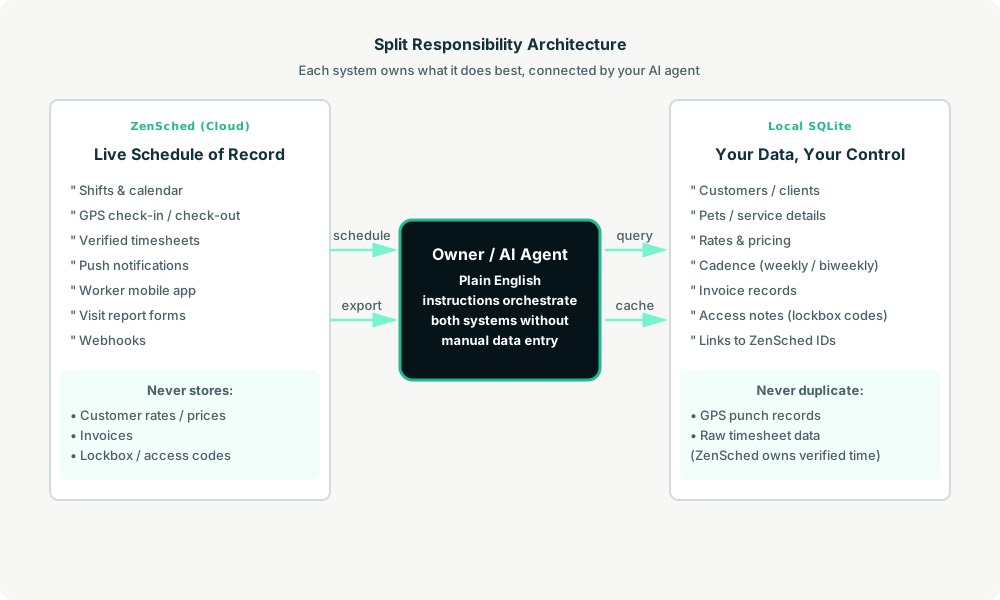
- ZenSched: Live schedule, GPS-verified check-ins/check-outs at the client’s door (geofence enforced), caregiver app + push notifications, Visit Record form (care-task checklist, concern flag with conditional note, optional note, optional signature), timesheets. ZenSched never stores your care plans, diagnoses, medication lists, bill rates, or door codes.
- Local SQLite database: Clients, care plans, care tasks, caregivers, bill rates, recurring visit schedule, visit summaries, payroll runs, and invoices. Links to ZenSched location, event, and shift IDs. After one metered form read, a per-visit summary is cached locally so “how has Mr. Alvarez been this week?” is free later.
The agent orchestrates both: it expands who is due from SQLite, creates shifts on ZenSched, and records verified visits plus Visit Record summaries back into SQLite for family updates, payroll, and invoices.
Privacy: care plans stay on the laptop
Diagnoses, medications, allergies, mobility notes, emergency contacts, and access notes (door codes, alarms, keys) live only in local tables. The kit skill forbids putting any of them into ZenSched fields—including location names, event titles, notes, and cancellation reasons (caregivers can see those). Give care plans and door codes to caregivers yourself, on a channel you trust. ZenSched only sees the de-identified label, the street address, and the GPS pin. The Visit Record itself tells caregivers not to write diagnoses or medication names in the free-text note.
For agencies that want EVV-grade records without an EVV contract: the kit exposes a view of the six 21st Century Cures Act elements (type of service, individual receiving, date, location, individual providing, time in/out) from verified punches joined to local visit rows. That is proof for families and insurers—and raw material for a future alternate-EVV integration. It is not a state submission path today.
Day-to-day workflow
A typical week looks like this:
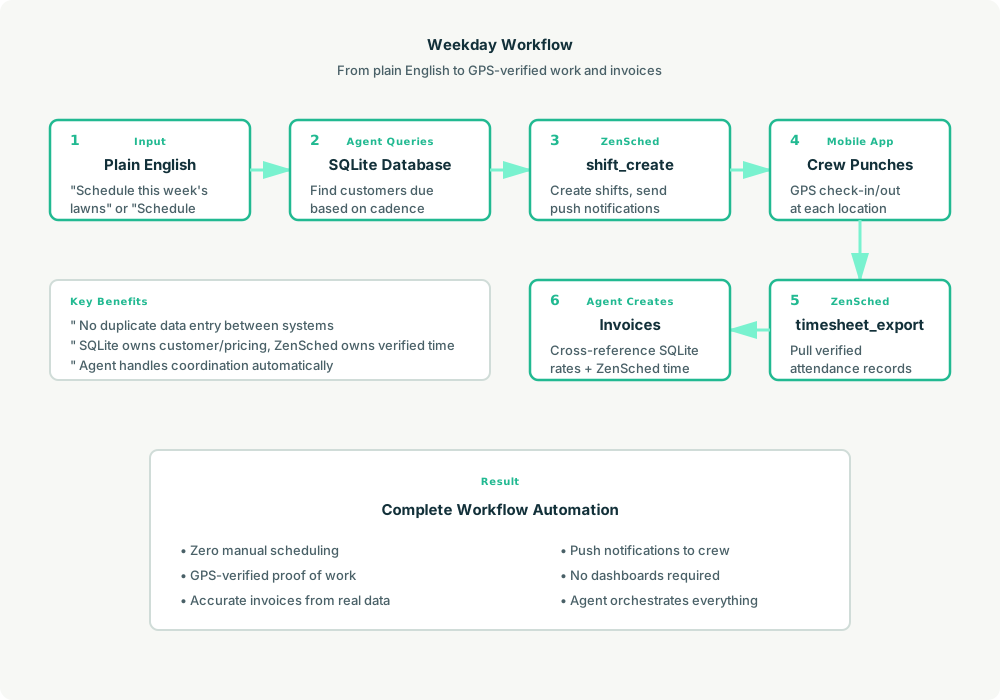
- Owner to agent (plain English): “Schedule next week.” Or: “Maria takes Mr. Alvarez Monday to Friday 8 to 12 through October.”
- Agent reads SQLite: Expands the recurring
visit_schedulefor the next 7 days (two multi-hour visits per caregiver per weekday is a common pattern). - Agent creates shifts on ZenSched: One
shift_createper visit, with the Visit Record already assigned. Caregivers get push notifications. Events roll every ≤60 days behind the scenes; the owner never manages that. - Caregiver does the work: Opens the ZenSched app, GPS check-in within the client’s geofence, fills the Visit Record (tasks completed, concern flag, optional note and signature), check-out.
- Live check: “Is Maria at Mr. Alvarez’s?” Agent uses
shift_status. “Anything flagged this week?” Agent pulls Visit Records once (metered), stores summaries locally, and leads with concern flags (mood change, fall or near-fall, skin or pain, refused care). - Payroll / invoice: “Export everyone’s hours for payroll.” Processed timesheet export → CSV for Gusto or QuickBooks. “Draft Lucia’s invoice for September.” Verified hours × local bill rate, with GPS-verified line items.
No dashboards. No asking the owner to run SQL. Just plain English and GPS-verified proof of the visit.
Visit Record on the caregiver phone
Here’s what the Visit Record looks like on a real shift (screenshots land when form captures are ready). The caregiver opens the ZenSched mobile app (iOS App Store | Google Play), taps into the scheduled visit after GPS check-in, and fills the checklist.
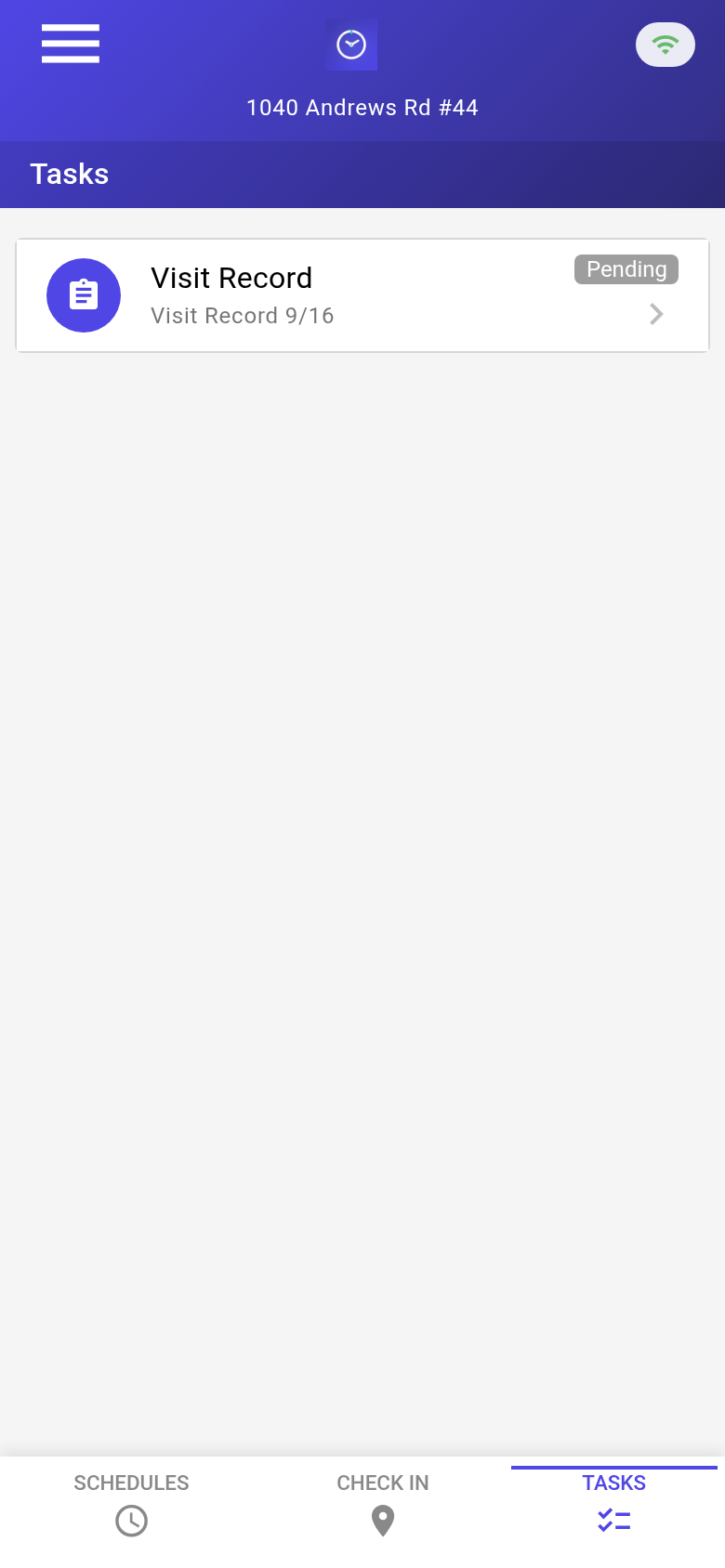
The caregiver’s Tasks tab with a pending Visit Record. Each visit is GPS-verified at the client’s door before the form is filled.
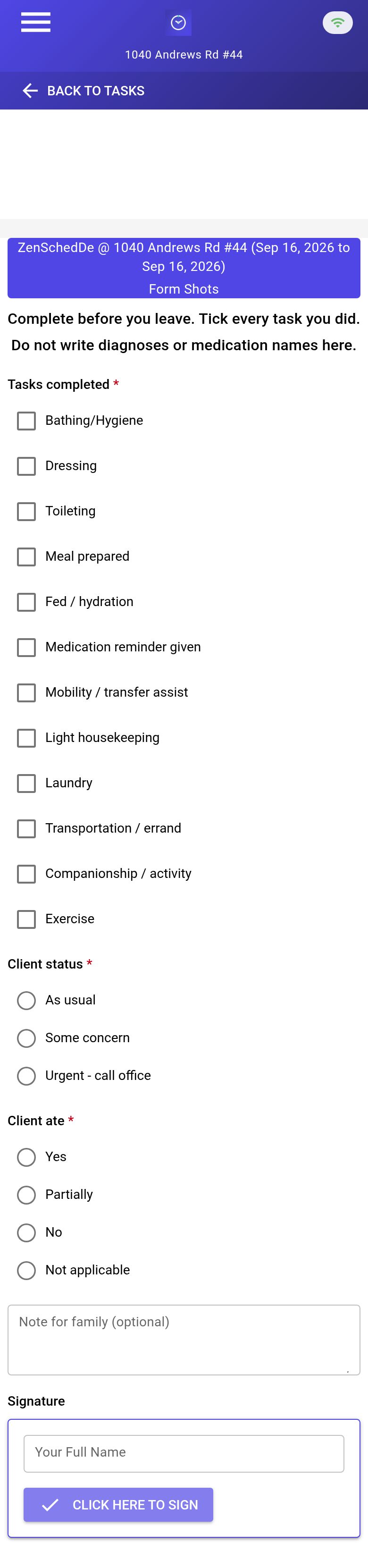
The blank Visit Record: care-task checklist (bathing, dressing, meal, mobility assist, toileting, meds reminder given, housekeeping), concern flag with a conditional note, optional visit note, optional signature. Clinical vitals / medication administration are intentionally not on this form—this kit is non-medical companion and personal care.
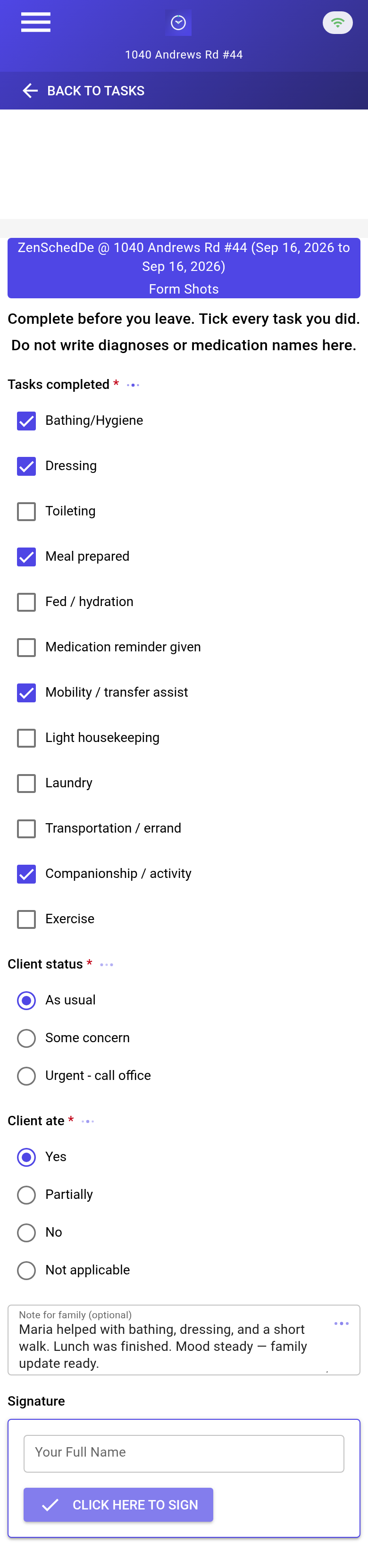
A completed record: tasks checked, concern flag set when something is off, short note for the family update the AI will draft, optional signature. ~25¢/visit with GPS in, GPS out, and a basic form read.
Setup summary
Getting started takes about 15 minutes:
- Install an MCP client: Claude Desktop or Cursor both support MCP.
- Connect ZenSched MCP: Add
https://mcp.zensched.com/mcpto your MCP config. - Connect easy-sqlite-mcp: Point
SQLITE_PATHat a localhomecare-ops.dbon an encrypted, backed-up folder (this file holds client health information—treat it like a filing cabinet). - Paste the reference skill: The zensched-homecare-kit includes
SKILL.md,schema.sql, and a quickstart. Load the schema once (one statement per execute). - Create your ZenSched account: Call
zensched_guide, thenaccount_createfor azsc_key (no email required). Set your payroll period when you are ready. - Fund when needed: Free tools under daily quota; metered GPS, geocode, worker invites, and form reads draw from prepaid balance. The $5 activation deposit is credited to your account.
Worker app: Android on Google Play and iOS on the App Store.
For step-by-step details, see the ZenSched quickstart and the homecare kit.
Metering: what you pay for
ZenSched uses transparent per-action pricing (see pricing):
- Free MCP calls under daily quota for basic operations
- GPS check-in/check-out: $0.10 each (metered verification)
- Address geocoding: $0.03 per location (once per client home)
- Worker invite: $0.25 (one-time email; Spanish via
lang="es") - Form submission reads: $0.05 basic / $0.15 with media — read once, summarize locally. A signature-only Visit Record bills at the basic rate (signatures are not counted as uploaded images).
- Processed timesheets: $0.10 per worker per payroll window (optional; raw/hours exports are free)
Worked example from the vertical pitch: 4 caregivers, 2 visits each per weekday ≈ 173 visits/month → about $44 with a checklist Visit Record every visit (~$0.25 per visit). GPS-only is closer to $35. Against a 4-hour visit billed at ~$33/hour, that is a fraction of a percent of revenue.
No monthly subscription. No per-seat fee. No per-client fee. No annual contract.
Against quote-based US incumbents at this size, ZenSched is often a third to a tenth of the software bill—but CareSmartz360’s low end and ShiftCare’s 5-user minimum can land near parity. At parity the sell is the AI-run operation and the enforced geofence, not a discount. Those suites still include care plans, family portals, and invoicing that ZenSched does not; keep them if you use those features every day.
What you get
- Geofenced check-in and check-out at the client’s door, with distance shown while the visit is running
- A Visit Record on the caregiver’s phone: care-task checklist, concern flag, optional note and signature
- Payroll hours from verified punches instead of reconstructed paper sheets
- Family and LTC-ready visit proof without a heavy suite
- Care plans, meds, and door codes kept off the vendor cloud by design
- About 15 minutes to stand up; the agent is the interface
What you don’t get (be blunt)
- Not a certified EVV vendor / no aggregator submit
- No HIPAA BAA yet
- No family portal or shareable visit link (the AI drafts the update; you send it by text or email)
- No care-plan authoring, assessments, or medication administration records
- No recruiting, credential tracking, or payroll processing (export only)
- No telephony / IVR check-in for caregivers without smartphones (
remote_checkinis a last resort and is policy-wide)
Who this is for (and who it’s not for)
Ideal for:
- Caregiver-owners and 3–10 caregiver private-pay / LTC-insurance agencies
- Operators who want GPS proof and a task checklist without AxisCare/WellSky overhead
- Agent builders exploring field-ops with forms, geofence, and local PHI separation
Not a replacement for:
- State-mandated EVV systems for Medicaid visits
- Full home-care platforms if you need a family portal, integrated billing, care-plan authoring, or franchise software
- Covered entities that need a BAA before any client-linked data leaves the premises
This is agent-first infrastructure. The operator talks to the agent, and the agent talks to ZenSched.
Get started
- Kit: github.com/zenschedmcp/zensched-homecare-kit
- Docs: zensched.com/docs/quickstart
- MCP:
https://mcp.zensched.com/mcp - Related: Agent-run lawn care reference design · Agent-run pet care reference design
Ready to build your own workflow?
Clone the reference kit and connect ZenSched to your AI agent.