Reference design
Agent-run pet care: a ZenSched reference design
Running a 1–5 person dog walking or pet sitting business means juggling clients, pets, weekday cadences, access codes, and owner updates—often across texts, notes apps, and a shared calendar. What if an AI assistant could schedule the week, collect GPS-verified visit reports with photos, and keep your CRM and invoices on your laptop—without putting lockbox codes into a vendor dashboard?
This reference design shows how a small pet-care crew can deploy an AI agent using ZenSched as the live schedule of record (with a Visit Report form on the walker’s phone) and a local SQLite database for clients, pets, prices, access notes, and invoices.
The problem: visits, meds, and “how was Bella?”
Small walkers and sitters face a weekly loop: who is due which days, which walker is covering, did they actually show up at the door, what happened on the visit, and who still owes money. Owners want a short digest with photos. Walkers need the schedule on their phone. You need lockbox and alarm notes somewhere safe.
Traditional pet-care or field-service suites often mean per-seat pricing, a heavy dashboard, and access codes living in someone else’s cloud. For a tiny operation, that overhead is the wrong trade.
The solution: split responsibility between ZenSched and local data
This architecture divides work cleanly:
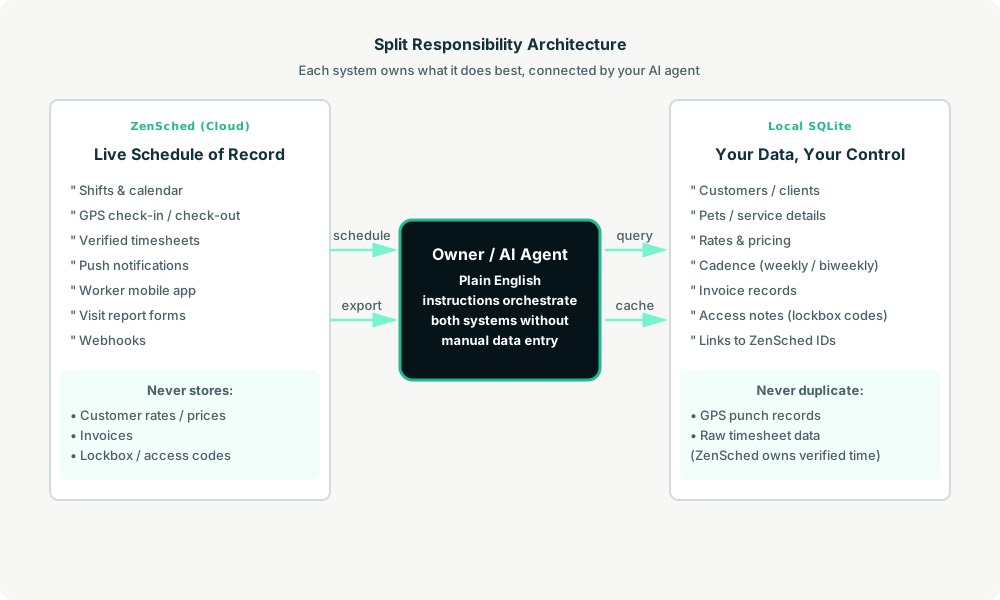
- ZenSched: Live schedule, GPS-verified check-ins/check-outs at the client’s door, worker app + push notifications, Visit Report form (activities, peed/pooped, meds, notes, photos, concern flag), timesheets. ZenSched never stores your prices, pet CRM, or lockbox codes.
- Local SQLite database: Clients, pets, price list, recurring weekday schedule, invoice records, and access notes that never leave your computer. Links to ZenSched location/event/shift IDs. Cache per-visit report summaries after one metered read so later digests are free.
The agent orchestrates both: it reads from SQLite to know which pets are due, creates shifts in ZenSched with Visit Report forms attached, and caches report summaries locally for owner digests.
Privacy: lockbox codes stay on the laptop
Lockbox codes, alarm words, garage codes, and key hiding spots live only in local access notes. The kit’s skill forbids putting them into any ZenSched field. Give them to your walker yourself. ZenSched only sees the street address and the GPS pin.
Day-to-day workflow
A typical week looks like this:
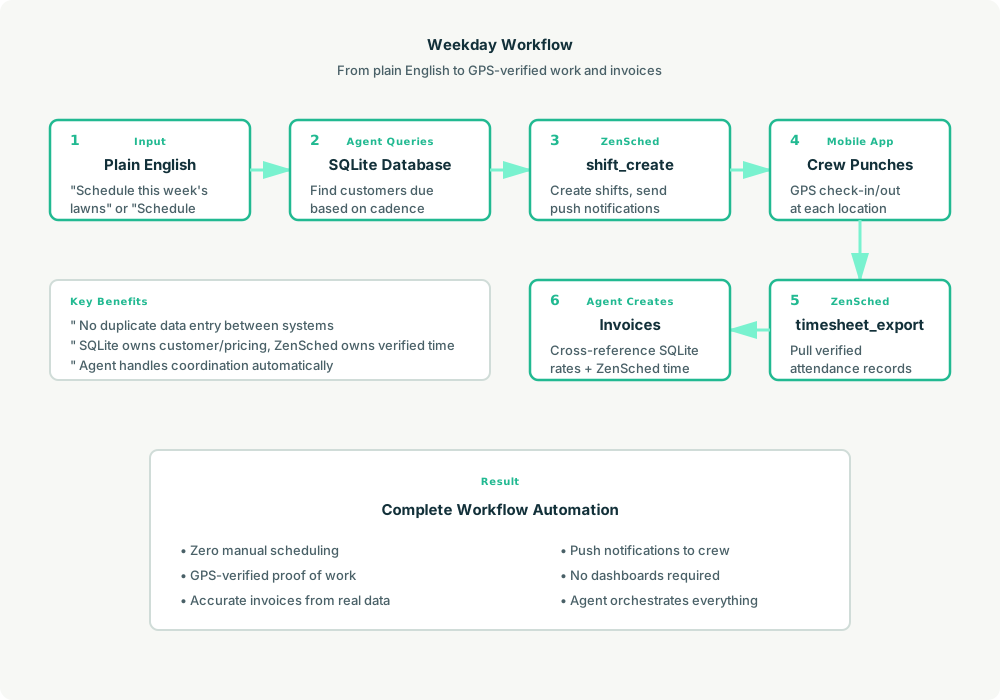
- Owner to agent (plain English): “Schedule next week for Maya.”
- Agent reads SQLite: Query pets due next week based on their recurring weekday schedule.
- Agent creates shifts on ZenSched: For each visit, call
shift_createwith the location ID, worker ID, and Visit Report form attached. ZenSched sends push notifications to the walker. - Walker gets to work: Workers use the ZenSched mobile app (Android or iOS) to see their schedule, navigate to each client, GPS check-in at the door, complete the Visit Report (activities, potty, meds, photos, concerns), and check out.
- Reconciliation: “Record what Maya did this week.” Agent calls
form_readonce (metered) per visit to pull submitted reports, caches summaries in SQLite, and generates an owner digest. Lead with any “Call me” concerns. Later digests pull from the local cache, so they’re free. - Invoicing: At month-end, generate invoices from SQLite that mention GPS-verified visits without exposing raw punch data.
No dashboards. No manual data entry. Just plain English instructions to the agent and GPS-verified proof of service with photos.
Visit Report on the walker phone
Here’s what the Visit Report looks like on a real shift. The walker opens the ZenSched mobile app (iOS App Store | Google Play), taps into the scheduled visit, and fills out the form after GPS check-in at the client’s door. Owners receive digests built from these submissions.
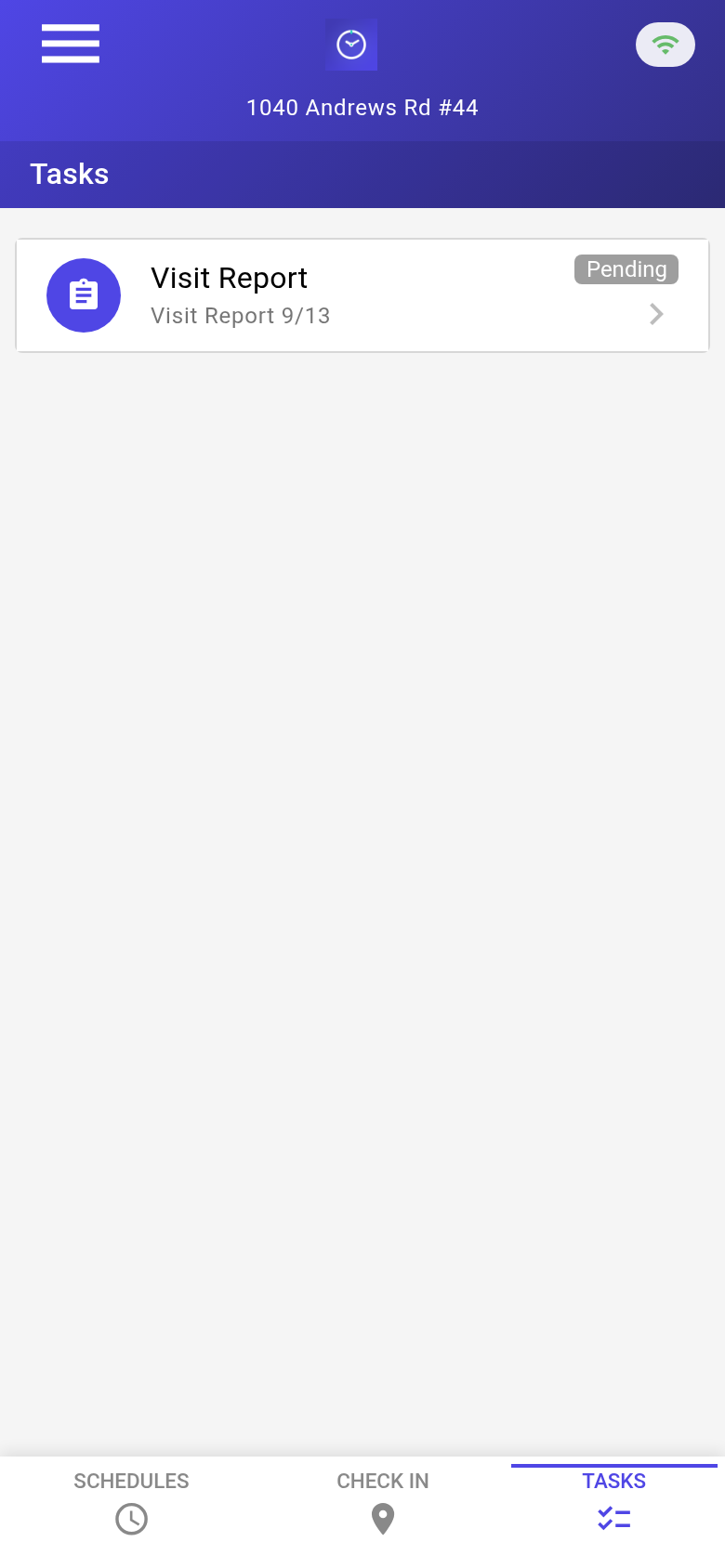
The walker’s Tasks tab with a pending Visit Report. Each visit is GPS-verified before the form becomes available.
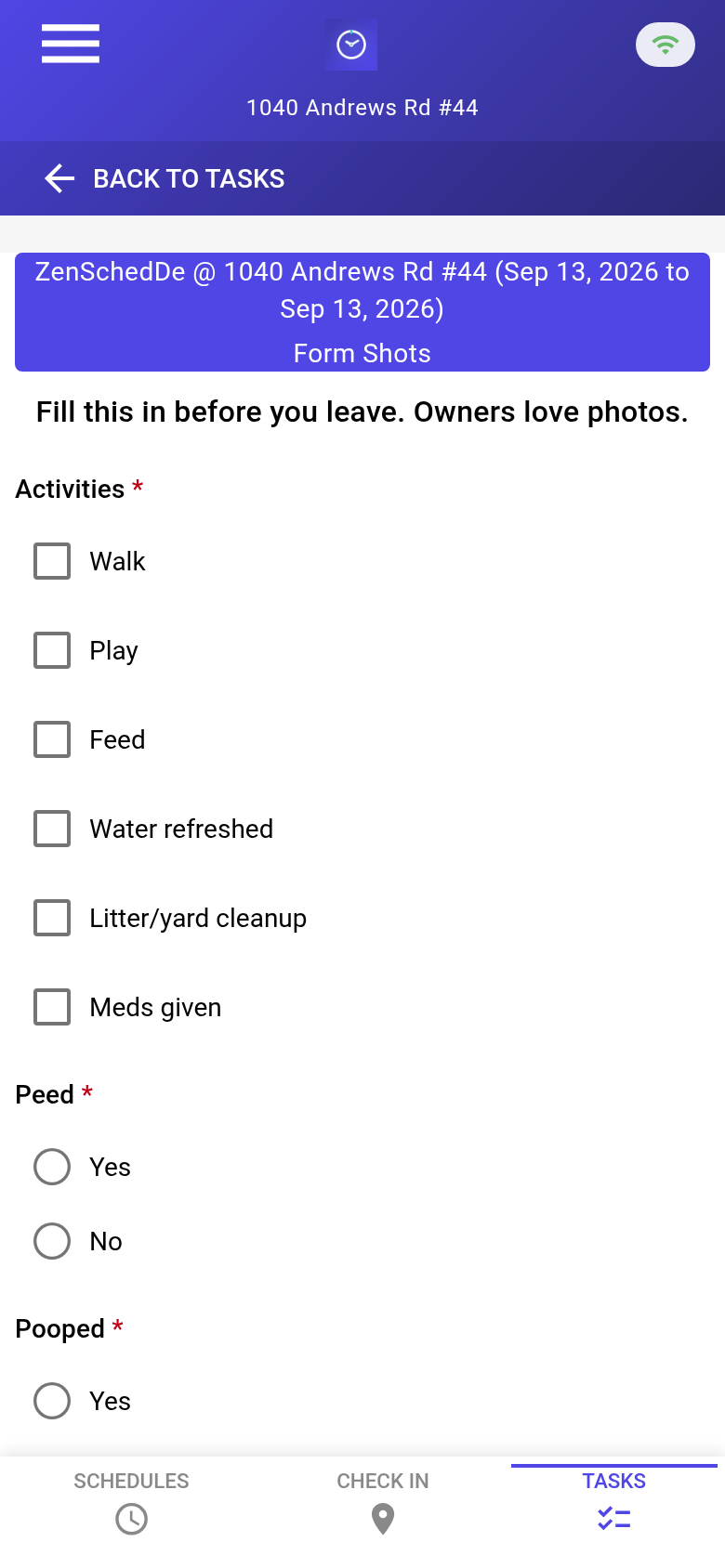
The blank form with Activities checkboxes, Peed/Pooped radio buttons, and Pooped options. Meds and concern fields appear only when relevant (form show_if logic).
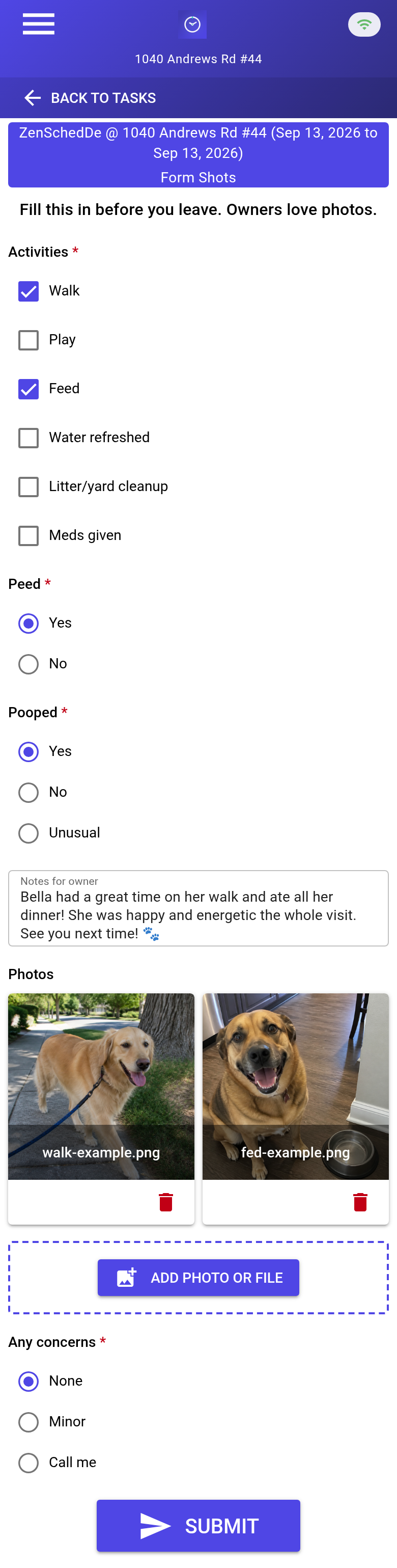
A completed report: Walk + Feed activities, both potty confirmations, a quick note (“Bella had a great time…”), two photos, and no concerns flagged.
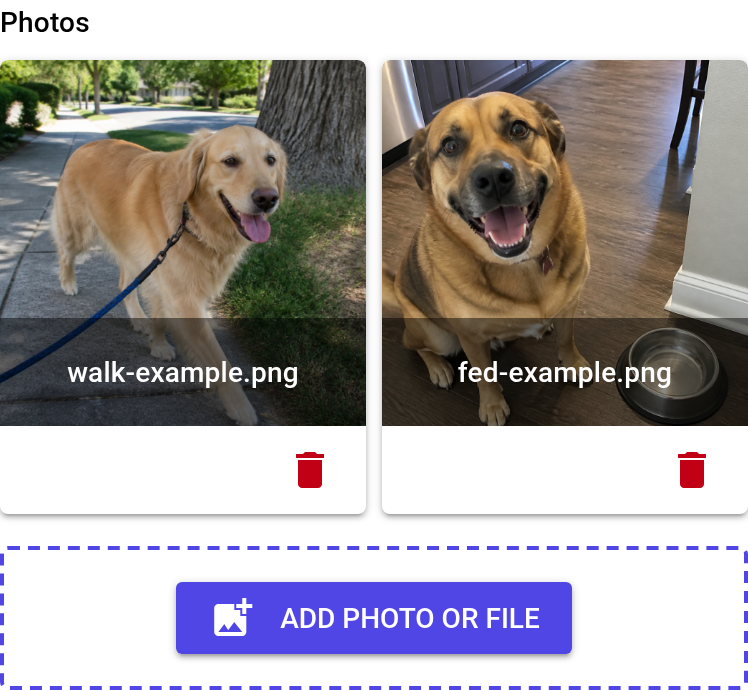
Photo thumbnails with delete buttons. Photos upload with the submission and cost $0.15 per report with media (vs. $0.05 for basic fields only).
Setup summary
Getting started takes about 15 minutes:
- Install an MCP client: Claude Desktop or Cursor IDE both support MCP.
- Connect ZenSched MCP: Add
https://mcp.zensched.com/mcpto your MCP config. - Connect easy-sqlite-mcp: Set up a local SQLite MCP server for client data (available on npm).
- Paste the reference skill: The zensched-petcare-kit repository includes a
SKILL.mdfile that teaches the agent the complete workflow. Paste it into your agent’s context or attach it as a resource. Visit Report photo fields set"stamp_photos": trueso exported JPEGs carry readable date, time, and GPS (opt-in per field; gallery picks without EXIF may show date/time only). - Create your ZenSched account: Call
account_createthrough the agent to get yourzsc_API key (no email required). - Fund when needed: Start with 200 free MCP calls per day. When you need GPS verification, geocoding, worker invites, or Visit Report submissions, add prepaid balance. The $5 activation deposit is credited to your account.
- Onboard workers: Install the ZenSched mobile app from Google Play (Android) or the iOS App Store.
For step-by-step details, see the ZenSched quickstart and the petcare-kit repository.
Metering: what you pay for
ZenSched uses transparent per-action pricing:
- 200 free MCP calls/day for basic operations
- GPS check-in/check-out: $0.10 each (metered verification at the client’s door)
- Address geocoding: $0.03 per location
- Worker invite: $0.25 (one-time email to onboard a walker)
- Visit Report submission (basic fields): $0.05
- Visit Report with media (photos): $0.15
- Processed timesheets: $0.10 per worker per payroll period (optional; raw data exports are free)
The $5 activation unlocks paid meters and becomes spendable balance. No monthly subscription. No per-seat fees. You pay for the outcomes your agent needs.
Cost optimization tip: Read each visit’s report once via form_read (metered), then cache the summary in SQLite. Later owner digests pull from the cache for free instead of re-reading from ZenSched.
What you get
With this setup, you gain:
- GPS-verified attendance for every visit, timestamped and pinned to the client’s door
- Visit Report digests with activities, potty status, meds administered, photos, and concern flags
- Agent-owned CRM and billing stored locally in SQLite (your data, your control)
- Push notifications to walkers for upcoming shifts
- Privacy-first access control: Lockbox codes never touch a vendor database
- Exportable timesheets for payroll (optional)
- Webhook support for real-time event delivery (optional)
You skip the dashboards, per-seat fees, and enterprise feature bloat that larger pet-care platforms require.
Who this is for (and who it’s not for)
Ideal for:
- Tiny dog walking or pet sitting crews (1–5 people) who want automation without complexity
- Agent builders exploring pet-care or field service use cases
- Small service businesses with similar visit-based patterns
Not a replacement for:
- Time To Pet, Precise Petcare, or Gingr if you need client portals, integrated payments, or scheduling dashboards for humans
- Operations that require a human-facing dashboard for daily decisions
- Companies comfortable storing lockbox codes in a vendor’s cloud
This is agent-first infrastructure. The operator talks to the agent, and the agent talks to ZenSched.
Get started
- Clone the zensched-petcare-kit repository
- Connect the ZenSched MCP server
- Read the quickstart guide
- See the related lawn-care reference design for another agent-first workflow
Build a workflow that works for your crew. Let your agent handle the scheduling and owner updates.
Ready to build your own workflow?
Clone the reference kit and connect ZenSched to your AI agent.