Reference design
Agent-run merchandising audits: a ZenSched reference design
Frito-Lay bought 200 stores, once a week, October through December. Thursday afternoon and fourteen are still open. Two that came back look like they were punched from a parking lot three towns over. The brand manager is asking for proof. What if an AI assistant could take that pasted store list, put a GPS check-in on the merchandiser’s phone at each banner, collect facings, OOS, and a bay photo, and tell you mid-week which Krogers are still unfilled — without putting client fees, QA notes, or merchandiser pay into a per-seat SaaS dashboard?
This reference design shows how a small merchandising brokerage (an owner, one to two dispatchers, 10–80 gig merchandisers) or an in-house brand audit team can deploy an AI agent using ZenSched as the live schedule of record (with a bay audit on the phone) and a local SQLite database for clients, programs, stores, visits, invoices, and merchandiser pay.
Honest framing: this is not Repsly or a full roadshow platform
Read this before you clone the kit.
- ZenSched is not planogram AI or ShelfScan. Repsly, Movista, and Trax-class tools score the shelf from photos. This kit does not. If the brand is buying an IR score, stay on Repsly or Trax. ZenSched wins on “were you in the store, here are facings, OOS, and a bay photo.”
- It is not a brand portal. Clients get a CSV and a proof sheet. There is no login for a five-store franchisee.
- It is not a full roadshow stack. Inventory sync, demo staffing, timesheets, payroll exports, and retailer portals are out of scope. This kit is for audit-only shops: visit proof plus a form, cents per visit, no seats.
- The proof is presence and time. With
geofence_enabledandrequire_on_site, the merchandiser cannot check in outside the radius or the window. Repsly records a breadcrumb; ZenSched refuses the punch. $0.10 per verified punch. - Bay photos can carry a burned-in stamp (opt-in). Set
"stamp_photos": trueon the bay photo field inform_create/form_update. After upload, readable date, time, and GPS burn onto the JPEG from capture metadata. Default off; gallery picks without EXIF may show date/time only. - Mall stores need a wider policy, not org-wide remote check-in. Widen
checkin_radius_mon a second brand/policy for mall programs. Do not flipremote_checkinon the default policy — that turns GPS proof off for every metro stop.
The kit’s SKILL.md makes that split a hard rule. Do not sell this as cheaper Repsly when the product is IR and a portal.
The problem: chargebacks and a spreadsheet of stores
Small brokerages already have a stack: Repsly or Movista if they bought seats and a 12-month contract; Field Agent if the brand skipped them; otherwise Google Forms, a spreadsheet, Facebook groups, and Venmo. The free stack does not refuse a punch from the couch.
The weekly loop is the same whether you dispatch five merchandisers or walk the county yourself:
- Fill every store in the rotation before the window closes. Unfilled is a refund.
- Prove the merchandiser was physically in that store. A rejected visit is a chargeback plus a re-hit.
- Come back with facings, OOS, planogram yes/no/partial, and a bay photo the brand can act on.
- Know Thursday that Tuesday was a no-show, not when the month closes.
- Pay merchandisers correctly from visits you actually approved.
Not on that list: inventory sync, W-2 payroll at Acosta scale, or winning a national contract.
The solution: split responsibility between ZenSched and local data
This architecture divides work cleanly:
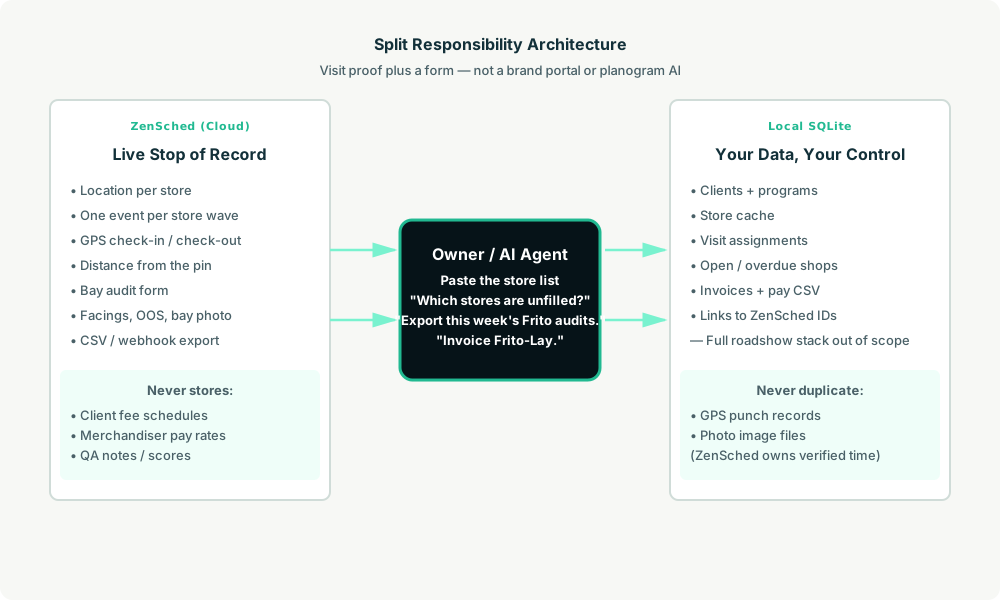
- ZenSched: Live store pin, GPS-verified check-in and check-out (geofence enforced), merchandiser app + push, one bay audit form per program (facings, OOS, planogram match, bay photo, notes). ZenSched never stores client fee schedules, QA notes, or merchandiser pay rates.
- Local SQLite database: Clients and programs (wave dates, fees), store cache, visit assignments, open/overdue shops, invoices, merchandiser pay CSV. Links to ZenSched location, event, and shift IDs. After one metered form read, punches and photo URLs are cached so “is Luis at Kroger 412?” is free later.
The agent orchestrates both: it parses a pasted store list into a local program, creates one event per store wave and one shift per visit on ZenSched, and writes verified arrival plus the audit back into SQLite for the brand CSV and invoice.
Privacy: fees and pay stay local
Merchandisers see the store, the slot, the form, and any cancellation reason. They do not see the client contact, the fees, QA notes, or who else is on the route. The store label that crosses to ZenSched is the banner plus the street (Kroger - Oak Ave). If you ask the agent to put a fee or pay rate in a ZenSched field — including cancellation reasons subs can see — it should refuse.
Day-to-day workflow
A typical audit week looks like this:
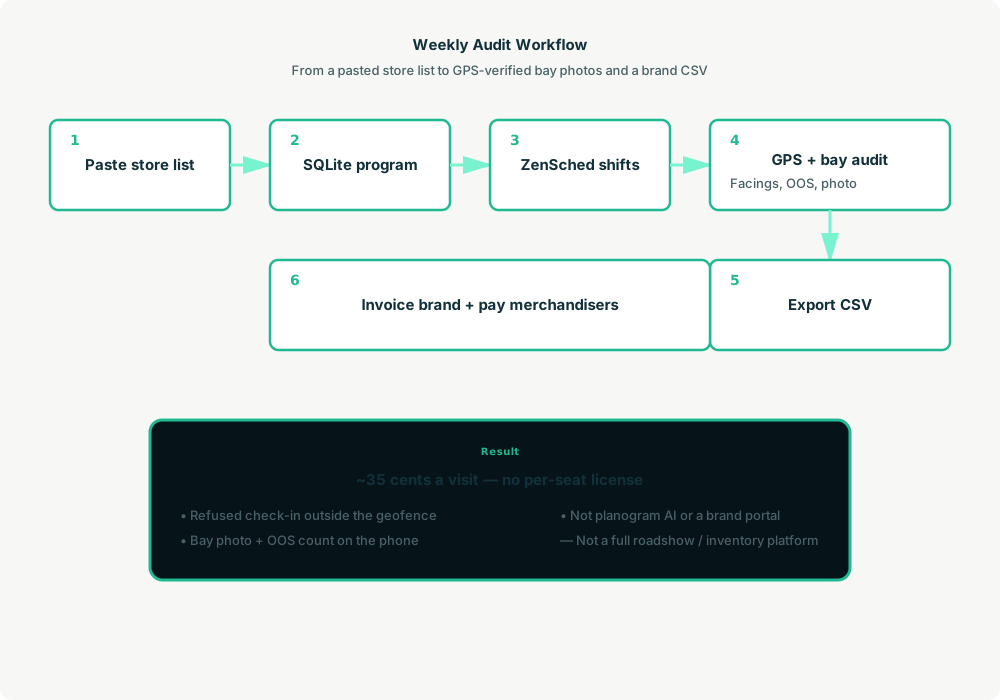
- You to agent (plain English): Paste the brand’s store list. “Run a weekly Frito audit from Monday.”
- Agent writes SQLite: Upserts the client and program, caches stores (repeat banner pin reuses; new street geocodes once), opens visit rows, keeps fees local.
- Agent creates the wave on ZenSched: One
location_createif the store is new, one event per store for the wave (under the 60-day cap),form_createonce for the bay audit,form_assignper store event. “Assign Kroger 412 to Luis Tuesday 8–12” is oneshift_create. He gets a push. - The merchandiser does the work: Open the ZenSched app, GPS check-in from the lot, count facings and voids, photograph the bay, check out.
- Unfilled chase: “Which Frito stores are still open this week?” Agent joins open visits to punches — “five unfilled, Tom missed Irving Wednesday.”
- Money: “Export this week’s Frito audits as CSV.” “Invoice Frito-Lay.” “What do I owe Luis?” Plain-text invoice plus merchandiser pay CSV from verified visits.
No dashboards. No asking you to run SQL. Paste the list, then talk to the agent.
Bay audit on the phone
Here’s what the audit looks like on a real shift. The merchandiser opens the ZenSched mobile app (iOS App Store | Google Play), checks in at the store, then fills the form before they drive off.
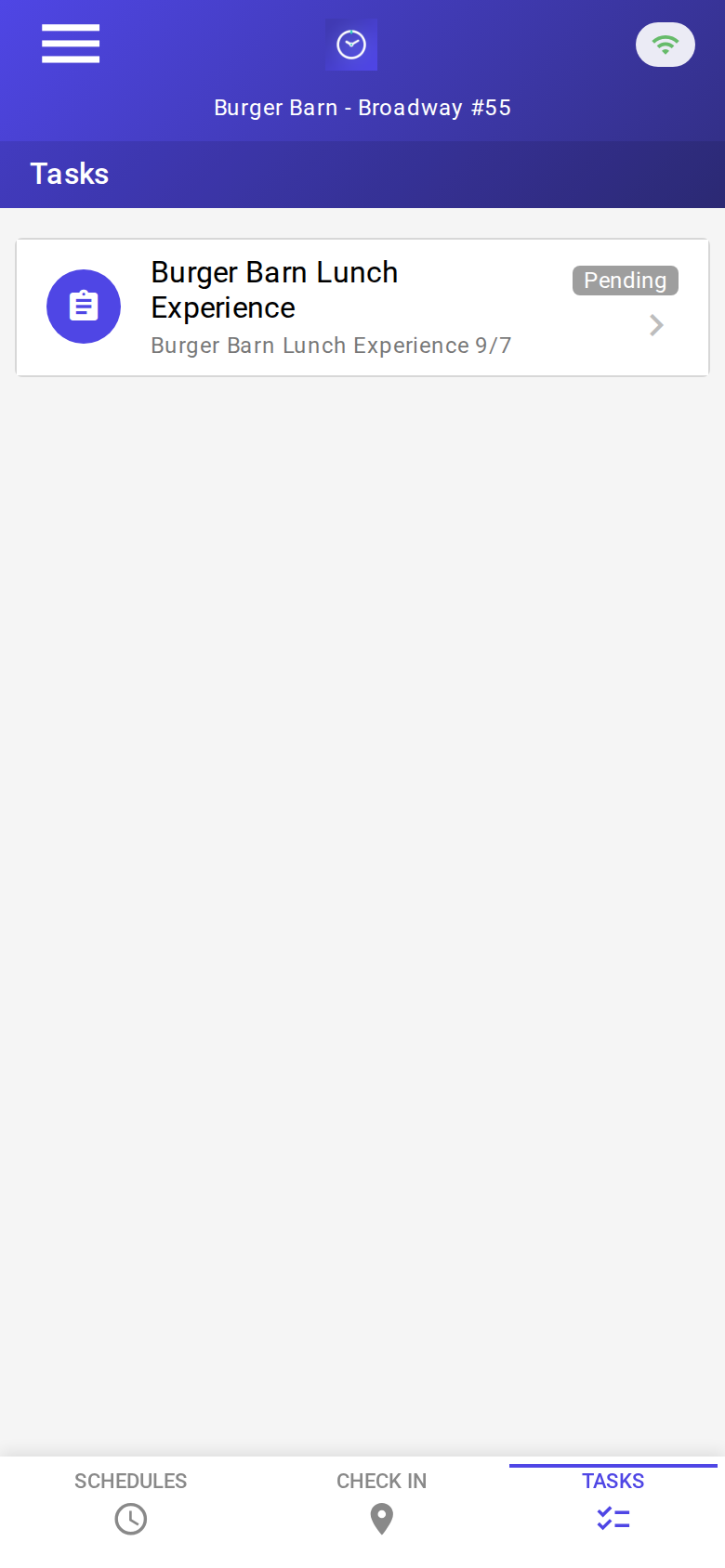
The Tasks tab with a pending audit. Check-in is GPS-verified at the store before the form is the work.
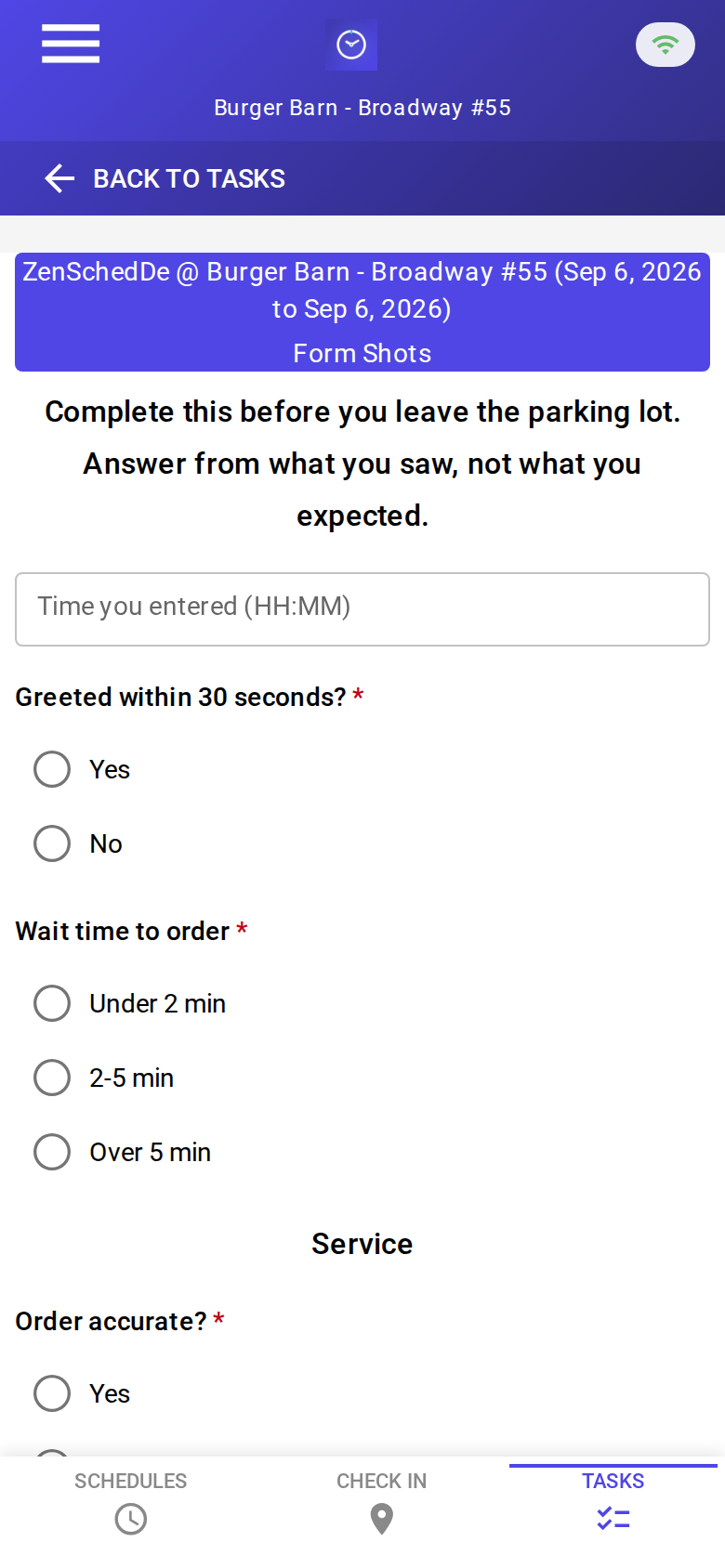
The blank audit: facings, OOS, planogram match, bay photo, notes. No signature pad.

A completed visit: facings counted, 2 OOS, bay photo attached. About 35 cents with GPS in, GPS out, and the photo read.
Setup summary
Getting started takes about 15 minutes:
- Install an MCP client: Claude Desktop, Cursor, or Muse Code.
- Connect ZenSched MCP: Add
https://mcp.zensched.com/mcpto your MCP config. - Connect easy-sqlite-mcp: Point
SQLITE_PATHat a localmerch-ops.dbon an encrypted, backed-up folder. - Paste the reference skill: The zensched-merch-audit-kit includes
SKILL.md,schema.sql, and a quickstart. Load the schema once (one statement per execute). - Create your ZenSched account: Call
zensched_guide, thenaccount_createfor azsc_key. Invite merchandisers at $0.25 each once. - Fund when needed: Metered GPS, geocode, and form reads draw from prepaid balance. The $5 activation deposit is credited to your account.
Mall stores need a second brand and policy with a wider radius (150–300 m). Do not flip remote_checkin on the default org-wide policy.
Worker app: Android on Google Play and iOS on the App Store.
For step-by-step details, see the ZenSched quickstart and the merch-audit kit.
Metering: what you pay for
ZenSched uses transparent per-action pricing (see pricing):
- GPS check-in/check-out: $0.10 each
- Address geocoding: $0.03 per new store (once; repeat stores reuse the pin)
- Worker invite: $0.25 per merchandiser (once)
- Form submission reads: $0.05 basic / $0.15 with photos — read once, cache locally. Bay photos are required, so plan on $0.15.
Worked example: 800 store visits a month (weekly audit of ~200 stores) with a bay photo every visit → about $283/month, or ~$0.35 per visit. First month with all geocodes and invites lands near $0.37. GPS-only is $0.20. On a $40 brand fee that is 0.9% of revenue.
Read the incumbent comparison honestly. Against Repsly when they seat the field team, ZenSched is an order of magnitude cheaper — but Repsly buys IR, planogram files, and a portal. Against a 3-seat Repsly office (~$267/month) ZenSched at $283 is parity — the sell is enforced geofence, no 12-month contract, and merchandisers who are not seats. Against the free Forms + Facebook stack, ~$280 buys a punch they cannot fake. Need inventory, IR, or a full roadshow stack? That is out of scope for this kit.
What you get
- Geofenced check-in and check-out at the store, with distance from the pin
- A bay audit on the phone: facings, OOS, planogram flag, photo
- “Which stores are still unfilled?” from the agent mid-week
- CSV export for the brand manager
- Invoices and merchandiser pay CSV from verified visits
- About 15 minutes to stand up; the agent is the dispatcher
What you don’t get (be blunt)
- No planogram AI / image recognition (ShelfScan, Trax)
- No brand portal or client login
- No inventory sync, order-writing, or W-2 payroll at Acosta scale
- Photo stamp is opt-in (
"stamp_photos": trueon the bay photo field at form setup; gallery picks without EXIF may show date/time only) remote_checkinis a last resort and turns GPS proof off for the whole policy- No full roadshow stack (inventory, demo staffing, payroll)
Who this is for (and who it’s not for)
Ideal for:
- Regional merchandising brokerages on Forms + Facebook who lose chargebacks
- Owners paying Repsly per seat for a portal the brand never opens
- Mid-size CPG brand managers who dispatch part-timers to photograph the bay
- Operators who already talk to Claude, Cursor, or Muse and want a pasted CSV to become phone shifts
Not a replacement for:
- Acosta / SPAR / CROSSMARK-scale W-2 field forces
- Repsly or Movista when the product is IR scoring and a brand portal
- A full roadshow platform when the vendor needs inventory, demo staffing, and payroll
This is agent-first infrastructure. The operator talks to the agent, and the agent talks to ZenSched.
Get started
- Kit: github.com/zenschedmcp/zensched-merch-audit-kit
- Docs: zensched.com/docs/quickstart
- MCP:
https://mcp.zensched.com/mcp - Related: Agent-run mystery shopping · Agent-run claim photo inspections · Agent-run lawn care
Ready to build your own workflow?
Clone the reference kit and connect ZenSched to your AI agent.