Reference design
Agent-run mystery shopping: a ZenSched reference design
The client bought 150 stores, once in October, lunch rush. Twelve are still unfilled on Thursday. Two that came back look like they were submitted from a couch. The editor is scrolling receipts. What if an AI assistant could take the pasted brief, put a GPS check-in on the shopper’s phone at that store, install the evaluation with a required receipt photo, and tell you mid-week which shops are still open — without putting client fees, QA notes, or shopper pay handles into a vendor dashboard?
This reference design shows how a small MSP (an owner, one to three schedulers, a pool of contractor shoppers) or an in-house audit team can deploy an AI agent using ZenSched as the live schedule of record (with the evaluation on the phone) and a local SQLite database for clients, programs, stores, shopper pay, scores, and invoices.
Honest framing: this is not SASSIE
Read this before you clone the kit.
- ZenSched is not a questionnaire engine. It stores a form (select, text, number, photo, section) and its submissions.
show_iffollow-ups work on the phone when the source is an earlier select or multi-select. There is no piping, no branching by score, and no validation of a time typed as text. - It does not score or produce a client portal. Weights, if you want them, live in local SQLite. The agent computes a number from the export. Clients never log in. You send a CSV and a plain-text invoice.
- It does not recruit shoppers or pay them. You bring the pool. The kit writes a PayPal mass-pay CSV from verified, submitted shops. You pay outside the kit.
- Covert shops need their own brand and policy. Check-in is one tap from the car or the sidewalk inside the radius, then the form in the car after. Turn the check-out reminder off on that policy so nothing buzzes at the counter. Phone or web shops that cannot have a GPS punch also get their own brand and policy with
remote_checkin. Do not flipremote_checkinon the default org-wide policy — that turns GPS proof off for every in-person program in the account. - The proof is presence and time, not honesty. GPS says the shopper was within the radius at check-in and check-out. The receipt photo is a purchase timestamp. The form is what they claim they saw. The kit flags late, short, or missing punches. It cannot tell you a narrative is made up.
The kit’s SKILL.md makes that split a hard rule. That narrows what a third party sees; it does not make a rejected shop go away by itself.
The problem: unfilled rotations and couch shops
Small MSPs already have a stack: SASSIE or Shopmetrics if they sell branching questionnaires and a client login; Field Agent or BeMyEye if the brand skipped them; otherwise Google Forms, a spreadsheet, Facebook groups, and PayPal. The free stack does not refuse a punch from home. The $3.50–$5.00-a-shop stack does geo-verify — usually as a code an editor compares — and it is a large slice of a $30 margin.
The weekly loop is the same whether you are an owner-operator or two schedulers:
- Fill every shop before the window closes. Unfilled is a refund.
- Prove the shopper was physically there in the window. A chargeback plus a re-shop is your cost.
- Get the receipt and answers to the editor without a 40-hour QA month.
- Pay shoppers the right fee plus reimbursement, once, from shops you actually approved.
- Know Thursday that Tuesday’s shop did not happen.
Not on that list: a marketplace of shoppers, or a portal for a five-store franchisee.
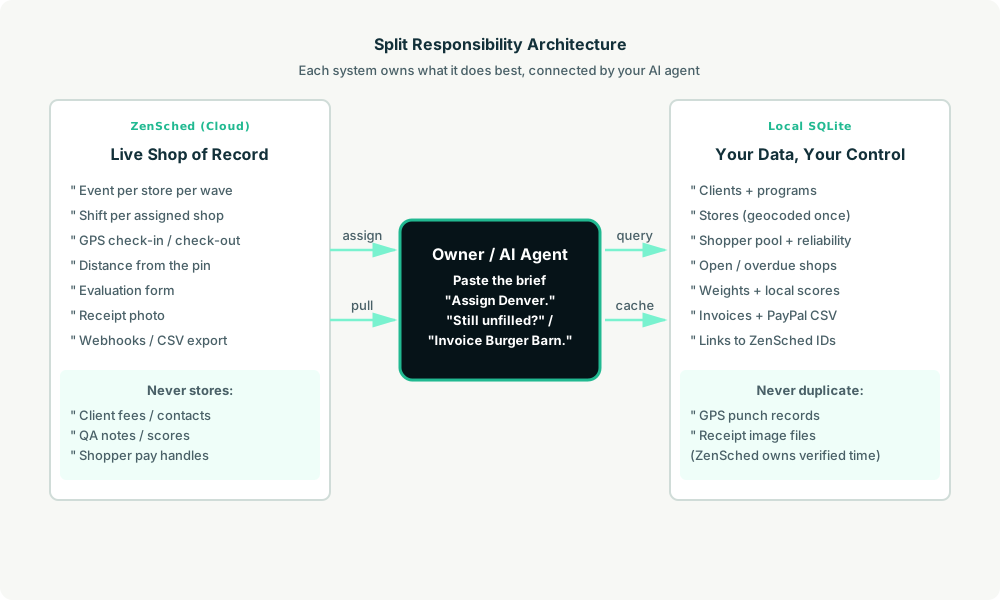
The solution: split responsibility between ZenSched and local data
This architecture divides work cleanly:
- ZenSched: Live store pin, GPS-verified check-in and check-out (geofence enforced), shopper app + push, one evaluation form per program (scored selects, wait time, cleanliness, receipt photo, narrative). ZenSched never stores client fees, QA notes, scores, or pay handles.
- Local SQLite database: Clients and programs (wave dates, window, quota, fees), a store cache so a banner location is geocoded once, shoppers, open/overdue shops, optional question weights, invoices, and the PayPal CSV. Links to ZenSched location, event, and shift IDs. After one metered form read, punches and answers are cached so “is Dana at Colfax?” is free later.
The agent orchestrates both: it parses a pasted brief into a local program, creates one event per store and one shift per assigned shop on ZenSched, and writes verified arrival plus the evaluation back into SQLite for QA, invoices, and pay.
Privacy and covert shops
Shoppers see the store, the slot, the form, and any cancellation reason. They do not see the client contact, the fees, QA notes, scores, or who else is shopping. The kit forbids putting any of those into ZenSched fields. Clients get store-and-date results, never shopper names. The store label that crosses to ZenSched is the banner plus the street (Burger Barn - Broadway).
Covert work is a briefing problem, not a GPS-off problem. Check in from the car. Complete the form after. Keep in-person programs on a geofenced policy. If you also run phone shops, give those a separate brand and policy. Org-wide remote_checkin is the wrong fix — it would let every shopper punch from the couch.
Shopper name and email do go to ZenSched on worker_invite (US-hosted). Pay details and ratings stay local. EU/UK agencies should treat that as contractor personal data and ask counsel before they invite a European pool.
Day-to-day workflow
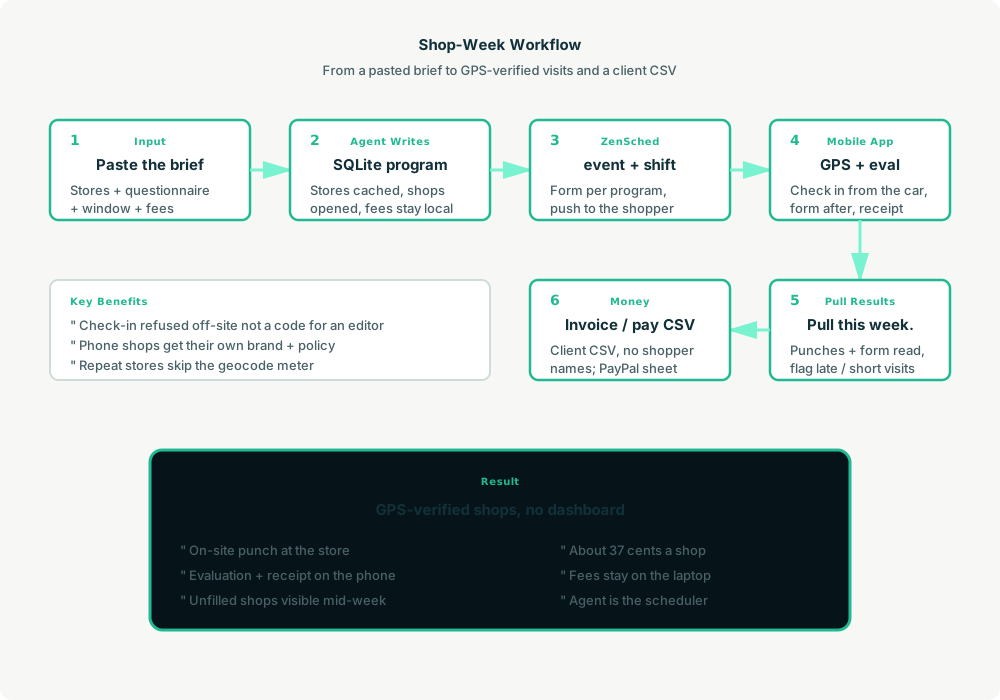
A typical shop week looks like this:
- You to agent (plain English): Paste the client’s brief. “Set up the Burger Barn lunch shops.”
- Agent writes SQLite: Upserts the client and program, caches stores (repeat banner pin → reuse; new street → geocode once), opens shops from the quota, keeps fees local.
- Agent creates the wave on ZenSched: One
location_createif the store is new, one event per store for the wave (under the 60-day cap),form_createonce for the questionnaire,form_assignper store event. “Give Dana the Broadway shop, Tuesday 11 to 2” is oneshift_create. She gets a push. - The shopper does the work: Open the ZenSched app, GPS check-in from the parking lot, shop, fill the evaluation in the car (answers + receipt photo), check out.
- Pull results: “Pull this week.” Agent matches punches (free) and form reads (metered once), flags late / short / no-punch shops, and asks you to approve or reject.
- Money: “Invoice Burger Barn.” CSV plus a plain-text invoice — no shopper names. “Run shopper pay.” PayPal mass-pay CSV from verified, approved shops.
No dashboards. No asking you to run SQL. Paste the brief, then talk to the agent.
Evaluation on the phone
Here’s what the form looks like on a real shift. The shopper opens the ZenSched mobile app (iOS App Store | Google Play), checks in at the store, then fills the evaluation before they drive off.
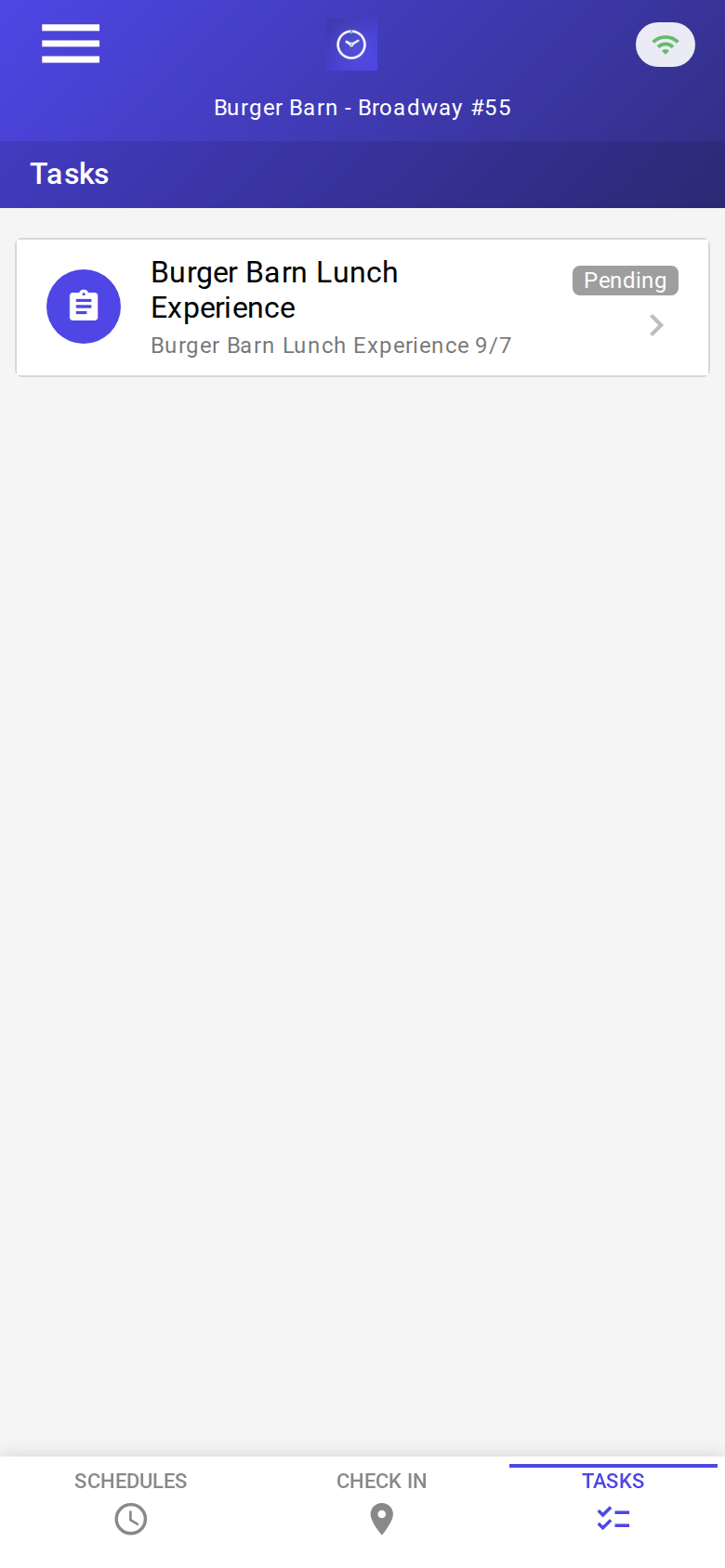
The Tasks tab with a pending evaluation. Check-in is GPS-verified at the store before the form is the work.
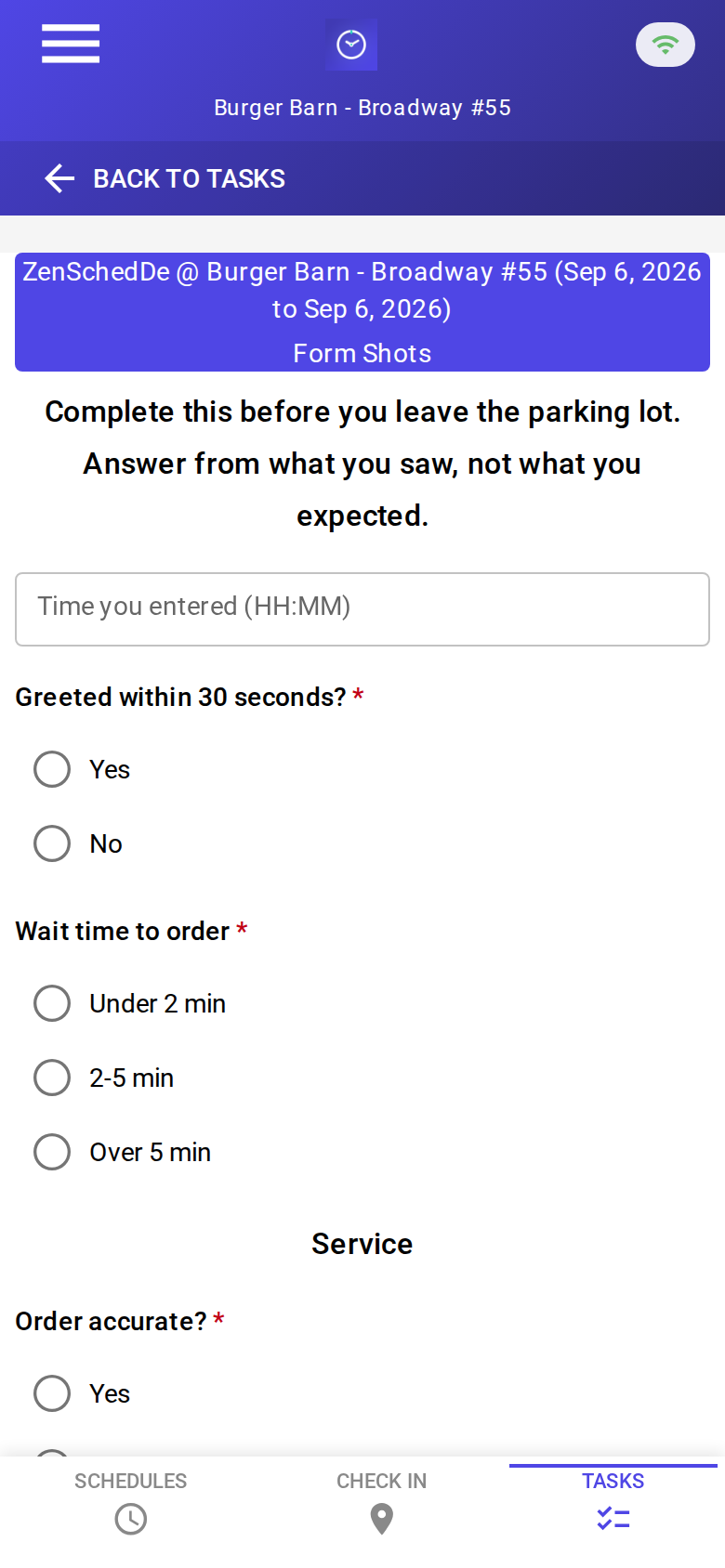
The blank evaluation: arrival time, greeted within 30 seconds, wait, order accuracy, friendliness, upsell, cleanliness, required receipt photo, total, narrative. No signature pad.

A completed shop: greeted yes, 2–5 minute wait, order accurate, receipt $14.87. About 37 cents with GPS in, GPS out, and the photo read.
Setup summary
Getting started takes about 15 minutes:
- Install an MCP client: Claude Desktop or Cursor both support MCP.
- Connect ZenSched MCP: Add
https://mcp.zensched.com/mcpto your MCP config. - Connect easy-sqlite-mcp: Point
SQLITE_PATHat a localshop-ops.dbon a backed-up folder (this file holds client fees and shopper pay handles). - Paste the reference skill: The zensched-mystery-shop-kit includes
SKILL.md,schema.sql, and a quickstart. Load the schema once (one statement per execute). Receipt photo fields set"stamp_photos": trueso exported JPEGs carry readable date, time, and GPS (opt-in per field; gallery picks without EXIF may show date/time only). - Create your ZenSched account: Call
zensched_guide, thenaccount_createfor azsc_key (no email required). Invite shoppers as workers — they are who check in. - Fund when needed: Free tools under daily quota; metered GPS, geocode, worker invites, and form reads draw from prepaid balance. The $5 activation deposit is credited to your account.
Worker app: Android on Google Play and iOS on the App Store.
For step-by-step details, see the ZenSched quickstart and the mystery-shop kit.
Metering: what you pay for
ZenSched uses transparent per-action pricing (see pricing):
- Free MCP calls under daily quota for basic operations
- GPS check-in/check-out: $0.10 each (metered verification)
- Address geocoding: $0.03 per new store (skipped when the store cache already has that pin)
- Pin refine (optional): $0.10 when you ask ZenSched to move a mailbox geocode onto the building
- Worker invite: $0.25 per shopper (once; re-invites of the same email should not double-bill)
- Form submission reads: $0.05 basic / $0.15 with the receipt photo — read once, cache locally
Worked example from the vertical pitch: 600 shops a month, 150 new stores, 40 new shoppers → $224.50 with a receipt-photo evaluation every time (about 37 cents a shop). On a $45 client fee that is 0.8%. A GPS-only shop (no photo read) is about 25 cents. A slow client month costs almost nothing.
Read the incumbent comparison honestly. Against ClientSmart / SASSIE / Shopmetrics at $3.50–$5.00 a shop, ZenSched is about a tenth of the price at any volume. That gap buys branching, weighted scoring, editor queues, a client portal, and shopper pay — none of which this kit has. Sell to the Google-Forms MSP on chargebacks and mid-week unfilled shops. Sell to a platform MSP only if they are paying $3.50+ a shop for a portal their clients never open.
What you get
- Geofenced check-in and check-out at the store, with distance from the pin — the punch is refused off-site
- An evaluation on the phone when the shop is assigned: selects, timings, cleanliness, required receipt photo, narrative
- Mid-week “still unfilled” and “who missed a window” from the agent
- Scores and receivables on the laptop; client CSV with shopper names stripped
- PayPal mass-pay CSV from verified, approved shops
- About 15 minutes to stand up; the agent is the scheduler
What you don’t get (be blunt)
- Not a questionnaire engine (no piping, no branching by score)
- No weighted scoring product — local weights + the agent, if you want a number
- No client portal, no editor revision queue, no report PDFs
- No shopper marketplace and no payments
- Org-wide
remote_checkinis not the covert-shop fix — use a per-brand policy - Unassigned shops live only in SQLite (
shift_createneeds a worker) - Two schedulers on two laptops need a shared database the kit does not provide
Who this is for (and who it’s not for)
Ideal for:
- Small MSPs on Google Forms and a spreadsheet
- In-house brand-audit / price-check teams with part-timers
- 20–40 question retail and QSR programs with a receipt and a narrative
- Operators who already talk to Claude or ChatGPT and want the brief to become phone shifts
Not a replacement for:
- SASSIE or Shopmetrics if you sell 150-question hotel evals with section weights and a client login
- Crowd platforms (Field Agent, BeMyEye) that are the shopper pool
- A shopper recruiting board
This is agent-first infrastructure. The operator talks to the agent, and the agent talks to ZenSched.
Get started
- Kit: github.com/zenschedmcp/zensched-mystery-shop-kit
- Docs: zensched.com/docs/quickstart
- MCP:
https://mcp.zensched.com/mcp - Related: Agent-run lawn care · Agent-run pet care · Agent-run home care · Agent-run mobile notary · Agent-run process serving · Agent-run STR turnover · Agent-run tenant inventory
Ready to build your own workflow?
Clone the reference kit and connect ZenSched to your AI agent.