Reference design
Agent-run mobile notary: a ZenSched reference design
You printed 150 pages, drove 40 minutes, and sat in a driveway for an hour. The borrower never opened the door. The signing service will pay a trip fee “if the notary arrived on time” — and today that proof is a text message and your word. What if an AI assistant could book the signing from a pasted confirmation, put a GPS check-in on your phone at that address, collect a Signing Completion Record with the drop-receipt photo, and draft the trip-fee request — without putting signer names, ID numbers, or loan numbers into a vendor dashboard?
This reference design shows how a solo NSA or a 2–5 notary micro-agency can deploy an AI agent using ZenSched as the live schedule of record (with a Signing Completion Record on the phone) and a local SQLite database for clients, appointments, journal pointers, mileage, invoices, and sub payouts.
Honest framing: this is not your journal
Read this before you clone the kit.
- ZenSched is not a notary journal and must never be used as one. State law governs the journal — bound book or an approved electronic journal, signer name, ID type and number, signature, thumbprint where required, fee. The kit’s
journal_indexstores only a pointer (book, entry, page, act type, count) so the agent can answer “which journal entry was order 8827.” It never stores ID numbers, SSNs, dates of birth, loan numbers, or thumbprints. - Signer information stays on your computer. Names, phones, gate codes, and room numbers live only in local SQLite. ZenSched receives a place label (
Lakeview Title - Bellevue, orSigning - Elm Stfor a home), the street address for the GPS pin, an event title made of the signing type and your appointment number (Refi signing A-2026-0001), and the Completion Record — which asks for ID type only. - It does not perform notarial acts, verify identity, or run RON. The Completion Record has no signature pad, on purpose: on ZenSched a signature field replaces the Submit button, and a signature on an ops form invites confusion with the notarial act.
The kit’s SKILL.md makes that split a hard rule the AI will refuse to break. That narrows what a third party sees; it does not make you compliant by itself. Ask counsel about the signing address itself — it must be geocoded, even with the name stripped.
The problem: arrival proof, scan-backs, and slow pay
Mobile notaries already have a stack: Snapdocs (or SigningOrder, NotaryDash, Amrock) for offers, a paper or approved e-journal, NotaryGadget or a spreadsheet for fees, MileIQ for miles. Nothing in that stack proves you were at the door at 6:00 pm, and nothing in it belongs to you when the service disputes the fee.
The weekly loop is the same whether you are a solo NSA or dispatching two subs:
- Did I arrive on time? Late or no-show notaries are how you get dropped from a rotation.
- Can I recover the trip and print fee when the borrower fails?
- Did the package actually ship — and can I show the receipt when FedEx “never arrived”?
- Which of last month’s 50 signings is unpaid at day 35?
- If I send a sub: did they actually show?
Snapdocs timestamps order status for the company that pays you, at order level (Open, Completed, Did not sign). That log is theirs. Direct title and general-notary work never touch it.
The solution: split responsibility between ZenSched and local data
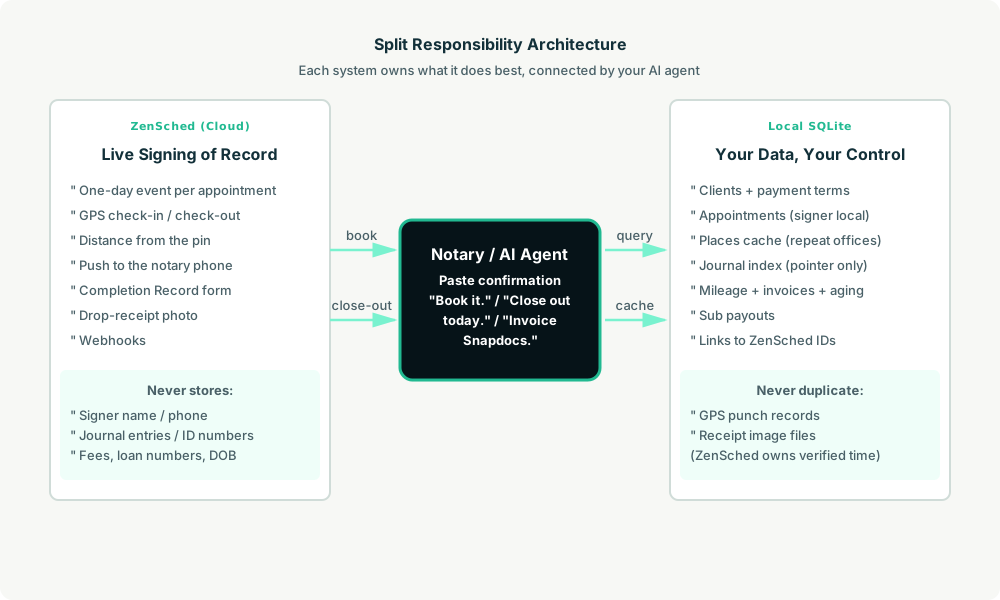
This architecture divides work cleanly:
- ZenSched: Live appointment, GPS-verified check-in and check-out at the signing address (geofence enforced), notary app + push notifications, Signing Completion Record (outcome, documents notarized, ID type, scan-backs, tracking number, drop-receipt photo, notes). ZenSched never stores signer names, journal entries, fees, or loan numbers.
- Local SQLite database: Clients (signing services, title, lenders — with payment terms and trip-fee policy), a
placescache so repeat title offices are geocoded once, appointments (signer name and phone stay here), journal pointers, mileage, invoices with aging, and sub payouts. Links to ZenSched location, event, and shift IDs. After one metered form read, arrival stamps and the outcome are cached locally so “was I on time at the Kim signing?” is free later.
The agent orchestrates both: it parses a pasted confirmation into a local appointment, creates a one-day event and shift on ZenSched, and writes verified arrival plus the Completion Record back into SQLite for invoices and trip-fee letters.
Privacy: the journal stays the journal
Borrower names, phones, gate codes, and room numbers live only in local tables. The kit skill forbids putting any of them into ZenSched fields — including location names, event titles, notes, and cancellation reasons (subs can see those). Loan numbers, ID numbers, dates of birth, and thumbprints are not stored anywhere in this kit; they belong on the documents and in your journal. The Completion Record itself tells you not to write them in the free-text note.
Texas and Illinois prohibit recording ID numbers or biometrics in a journal. A cloud tool that stored them would be illegal in some states and a breach target in all of them. The kit draws the line so you do not have to remember it per state: operational facts only.
Day-to-day workflow
A typical signing day looks like this:
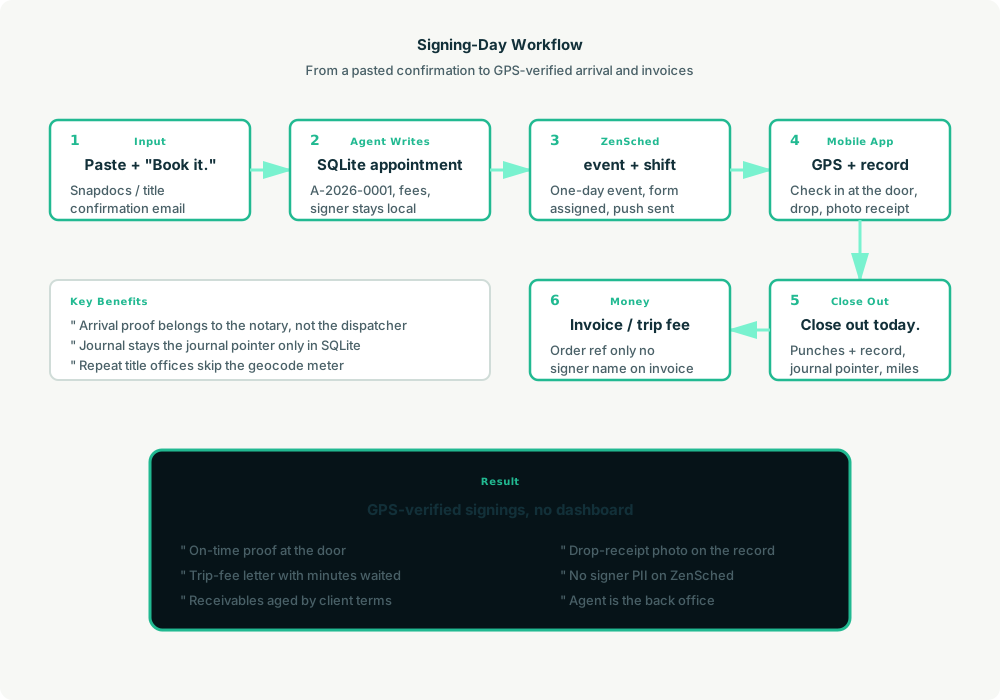
- You to agent (plain English): Paste the Snapdocs (or title) confirmation. “Book it.”
- Agent writes SQLite: Upserts the client, looks up the address in
places(repeat title office → reuse the pin; new home → geocode once), saves appointmentA-2026-0001with fees and the signer kept local. - Agent creates the signing on ZenSched: One
location_createif the place is new, one single-dayevent_create,form_assignfor the Completion Record, oneshift_createfor the window. You get a push. Events are one day — nothing to roll. - You do the work: Open the ZenSched app, GPS check-in at the door, complete the signing, check out, drop the package, fill the Signing Completion Record (outcome, document count, ID type, scan-backs, tracking, receipt photo).
- Close out: “Close out today. Torres: Book 3, entries 412 to 417, all acknowledgments, 23 miles.” Agent pulls verified punches (free) and the record (metered once), stores the journal pointer and miles, and tells you what is now receivable.
- Money: “Invoice Snapdocs.” Plain-text invoice under their terms, order ref only — no signer name. “Walsh no-showed. Get me the trip fee.” Draft uses GPS-verified arrival and minutes on site. “Who owes me money?” ages open invoices.
No dashboards. No asking you to run SQL. Paste the confirmation, then talk to the agent.
Signing Completion Record on the phone
Here’s what the record looks like on a real shift. You open the ZenSched mobile app (iOS App Store | Google Play), check in at the address, then fill the form before you leave.
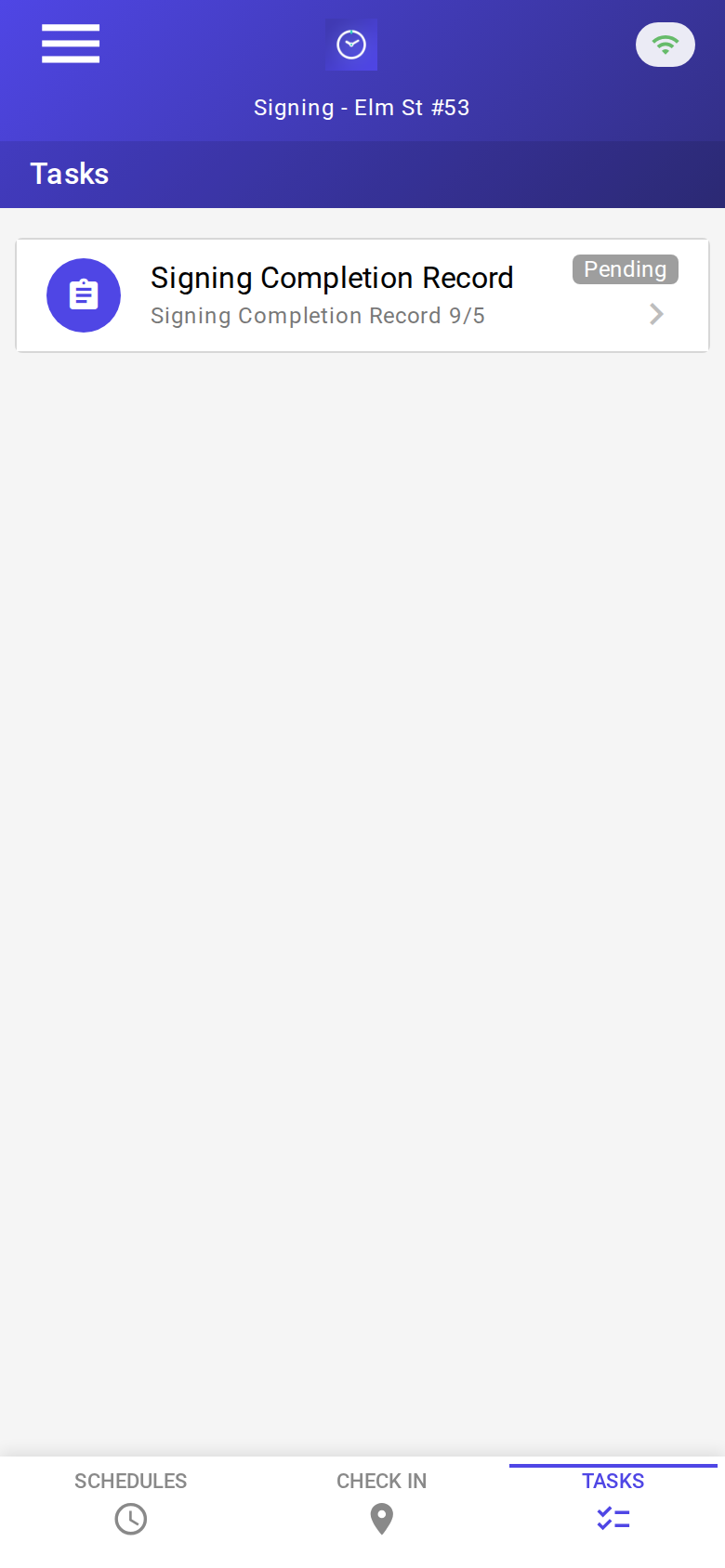
The Tasks tab with a pending Signing Completion Record. Check-in is GPS-verified at the signing address before the form is the work.
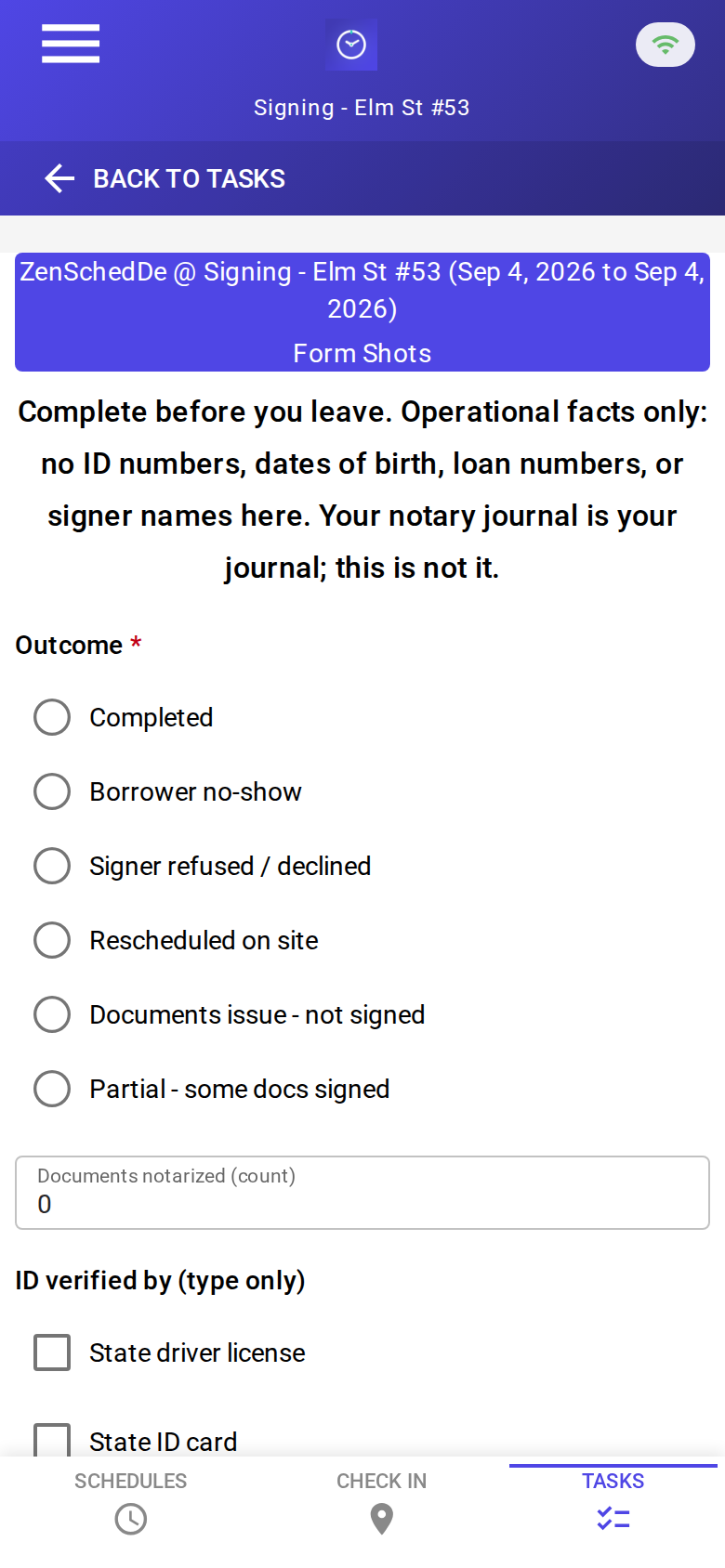
The blank record: outcome, documents notarized, ID type only, scan-backs, tracking number, drop-receipt photo, notes. No signature pad. No ID numbers.
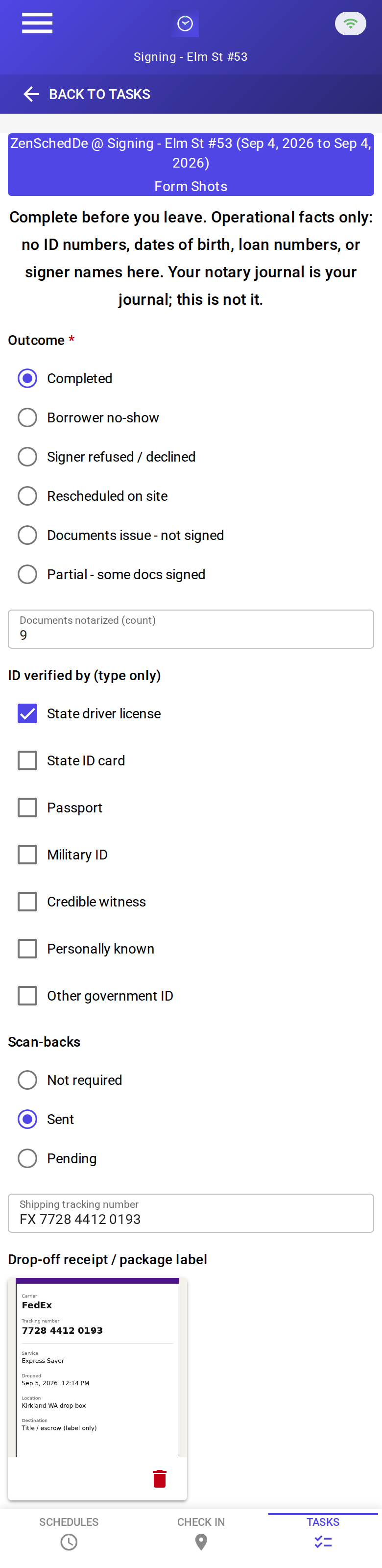
A completed record: borrower signed, nine documents, state driver license (type only), scan-backs sent, FedEx tracking, receipt photo. About 38¢ on a new address with the photo read.
Setup summary
Getting started takes about 15 minutes:
- Install an MCP client: Claude Desktop or Cursor both support MCP.
- Connect ZenSched MCP: Add
https://mcp.zensched.com/mcpto your MCP config. - Connect easy-sqlite-mcp: Point
SQLITE_PATHat a localnotary-ops.dbon an encrypted, backed-up folder (this file holds signer names and phones — treat it like a filing cabinet). - Paste the reference skill: The zensched-notary-kit includes
SKILL.md,schema.sql, and a quickstart. Load the schema once (one statement per execute). Drop-receipt photo fields set"stamp_photos": trueso exported JPEGs carry readable date, time, and GPS (opt-in per field; gallery picks without EXIF may show date/time only). - Create your ZenSched account: Call
zensched_guide, thenaccount_createfor azsc_key (no email required). Invite yourself as the worker — you are the notary on the phone. - Fund when needed: Free tools under daily quota; metered GPS, geocode, worker invites, and form reads draw from prepaid balance. The $5 activation deposit is credited to your account.
Worker app: Android on Google Play and iOS on the App Store.
For step-by-step details, see the ZenSched quickstart and the notary kit.
Metering: what you pay for
ZenSched uses transparent per-action pricing (see pricing):
- Free MCP calls under daily quota for basic operations
- GPS check-in/check-out: $0.10 each (metered verification)
- Address geocoding: $0.03 per new location (skipped when
placesalready has that title office) - Worker invite: $0.25 (once for yourself; again per sub)
- Form submission reads: $0.05 basic / $0.15 with the receipt photo — read once, cache locally
Worked example from the vertical pitch: solo NSA, 12 signings a week ≈ 52/month → $19.76 with a receipt-photo record every time (~38¢ per new-address signing, ~35¢ at a repeat office). On a $125 fee that is 0.3%. One recovered $50 trip fee pays for two and a half months.
No monthly subscription. No per-seat fee. A dead month costs nearly nothing — which matters when origination volume moves with mortgage rates.
Read the incumbent comparison honestly. At 52 signings a month ZenSched is about $8 above NotaryGadget ($11.95). NotaryGadget does invoicing and a tax estimate that this kit leaves to SQLite and the agent. Nothing in that stack does arrival proof. The sell to a full-timer is not a discount; it is evidence that gets one trip fee paid a quarter, or keeps a title rotation after a “you were late” dispute. Part-timers (most of the market) come in cheaper than the subscription stack.
What you get
- Geofenced check-in and check-out at the signing address, with distance from the pin
- A Signing Completion Record on the phone: outcome, document count, ID type, scan-backs, tracking, drop-receipt photo
- Your own arrival proof — independent of Snapdocs or any dispatcher
- Journal pointers and receivables on the laptop; invoices that never carry a signer name
- Sub payouts from verified punches if you dispatch
- About 15 minutes to stand up; the agent is the interface
What you don’t get (be blunt)
- Not a journal / not a substitute for one
- No Snapdocs, SigningOrder, or NotaryDash API — intake is a pasted confirmation
- No RON / e-notarization
- No ID numbers, thumbprints, or loan numbers stored anywhere in the kit
- No mileage GPS in motion (check-in and check-out points only; miles are entered per appointment)
- No PDF invoices, tax filing, or 1099s
remote_checkinis a last resort and is policy-wide (hospital / jail / high-rise: widen the radius instead)
Who this is for (and who it’s not for)
Ideal for:
- Solo NSAs and hybrid mobile notaries (loan signings plus general notary work)
- 2–5 notary micro-agencies that need to know the sub arrived
- Operators who already talk to Claude or ChatGPT and want the confirmation email to become a phone shift
Not a replacement for:
- Your statutory journal
- Snapdocs or the signing-service portal (work still comes from there)
- NotaryGadget if you want its invoicing and tax estimate as the system of record — keep it, and use ZenSched for punches
- RON platforms
This is agent-first infrastructure. The operator talks to the agent, and the agent talks to ZenSched.
Get started
- Kit: github.com/zenschedmcp/zensched-notary-kit
- Docs: zensched.com/docs/quickstart
- MCP:
https://mcp.zensched.com/mcp - Related: Agent-run lawn care · Agent-run pet care · Agent-run home care
Ready to build your own workflow?
Clone the reference kit and connect ZenSched to your AI agent.