Reference design
Agent-run process serving: a ZenSched reference design
You knocked twice last week and once this morning. The affidavit is due tomorrow, and the attempt log is a camera roll plus whatever you remember about the Civic in the drive. If the defendant files to quash — “nobody ever came to the door” — what do you pull up? What if an AI assistant could take the firm’s pasted request, put a GPS check-in on your phone at that address, collect an Attempt Record with the door photo, and draft the diligence paragraphs — without putting the defendant’s name, date of birth, or the summons into a vendor dashboard?
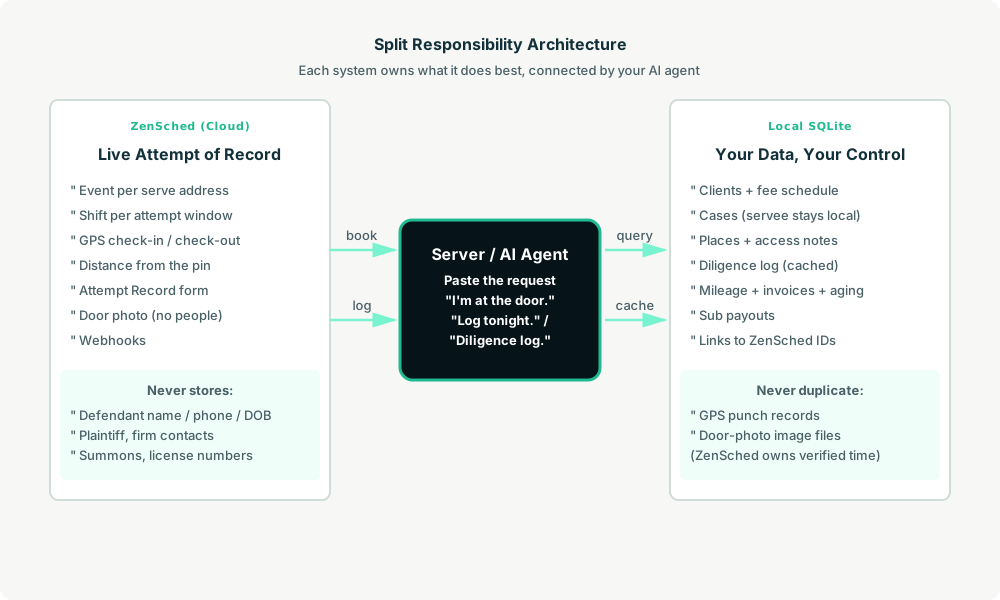
This reference design shows how a solo process server or a 2–8 server shop can deploy an AI agent using ZenSched as the live schedule of record (with an Attempt Record on the phone) and a local SQLite database for clients, cases, defendants, diligence cache, mileage, invoices, and sub payouts.
Honest framing: this is not an affidavit generator
Read this before you clone the kit.
- ZenSched does not write affidavits, proofs of service, or e-file. The kit’s diligence view lists every attempt with GPS-verified times, outcome, description, photo count, and server. The agent formats that as numbered paragraphs. You paste into your form (Judicial Council, the firm’s template, Word), add the sworn parts, sign it, and file it as you do now.
- It does not know your state’s rules. How many attempts, on which days, at which times, whether posting or substituted service is allowed, whether a mailing must follow: those are yours. A count of attempts is not a legal opinion. The kit forbids the AI from telling you service was sufficient.
- Door photos can carry a burned-in stamp (opt-in). Set
"stamp_photos": trueon the door-photo field inform_create/form_update. After upload, the server burns readable date, time, and GPS onto the JPEG from capture metadata (default off). Gallery picks without EXIF may stamp date/time only. California servers: from January 1, 2027, CCP 417.10 as amended by AB 747 requires a door photo with readable date, time, and GPS on the image — enable"stamp_photos": trueon that field. The punch is corroboration; the affidavit is still yours to swear. - Defendant information stays on your computer. Names, phones, dates of birth, plaintiff, firm contacts, license numbers, and the summons live only in local SQLite. ZenSched receives a place label (
Serve 24-CV-1187 - Marconi Ave— case numbers are public record), the street address for the GPS pin, and the Attempt Record. The record’s physical-description field is operational and labelled “no names.” Do not photograph people.
The kit’s SKILL.md makes that split a hard rule the AI will refuse to break. That narrows what a third party sees; it does not make you compliant by itself.
The problem: reconstructed logs and a sworn page
Process servers already have a stack: ServeManager or Process Server’s Toolbox if they generate affidavits and run a client portal; ABC Legal or Proof if they work a national queue; otherwise a spreadsheet, a camera roll, and a Word template. Nothing in the glue stack proves you were at the door at 6:42 pm, and the attempt log gets rebuilt the night before the declaration is due.
The weekly loop is the same whether you are a solo or dispatching two subs:
- Can I prove each attempt happened where and when I say it did? A traverse hearing turns on that.
- Can I produce the diligence log without scrolling photos for half an hour?
- If I send a sub: did they actually go?
- Which of last month’s serves is unpaid at day 35?
- Am I reconstructing sewer-service-looking timelines from memory?
NYC has required licensed servers to carry GPS and keep electronic attempt records since 2010. California’s 2027 rule wants a stamped door photo on every attempt. The affidavit is still yours to swear.
The solution: split responsibility between ZenSched and local data
This architecture divides work cleanly:
- ZenSched: Live serve address, GPS-verified check-in and check-out at that pin (geofence enforced), server app + push notifications, Attempt Record (outcome, who accepted, physical description with no names, vehicles / lights, door photo, documents left, notes). ZenSched never stores defendant names, dates of birth, the summons, or firm contacts.
- Local SQLite database: Clients (law firms, collections, property managers — with payment terms and a fee schedule), a
placescache so repeat complexes are geocoded once, cases (defendant name and phone stay here), access notes, diligence cache, mileage, invoices with aging, and sub payouts. Links to ZenSched location, event, and shift IDs. After one metered form read, arrival stamps and the outcome are cached locally so “did Luis go last night?” is free later.
The agent orchestrates both: it parses a pasted service request into a local case, creates an event and attempt shift on ZenSched, and writes verified arrival plus the Attempt Record back into SQLite for the diligence log and invoices.
Privacy: the summons stays with you
Defendant names, phones, dates of birth, plaintiff, firm contacts, license numbers, gate codes, and the documents themselves live only in local tables. The kit skill forbids putting any of them into ZenSched fields — including location names, event titles, notes, and cancellation reasons (subs can see those). The street address has to go to ZenSched so the geofence works. The Attempt Record’s description field is physical only: sex, approximate age, height, build, hair, clothing, stated relationship. “Hispanic male, 40s, 5’8”, heavy build, grey hoodie, said he was the brother” is right. A name is not.
That narrows breach surface. It does not replace counsel, county registration, or the sworn form.
Day-to-day workflow
A typical serve day looks like this:
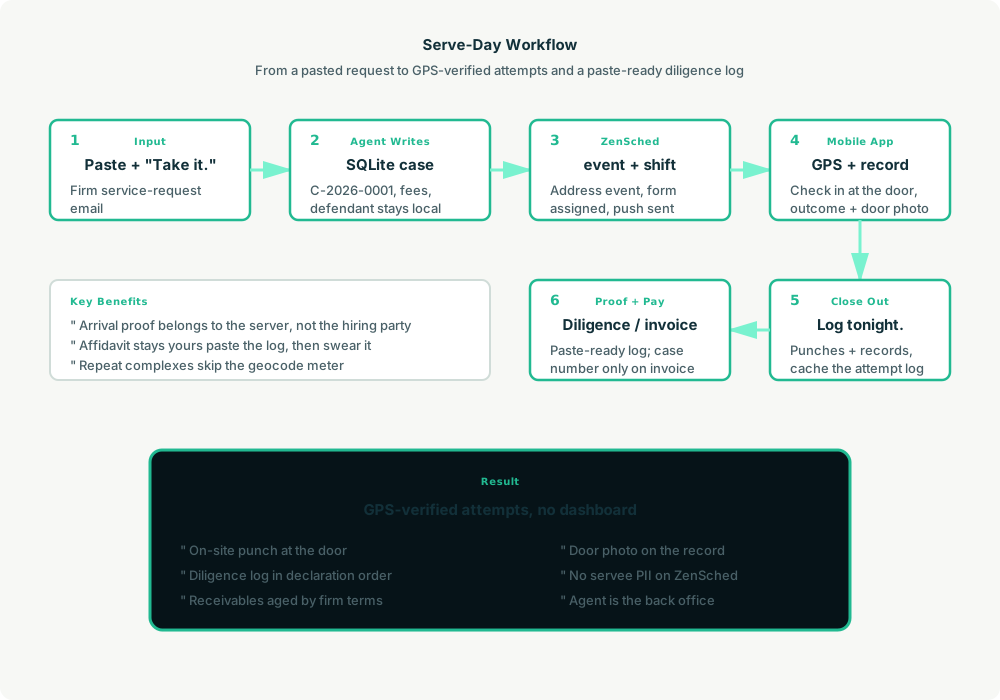
- You to agent (plain English): Paste the firm’s request. “Take it.”
- Agent writes SQLite: Upserts the client, looks up the address in
places(repeat complex → reuse the pin; new street → geocode once), saves caseC-2026-0001with fees and the defendant kept local. - Agent creates the serve on ZenSched: One
location_createif the place is new, one event windowed to the deadline,form_assignfor the Attempt Record, oneshift_createfor the first window. You get a push. Later attempts are more shifts on the same event. - You do the work: Open the ZenSched app, GPS check-in at the door, knock, fill the Attempt Record (outcome, vehicles, door photo — no people), check out. On the way home: “I’m at the door now” opens an ad-hoc window.
- Close out: “Log tonight’s attempts.” Agent pulls verified punches (free) and the records (metered once), caches them, and asks before you close a case as served.
- Proof and money: “Diligence log for 24-CV-1187” returns numbered paragraphs for the declaration. “Invoice Hollis.” Plain-text invoice under their terms, case number only — no defendant name. “Who owes me money?” ages open invoices. “Did Luis actually go?” answers from the punches.
No dashboards. No asking you to run SQL. Paste the request, then talk to the agent.
Attempt Record on the phone
Here’s what the record looks like on a real shift. You open the ZenSched mobile app (iOS App Store | Google Play), check in at the address, then fill the form before you drive off.
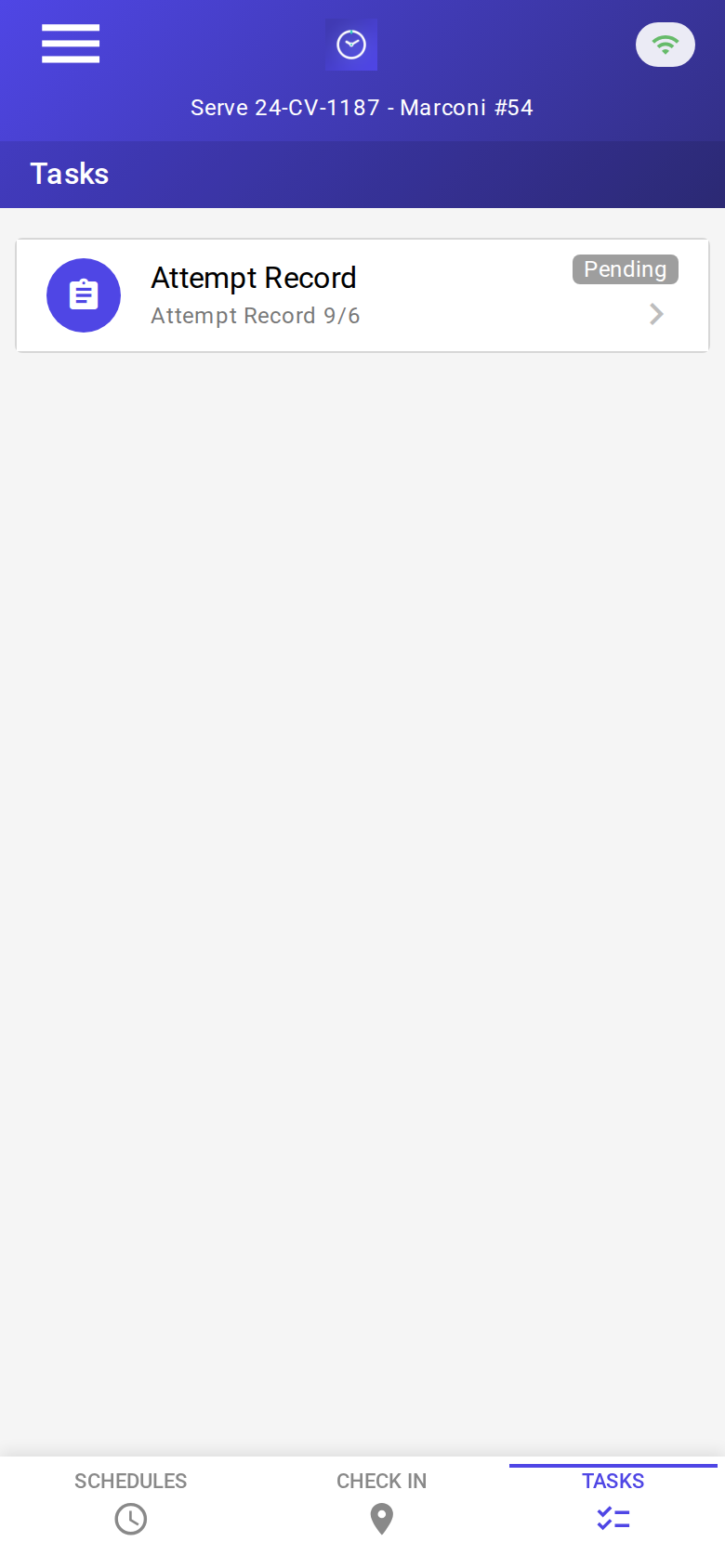
The Tasks tab with a pending Attempt Record. Check-in is GPS-verified at the serve address before the form is the work.
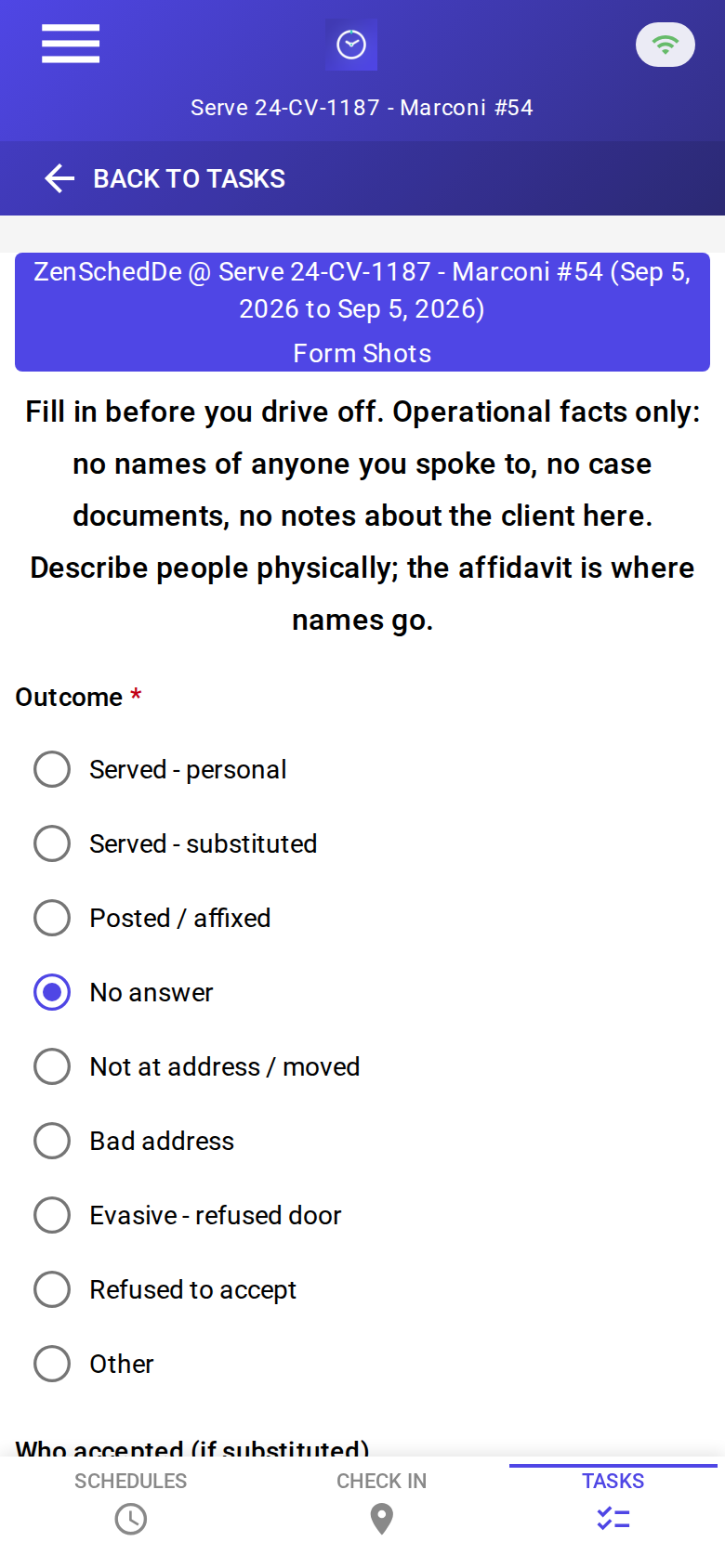
The blank record: outcome, who accepted, physical description (no names), vehicles / occupancy, door photo, documents left, notes. No signature pad. The sworn signature belongs on the affidavit.
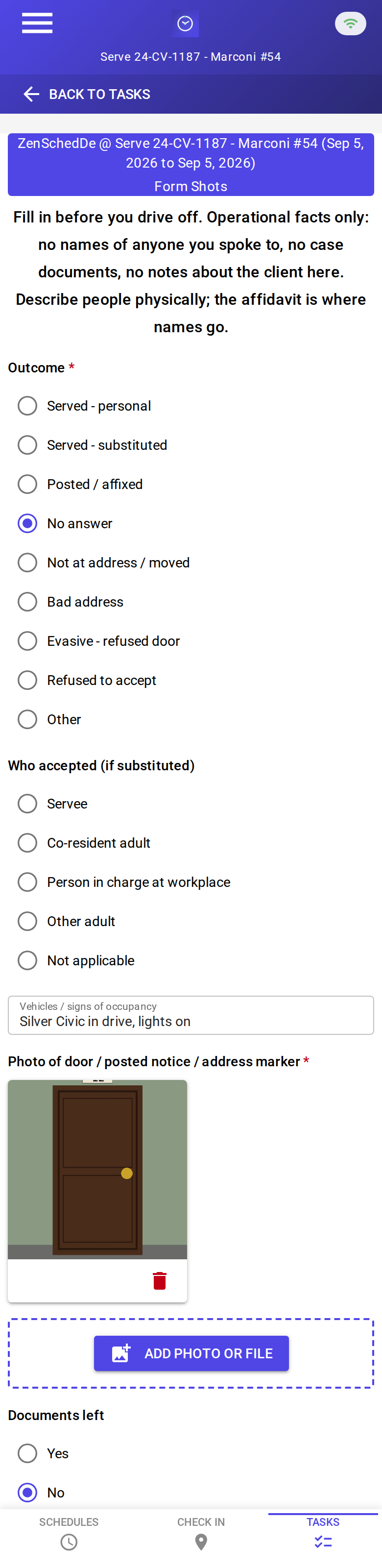
A completed record: no answer, silver Civic in the drive, lights on, door photo, documents not left. About 38¢ on a new address with the photo read; about 35¢ on a further attempt at the same pin.
Setup summary
Getting started takes about 15 minutes:
- Install an MCP client: Claude Desktop or Cursor both support MCP.
- Connect ZenSched MCP: Add
https://mcp.zensched.com/mcpto your MCP config. - Connect easy-sqlite-mcp: Point
SQLITE_PATHat a localserve-ops.dbon an encrypted, backed-up folder (this file holds defendant names and phones — treat it like a filing cabinet). - Paste the reference skill: The zensched-process-serving-kit includes
SKILL.md,schema.sql, and a quickstart. Load the schema once (one statement per execute). - Create your ZenSched account: Call
zensched_guide, thenaccount_createfor azsc_key (no email required). Invite yourself as the worker — you are the server on the phone. - Fund when needed: Free tools under daily quota; metered GPS, geocode, worker invites, and form reads draw from prepaid balance. The $5 activation deposit is credited to your account.
Worker app: Android on Google Play and iOS on the App Store.
For step-by-step details, see the ZenSched quickstart and the process-serving kit.
Metering: what you pay for
ZenSched uses transparent per-action pricing (see pricing):
- Free MCP calls under daily quota for basic operations
- GPS check-in/check-out: $0.10 each (metered verification)
- Address geocoding: $0.03 per new location (skipped when
placesalready has that complex) - Worker invite: $0.25 (once for yourself; again per sub)
- Form submission reads: $0.05 basic / $0.15 with the door photo — read once, cache locally
Worked example from the vertical pitch: solo server, 30 serves a month, 2.2 attempts each → 66 attempts → $24.00 with a door-photo record every time (~38¢ on a new address, ~35¢ on a further attempt at the same pin; about 80¢ a serve). On a $75 fee that is about 1%. A slow month costs almost nothing.
Read the incumbent comparison honestly. For a solo at this volume ZenSched is about half ServeManager’s 75-job tier ($51.74) and under Process Server’s Toolbox ($40). Those products generate affidavits and run a client portal. This kit does not. Above roughly 240 serves a month ServeManager is cheaper and does more; the agency sell is contractor enforcement (check-in refused off-site) and the AI back office, not a discount. ServeManager already has unlimited users, so “no seat fees” is not the differentiator — “pay only for attempts you make” is.
What you get
- Geofenced check-in and check-out at the serve address, with distance from the pin
- An Attempt Record on the phone: outcome, who accepted, physical description (no names), vehicles, door photo, documents left
- Your own arrival proof — independent of the hiring party or a national dispatcher
- Diligence paragraphs and receivables on the laptop; invoices that never carry a defendant name
- Sub payouts from verified punches if you dispatch
- About 15 minutes to stand up; the agent is the interface
What you don’t get (be blunt)
- Not an affidavit / proof-of-service generator, and not e-filing
- No knowledge of state service rules or “service was sufficient”
- Photo stamp is opt-in (
"stamp_photos": trueon the door-photo field; not a substitute for affidavits, state rules, or e-filing) - No skip tracing, no client portal, no summons stored anywhere
- No PDF invoices, tax filing, or 1099s
- Not a panic button — check-in/out is a record, not someone watching
remote_checkinis a last resort and is policy-wide (gated complexes: widen the radius instead)
Who this is for (and who it’s not for)
Ideal for:
- Solo process servers reconstructing the log from a camera roll
- 2–8 server shops that need to know the sub arrived at the pin
- Operators who already talk to Claude or ChatGPT and want the firm’s email to become a phone shift
Not a replacement for:
- Your sworn affidavit or Judicial Council form
- ServeManager / PST / Paper Tracker if you live in their affidavit generator and client portal — keep them, and use ZenSched for punches
- ABC Legal or Proof for work that only exists inside their queue
- A skip-trace database
This is agent-first infrastructure. The operator talks to the agent, and the agent talks to ZenSched.
Get started
- Kit: github.com/zenschedmcp/zensched-process-serving-kit
- Docs: zensched.com/docs/quickstart
- MCP:
https://mcp.zensched.com/mcp - Related: Agent-run lawn care · Agent-run pet care · Agent-run home care · Agent-run mobile notary
Ready to build your own workflow?
Clone the reference kit and connect ZenSched to your AI agent.