Reference design
Agent-run water-damage dry-out monitoring: a ZenSched reference design
The desk reviewer calls Tuesday. “Were you in that kitchen on the 12th, and did the drywall actually drop?” You pull up a clipboard photo in a group chat, maybe a DASH upload from a job that already closed, and hope the Sunday visit is somewhere in the binder. What if an AI assistant could book daily monitoring at 1842 Pine St, Houston, put a GPS check-in on the tech’s phone at the loss address, capture room-by-room moisture readings and meter photos on a Moisture Log, and answer “did Luis actually monitor yesterday” — without putting insured names, claim numbers, or policy numbers into a vendor cloud, and without pretending to be Xactimate, DASH, or your official IICRC S500 drying certificate?
This reference design shows how a 1–8 technician water-mitigation shop (independent restorers, franchise overflow, 1099 subs) can deploy an AI agent using ZenSched as the live schedule of record (with a Moisture Log on the phone) and a local SQLite database for clients, jobs, rooms, daily readings, invoices, and receivables.
Honest framing: owned daily log, not Xactimate or DASH
Read this before you clone the kit.
- The Moisture Log is not an IICRC S500 psychrometric package or a drying certificate. Nothing here computes GPP, grain depression, or a manufacturer’s dry standard. The form captures room, moisture %, meter type, and a meter photo — the trail you can pack for a TPA, not the official drying record you file elsewhere.
- It is not Xactimate, XactAnalysis, or DASH. Nothing writes line items, equipment days on an estimate, or uploads to a carrier portal. A pasted FNOL is dispatch only; claim numbers stay local.
- Insured names, claim numbers, policy numbers, and gate codes stay only in local SQLite. ZenSched locations and events are labeled
Dry-out J-2026-0001 - Pine St— street address for the geofence, not the insured’s name. - There is no BAA. Use this for property water losses. Do not run medical-records or workers-comp health visits here.
- Meter photos can carry a burned-in stamp (opt-in). Set
"stamp_photos": trueon the meter photo field inform_create/form_update. After upload, the server burns readable date, time, and GPS onto the JPEG from capture metadata (default off). Gallery picks without EXIF may stamp date/time only. The kit enables this on the Moisture Log meter field. - iOS is on the App Store (link); Android on Google Play.
The kit’s SKILL.md makes that split a hard rule the AI will refuse to break.
The problem: “were you there?” and “did the drywall drop?”
Small restoration shops already have a stack: DASH or Encircle if they bought the program suite; otherwise a Tramex meter, a paper drying log named for the street, meter-face photos in a group text, and QuickBooks. When an auditor cuts equipment days because Sunday’s visit is missing, the evidence is a clipboard and EXIF.
The daily loop is the same whether you drive the route or dispatch four techs:
- Did the tech stand in the same rooms every day you billed WTR MONITOR?
- What did the meter say — same materials, day over day, with photos?
- Proof the 1099 or second truck actually monitored — not just drove past.
- A file you still own when DASH closes the job and the supplement fight starts.
- Equipment and monitoring days you can actually collect on.
Not on that list: writing the Xactimate estimate, submitting to XactAnalysis, moisture maps, Bluetooth meter sync, or rebuild.
The solution: split responsibility between ZenSched and local data
This architecture divides work cleanly:
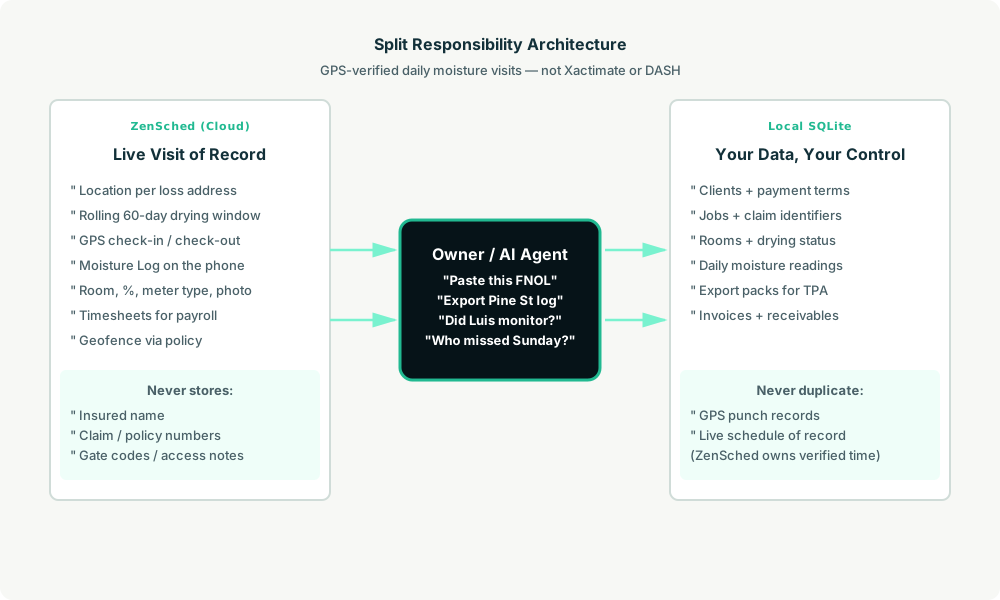
- ZenSched: Live loss-site pin, GPS-verified check-in and check-out (geofence enforced via policy, not per location), technician app + push, one Moisture Log per room visit (room, moisture %, meter type, meter photo, notes). ZenSched never stores insured names, claim numbers, or policy numbers.
- Local SQLite database: Clients (insurers, TPAs, homeowners), jobs with claim identifiers, rooms, daily visit summaries, moisture readings JSON, invoices, receivables. Links to ZenSched location, event, and shift IDs. After one metered form read, punches and readings are cached locally.
The agent orchestrates both: it reads which jobs are still drying from local views, creates daily monitoring shifts on ZenSched labeled by street address, and writes verified arrival plus room readings back into SQLite for export packs and billing.
Privacy: claim numbers never cross
Everything sensitive lives only in local tables: jobs.insured_name, jobs.claim_no, jobs.policy_no, and jobs.access_notes (gate codes, key boxes). ZenSched receives the street address for the GPS pin and the Moisture Log answers — never a claim number in a location title, never an insured surname in an event name. If you ask the agent to put claim data into ZenSched, it should refuse.
The loss address is geocoded (required for geofencing). Meter and equipment photos live on ZenSched as part of the form — counsel on your privacy position before program work.
Day-to-day workflow
A typical drying week looks like this:
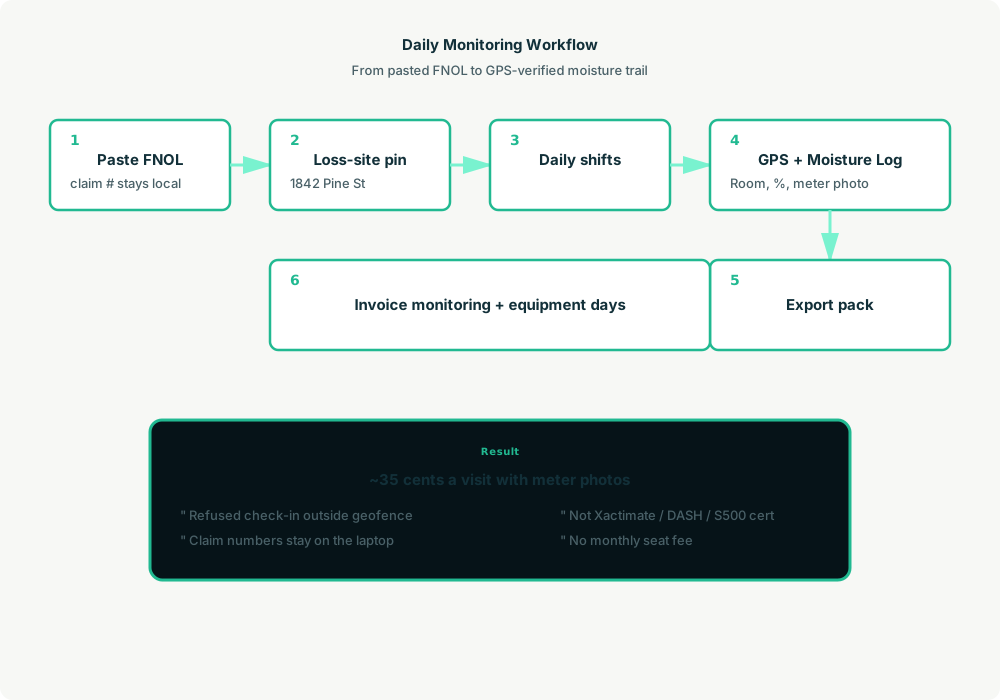
- You to agent (plain English): Paste the FNOL or plumber text — “Burst pipe, 1842 Pine St, kitchen/living/hall, Category 1, daily until dry.”
- Agent writes SQLite: Client, job with claim number and insured local only, rooms, drying status.
- Agent creates the window on ZenSched: One
location_createat the loss address ($0.03 geocode), one rolling event (≤60 days, renewed automatically),form_createonce for the Moisture Log,form_assign,shift_createper daily visit. Luis gets a push. - The tech does the work: Open the ZenSched app, GPS check-in at the pin, submit the Moisture Log once per room (moisture %, meter type, meter photo), check-out.
- Operations: “Export Pine Street moisture log.” “Which jobs missed a Sunday reading?” “Did Luis go to Pine Street yesterday?” Agent answers from SQLite after one metered read.
- Money: Invoice monitoring days and equipment from local job records. Plain-text invoices under client terms.
No dashboards. No asking you to run SQL. Talk to the agent.
Moisture Log on the phone
The technician opens the ZenSched mobile app, checks in at the loss address, then fills the Moisture Log once per room before leaving:
- Room (from the job’s room list)
- Moisture % reading
- Meter type (Tramex, Delmhorst, Protimeter, etc.)
- Meter photo (up to 2 per room)
- Notes
Outcome fields for no-access days and equipment pulls live in the kit’s daily visit workflow — a missing Sunday with no row is what the auditor cuts.
Setup summary
Getting started takes about 15 minutes:
- Install an MCP client: Claude Desktop, Cursor, or Muse Code.
- Connect ZenSched MCP: Add
https://mcp.zensched.com/mcpto your MCP config. - Connect easy-sqlite-mcp: Point
SQLITE_PATHat a localdryout-ops.dbon an encrypted, backed-up folder. - Paste the reference skill: The zensched-dry-out-kit includes
SKILL.md,schema.sql, and a quickstart. Load the schema once (one statement per execute). Meter photo fields set"stamp_photos": trueso exported JPEGs carry readable date, time, and GPS when captured in-app (opt-in per field; gallery picks without EXIF may show date/time only). - Create your ZenSched account: Call
zensched_guide, thenaccount_createfor azsc_key. Invite techs at $0.25 each once. - Fund when needed: Metered GPS, geocode, and form reads draw from prepaid balance. The $5 activation deposit is credited to your account.
Apartment complexes and rural slabs need a wider policy radius (policy_update), not org-wide remote_checkin — that turns GPS proof off for every job. Events cap at 60 days; the kit rolls a new event per job automatically when the drying window expires.
Worker app: Android on Google Play and iOS on the App Store.
For step-by-step details, see the ZenSched quickstart and the dry-out kit.
Metering: what you pay for
ZenSched uses transparent per-action pricing (see pricing):
- GPS check-in/check-out: $0.10 each
- Address geocoding: $0.03 per new loss site (once per job)
- Worker invite: $0.25 per technician (once)
- Form submission reads: $0.05 basic / $0.15 with photos — read once, cache locally
- Processed timesheet export: $0.10 per worker per pay period
Worked example from the vertical pitch: 8 concurrent jobs × 10 daily visits × 20 working days = 1,600 visits/month with meter photos every room → about $560/month, or ~$0.35 per visit (GPS in + GPS out + media read). A quieter one-truck shop at 160 visits/month is ~$56/month. On a $100 monitoring visit that is 0.35% of revenue.
Read the incumbent comparison honestly. At 1,600 photo-logged visits ZenSched is above Encircle Field Doc ($285) — the sell at volume is owned GPS proof and a log that survives after the brand job closes, not a discount. At 160 visits the independent is far cheaper than Encircle. Do not tell an auditor “it’s in ZenSched” instead of your official drying record.
What you get
- Geofenced check-in and check-out at the loss address, with distance from the pin
- A Moisture Log on the phone: room, moisture %, meter type, meter photos (optional burned-in date/time/GPS stamp via
"stamp_photos": true) - “Did Luis actually monitor Pine Street yesterday?” from the agent in plain English
- Export pack for the TPA from local readings + GPS facts
- Receivables and plain-text invoices from the same visits
- About 15 minutes to stand up; the agent is the file clerk
What you don’t get (be blunt)
- No Xactimate line items, moisture maps, or XactAnalysis upload
- No DASH job OS, equipment RFID, or carrier portal submit
- No GPP calculator, dry-standard engine, or IICRC S500 certification
- No BAA for health-record workflows
- Not a replacement for Encircle’s scope-to-estimate bundle
Who this is for (and who it’s not for)
Ideal for:
- Independent 1–8 tech mitigation shops on clipboard + meter photos
- Franchisees on cash jobs, overflow, and 1099 subs the brand app does not cover
- Operators who already talk to Claude, Cursor, or Muse and want daily monitoring to become phone shifts
Not a replacement for:
- Shops whose daily work is the estimate pipe and moisture map in Encircle or DASH
- Program contractors locked to a mandated TPA portal for every assignment
- Operators who need Bluetooth Tramex sync or psychrometric engines
This is agent-first infrastructure. The operator talks to the agent, and the agent talks to ZenSched.
Get started
- Kit: github.com/zenschedmcp/zensched-dry-out-kit
- Docs: zensched.com/docs/quickstart
- MCP:
https://mcp.zensched.com/mcp - Related: Agent-run pest control routes · Agent-run claims inspection · Agent-run property preservation
Ready to build your own workflow?
Clone the reference kit and connect ZenSched to your AI agent.