Reference design
Agent-run mobile money agent audits: a ZenSched reference design
The principal rejects twelve visits because the KYC poster photos look recycled. Thursday and 200 outlets are still open in the wave. ODK recorded a GPS point from a matatu stage. What if an AI assistant could paste a 400-row outlet list, GPS-check the auditor in at the kiosk, capture float plus branding and KYC-poster photos on an Audit Record, and tell you mid-week which wards are still unfilled — without putting agent IDs, till numbers, or owner names into a vendor cloud, and without pretending to be the telco’s AML file?
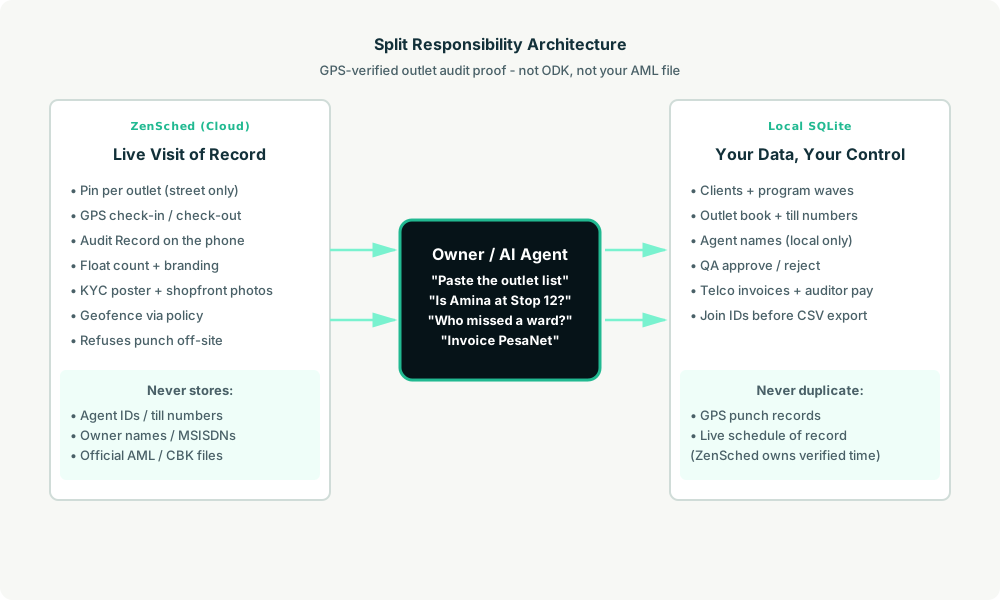
This reference design shows how a small mobile-money agent-network audit shop (an owner, one to three dispatchers, 4–20 field auditors) can deploy an AI agent using ZenSched as the live schedule of record (with an Audit Record form on the phone) and a local SQLite database for clients, programs, outlet books, QA, invoices, and auditor pay.
Honest framing: proof-of-visit, not the AML file
Read this before you clone the kit.
- The Audit Record is not a CBK, Bank of Tanzania, Bangladesh Bank, SBP, or CBN filing. It is not the principal’s AML procedures file, not a cash-in / cash-out ledger, and not a central-bank return. The kit collects float count, branding, and photos of the shopfront and KYC poster — field evidence for a visit the principal bought, not what an examiner expects in the compliance archive.
- It is not ODK, Kobo, SurveyCTO, or TaroWorks. No XLSForm skip logic, no entities case management, no SurveyCTO audio audit, no Salesforce sync. Keep those when the RFP names them.
- Agent IDs, till numbers, owner names, and phones stay only in local SQLite (
agents.agent_name,agents.agent_code). ZenSched locations are labeled by de-identified stop label + street —Stop 12 - Ngong Rd— not by till number or agent name. - Photos and float answers go to ZenSched (US-hosted). Shopfront and KYC-poster images cross borders; put that in the principal SOW. Do not photograph customer logbooks or ID cards.
- Branding and KYC photo fields can carry a burned-in stamp when the form sets
"stamp_photos": true(gallery picks without EXIF may show date/time only). - There is no signature field on purpose. On ZenSched a signature replaces Submit — submitting the form must not look like anyone signed a legal attestation.
- Android on Google Play; iOS on App Store (TestFlight). Auditors in KE/TZ/BD/PK/NG skew Android.
The kit’s SKILL.md makes that split a hard rule the AI will refuse to break.
The problem: ghost visits and recycled posters
Small field agencies already have a stack: ODK Collect + Central or SurveyCTO if the donor named a survey host; TaroWorks if Salesforce is already the ANM stack; otherwise Google Forms, WhatsApp photo dumps, and a spreadsheet of till numbers. ODK records GPS on the form; it does not refuse a punch from the next stage. Mock locations are a known enumerator sport.
The weekly loop is the same whether you audit for a telco wave or a super-agent’s own book:
- Was the auditor at till-row kiosk 14 on Ngong Road, not at a café photographing last month’s poster?
- Show float, branding, and the KYC poster — blurry or wrong outlet means the visit did not happen.
- Finish the wave before the window closes. Unfilled outlets are refunds.
- Know Thursday that Tuesday was a no-show while there is still time to re-hit the ward.
- Pay auditors and bill the principal from the same accepted-visit list.
Not on that list: becoming the telco’s AML officer, scoring 80-question XLSForms, or a portal for Safaricom HQ.
The solution: split responsibility between ZenSched and local data
- ZenSched: Live pin per outlet, GPS-verified check-in and check-out (geofence enforced via policy, not per location), auditor app + push, one Audit Record form per outlet visit (float count, branding Yes/No/Partial, KYC poster photo, shopfront photo). Indoor markets may need a wider policy or a second brand — never org-wide
remote_checkinfor the whole account. - Local SQLite database: Clients (telcos / MMOs), programs (wave dates, fees, quota), agents (outlet list with till numbers local only), auditors, visits with QA status, invoices, and pay runs. Links to ZenSched location, event, and shift IDs. After one metered form read, punches and summaries are cached locally.
The agent orchestrates both: it parses a pasted outlet list into SQLite, creates shifts on ZenSched labeled by stop code + street, and writes verified arrival plus Audit Record answers back for QA, telco billing, and auditor pay.
Privacy: agent identifiers never cross
Everything sensitive lives only in local tables: agents.agent_name, agents.agent_code, till numbers, MSISDNs, client fees, QA notes, auditor pay handles. ZenSched receives the de-identified stop label + street address for the GPS pin and the Audit Record answers (float, branding, photos) — never an agent ID in a location title, never a till number on the form. If you ask the agent to put identifiers into ZenSched, it should refuse.
Day-to-day workflow
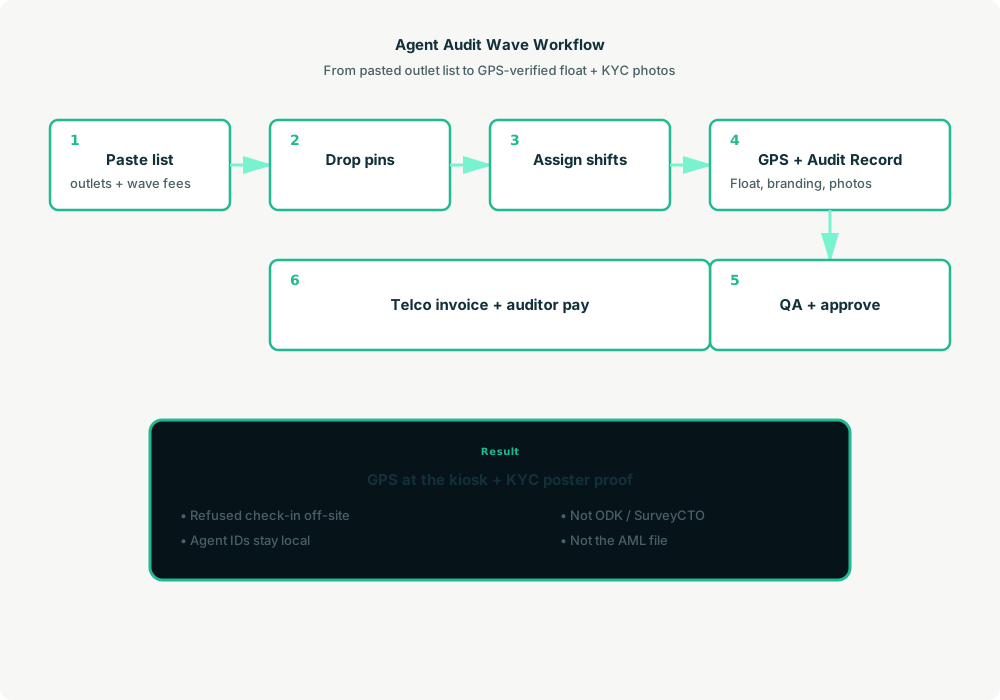
- You to agent (plain English): Paste the principal’s outlet list. “Set up the PesaNet September branding wave.”
- Agent writes SQLite: Upserts client and program, caches outlets (geocode new streets once, label
Stop {id} - {street}), opens visits from the quota. - Agent creates the wave on ZenSched: One
location_createper new outlet ($0.03 geocode), one event per outlet per wave (≤59 days),form_createonce for the Audit Record,form_assignper event. “Give Amina the Ngong Road outlets Tuesday 8:00–12:00” is fourshift_createcalls. She gets a push. - The auditor does the work: Open the ZenSched app, GPS check-in at the kiosk, count visible float, photograph KYC poster and shopfront, mark branding, check out.
- Pull results: “Which outlets are still unfilled?” Agent matches punches (free) and form reads (metered once), flags late / short / no-punch visits, and asks you to approve or reject.
- Money: Join agent IDs from SQLite locally, then export CSV for the principal. Invoice the telco and run auditor pay from approved visits.
No dashboards. No asking you to run SQL. Talk to the agent.
Audit Record on the phone
The auditor opens the ZenSched mobile app, checks in at the outlet, then fills the Audit Record before leaving:
- Float count (visible cash on the till)
- Branding OK (Yes / No / Partial)
- KYC poster (photo, up to 2)
- Shopfront (photo)
No agent ID, till number, or signature on the form. A separate official KYC file does not exist in ZenSched.
Setup summary
Getting started takes about 15 minutes:
- Install an MCP client: Claude Desktop, Cursor, or Muse Code.
- Connect ZenSched MCP: Add
https://mcp.zensched.com/mcpto your MCP config. - Connect easy-sqlite-mcp: Point
SQLITE_PATHat a localagent-audit.dbon an encrypted, backed-up folder. - Paste the reference skill: The zensched-agent-audit-kit includes
SKILL.md,schema.sql, and a quickstart. Load the schema once (one statement per execute). Branding and KYC photo fields set"stamp_photos": true. - Create your ZenSched account: Call
zensched_guide, thenaccount_createfor azsc_key. Invite auditors at $0.25 each once. - Fund when needed: Metered GPS, geocode, and form reads draw from prepaid balance. The $5 activation deposit is credited to your account. Balance is USD on Stripe.
Dense market stalls and indoor arcades need a wider policy radius (policy_update) or a second brand — not org-wide remote_checkin. Events cap at 60 days; the kit rolls a new event per outlet per wave automatically.
Worker app: Android on Google Play and iOS on the App Store.
For step-by-step details, see the ZenSched quickstart and the agent-audit kit.
Metering: what you pay for
ZenSched uses transparent per-action pricing (see pricing):
- GPS check-in/check-out: $0.10 each (about $0.20 per visit)
- Address geocoding: $0.03 per new outlet (once)
- Worker invite: $0.25 per auditor (once)
- Form submission reads: $0.05 basic / $0.15 with photos — read once, cache locally
- Processed timesheet export: $0.10 per worker per pay period (optional)
Worked example from the vertical pitch: 4 auditors × 8 outlet visits/day × 22 days ≈ 704 visits/month with photos on every stop.
| Pattern | Approx. monthly | Per visit |
|---|---|---|
| GPS + Audit Record with photos (kit default) | about $248 | about $0.35 |
| GPS-only proof per visit | about $141 | about $0.20 |
Read the incumbent comparison honestly. At 704 photo-logged visits, ZenSched (about $248/month) loses a pure-price fight to Kobo (free) and self-hosted ODK (about $10–40/month). It is at or under SurveyCTO’s published entry (about $225–250/month) and above ODK Cloud Standard ($199/month). ODK and SurveyCTO include skip logic, entities, and (SurveyCTO) audio audit ZenSched does not. Do not tell a bank examiner “it’s in ZenSched” instead of the principal’s AML file. The case at parity with ODK Cloud is enforced GPS plus AI dispatch, not a discount.
What you get
- Geofenced check-in at the outlet (refuses punch from the next stage)
- Audit Record: float, branding, KYC poster + shopfront photos
- Local outlet book with till numbers and agent names
- QA flags for late, short, or missing punches
- AI dispatch from plain English
- About 15 minutes to stand up
What you don’t get
- No official CBK / BOT / Bangladesh Bank / SBP / CBN filing
- No XLSForm / SurveyCTO audio audit
- No TaroWorks / Salesforce sync
- No principal portal or shopper marketplace
- Not a replacement for ODK when the instrument is an 80-question impact evaluation
Who this is for
Ideal for: 4–20 auditor subcontractors and super-agents visiting their own M-Pesa / bKash / JazzCash / OPay book, owners who want enforced GPS plus two photos and will type to Claude on a laptop, Android-heavy KE/TZ/BD/PK/NG field teams.
Not for: Exclusive national ANMs on Salesforce/TaroWorks, principals who already mandate their own app, IPA-grade mystery shops that need SurveyCTO QC, or shops that cannot fund USD Stripe activation.
Get started
- Kit: github.com/zenschedmcp/zensched-agent-audit-kit
- Docs: zensched.com/docs/quickstart
- MCP:
https://mcp.zensched.com/mcp - Related: Agent-run mystery shopping · Agent-run retail merchandising audits · Agent-run drinking-water delivery routes
Ready to build your own workflow?
Clone the reference kit and connect ZenSched to your AI agent.