Reference design
Agent-run crop scouting: a ZenSched reference design
The grower texts a leaf photo at noon. Your scout was supposed to walk Hansen 80 North Tuesday. The notebook says “looked fine.” What if an AI assistant could schedule weekly field walks, GPS-check the scout in at the west gate, capture growth stage plus aphid counts and canopy photos on a Scout Record, and tell you mid-week who missed a weekly — without putting grower names, gate codes, or CCA license numbers into a vendor cloud, and without pretending to be a spray prescription or a Brazilian receituário?
This reference design shows how a small crop-scout or independent-agronomy shop (an owner-CCA, one to five seasonal scouts) can deploy an AI agent using ZenSched as the live schedule of record (with a Scout Record form on the phone) and a local SQLite database for growers, fields, cadence, visit summaries, scout-log extracts, and invoices.
Honest framing: proof-of-visit, not the prescription
Read this before you clone the kit.
- The Scout Record is not a CCA / PCA written recommendation, not a receituário, and not an official agronomic prescription. It is your copy of what the scout typed on the phone (growth stage, pest count, pest type, canopy photos). It is not a threshold decision, not a spray order, and not a Brazilian receituário agronômico (Lei 14.785/2023 / Confea Resolução 1.149/2025) the grower can apply from.
- It is not a pesticide-use log and not a NAPIS filing. Counts on the Scout Record are observations, not products applied and not a regulatory pest-survey submission.
- It is not NDVI, yield, or satellite. No imagery pipeline, no stand-count AI, no variable-rate script.
- Grower names, farm names, gate codes, muddy-approach notes, and CCA / PCA license numbers stay only in local SQLite. ZenSched locations are labeled by field code + road —
North 80 - County road 15— never the grower or farm name. - Canopy photos go to ZenSched (US-hosted). Put that in the grower agreement if cross-border storage matters.
- There is no signature field on purpose. On ZenSched a signature replaces Submit — submitting the form must not look like anyone signed a legal attestation.
- Android on Google Play; iOS on App Store (TestFlight). US and AU field teams skew mixed; Brazil and India skew Android.
The kit’s SKILL.md makes that split a hard rule the AI will refuse to break.
The problem: missed weeklies and notebook counts
Small scout shops already have a stack: FarmQA or Agworld if they sell branded PDFs and maps; otherwise a Rite-in-the-Rain notebook, a pin in Google Maps, WhatsApp photos to the grower, and a season spreadsheet. FarmQA geotags a photo; it does not refuse a punch from the county road a mile south.
The weekly loop is the same whether you walk 8,000 acres in Iowa or a consultoria book in Mato Grosso:
- Was the scout at Hansen 80 North Tuesday, not at the café?
- What stage is the crop, what did you count, and can I show a photo?
- Bill the grower per field visit, not a vague “July consulting.”
- Know Thursday that Tuesday’s weekly was a no-show while there is still time to re-walk.
- Pay seasonal scouts from punches, not from reconstructing the notebook on Friday.
Not on that list: NDVI layers, variable-rate prescriptions, or replacing FarmQA’s grower PDF when that is already the system of record.
The solution: split responsibility between ZenSched and local data
- ZenSched: Live pin per field at the GPS corner, GPS-verified check-in and check-out (geofence enforced via policy, not per location), scout app + push, one Scout Record form per walk (growth stage, pest count, pest type, up to 2 canopy photos). Large fields may need a wider policy radius — never org-wide
remote_checkinfor the whole account. - Local SQLite database: Growers, fields (crop, acres, cadence, per-visit rate), access notes, scout license numbers, completed visits with scout-log extracts, and invoices. Links to ZenSched location, event, and shift IDs. After one metered form read, punches and summaries are cached locally.
The agent orchestrates both: it reads which fields are due from SQLite, creates shifts on ZenSched labeled by field code + road, and writes verified arrival plus Scout Record answers back for grower notes and invoicing.
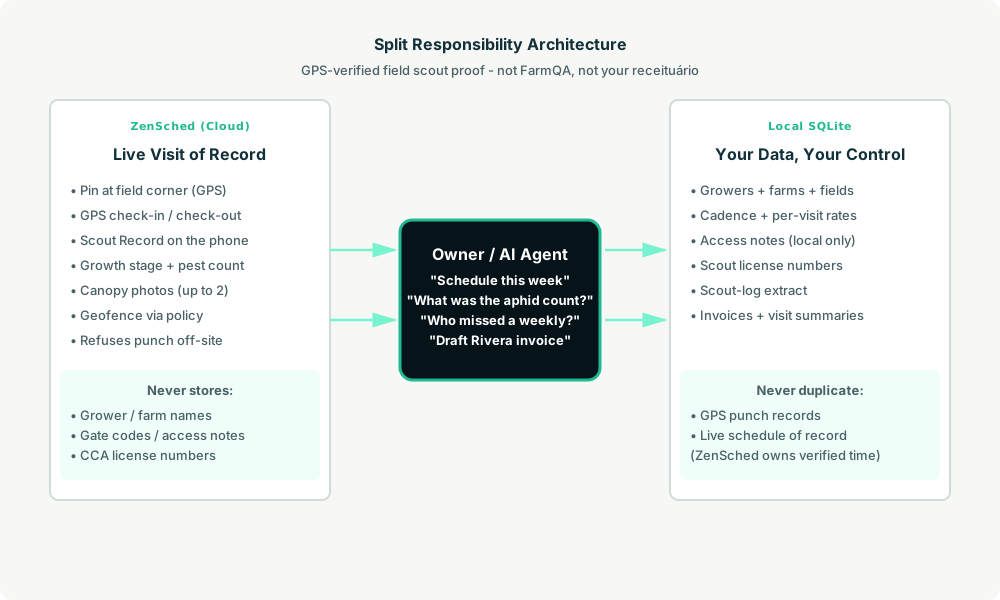
Privacy: grower and gate data never cross
Everything sensitive lives only in local tables: grower contact, farm names, gate codes, muddy-approach notes, CCA / PCA license numbers, per-field rates, and invoice history. ZenSched receives the de-identified field label + GPS corner and the Scout Record answers (stage, counts, photos) — never a grower name in a location title, never a gate code on the form. If you ask the agent to put grower names into ZenSched, it should refuse.
Day-to-day workflow
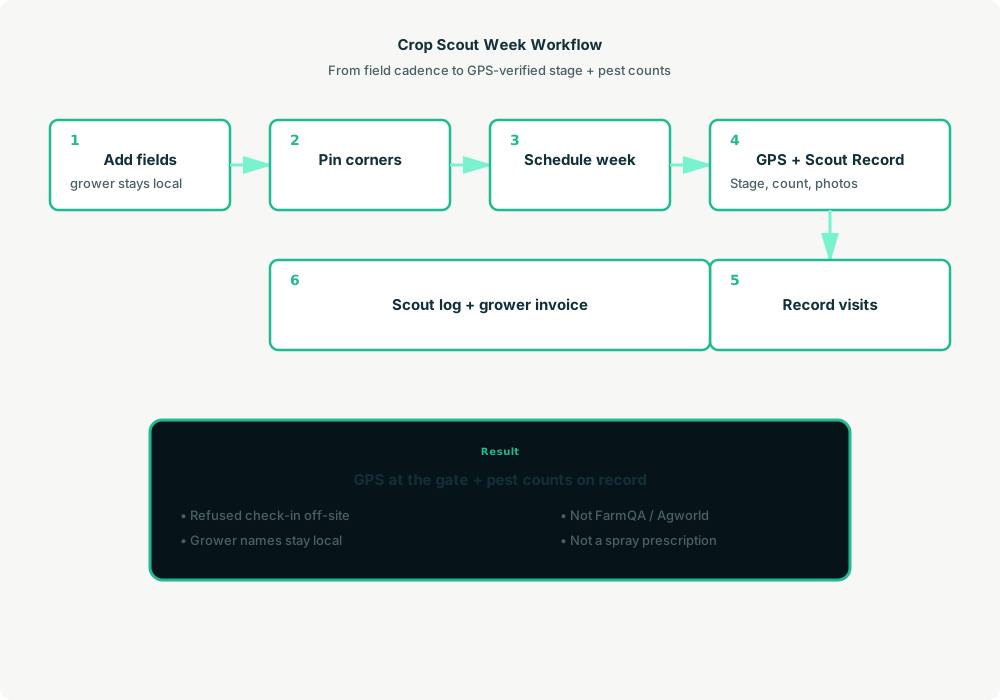
- You to agent (plain English): “Add Rivera Farms, North 80 corn, weekly scout $125, GPS corner 42.0308, -93.6319. South approach, muddy after rain.”
- Agent writes SQLite: Upserts grower and field, caches access notes locally, geocodes new corners once (
location_createwith lat/lng only — no street address so the pin stays on the corner). - Agent creates the week on ZenSched: One event per field (renewed every 60 days),
form_createonce for the Scout Record,form_assignper event. “Schedule this week for Priya” is eightshift_createcalls. She gets a push. - The scout does the work: Open the ZenSched app, GPS check-in at the field corner, walk the field, fill in the Scout Record with growth stage and canopy photos, check out.
- Pull results: “Record this week’s visits.” Agent matches punches (free) and form reads (metered once), saves summaries locally, advances each field’s next date.
- Money: “Scout log for last week” and “draft invoices for everyone with uninvoiced work” run from SQLite. Plain-text invoices you paste into email — no PDF engine in the kit.
No dashboards. No asking you to run SQL. Talk to the agent.
Scout Record on the phone
The scout opens the ZenSched mobile app, checks in at the field corner, then fills the Scout Record before leaving:
- Growth stage (V1 through R8 / equivalent)
- Pest count (number as typed)
- Pest type (aphids, rust, worms, None, etc.)
- Canopy photos (up to 2)
No grower name, spray recommendation, or signature on the form. Official prescriptions and state chemical logs still happen on your letterhead or in the tool your licence requires.
Setup summary
Getting started takes about 15 minutes:
- Install an MCP client: Claude Desktop, Cursor, or Muse Code.
- Connect ZenSched MCP: Add
https://mcp.zensched.com/mcpto your MCP config. - Connect easy-sqlite-mcp: Point
SQLITE_PATHat a localcrop-scout.dbon an encrypted, backed-up folder. - Paste the reference skill: The zensched-crop-scout-kit includes
SKILL.md,schema.sql, and a quickstart. Load the schema once (one statement per execute). - Create your ZenSched account: Call
zensched_guide, thenaccount_createfor azsc_key. Invite scouts at $0.25 each once. - Fund when needed: Metered GPS, geocode, and form reads draw from prepaid balance. The $5 activation deposit is credited to your account. Balance is USD on Stripe.
Large fields and sloppy rural GPS need a wider policy radius (policy_update, 150–250 m at a gate is typical) — not “set 75 m on that field.” Events cap at 60 days; the kit rolls a new event per field automatically.
Worker app: Android on Google Play and iOS on the App Store.
For step-by-step details, see the ZenSched quickstart and the crop-scout kit.
Metering: what you pay for
ZenSched uses transparent per-action pricing (see pricing):
- GPS check-in/check-out: $0.10 each (about $0.20 per visit)
- Address geocoding: $0.03 per new field corner (once)
- Worker invite: $0.25 per scout (once)
- Form submission reads: $0.05 basic / $0.15 with photos — read once, cache locally
- Processed timesheet export: $0.10 per worker per pay period (optional)
Worked example from the vertical pitch: 1 CCA + 2 seasonal scouts × 8 fields/day × 21 days ≈ 504 field visits/month with photos on every walk.
| Pattern | Approx. monthly | Per visit |
|---|---|---|
| GPS + Scout Record with photos (kit default) | about $176 | about $0.35 |
| GPS-only proof per visit | about $101 | about $0.20 |
Read the incumbent comparison honestly. In a US peak month, ZenSched photo (about $176) is above FarmQA’s amortized $100 for a CCA plus two scouts — the case is enforced GPS plus AI dispatch, not a discount. Over a four-month Corn Belt season, photo ZenSched (about $706) undercuts FarmQA $1,200/year. FarmQA and Agworld still win on maps, offline, and branded PDFs. Glue (Maps + WhatsApp + sheet) is free; we do not pretend otherwise.
What you get
- Geofenced check-in at the field corner (refuses punch from the county road)
- Scout Record: growth stage, pest count, pest type, canopy photos
- Local grower book with cadence and per-field rates
- Scout-log extract for grower notes
- AI dispatch from plain English
- About 15 minutes to stand up
- Near-zero meters in the off-season
What you don’t get
- No official receituário / ART / FIFRA / APVMA use log
- No NDVI, yield model, or field polygon / shapefile
- No branded multi-page grower PDF (kit drafts plain-text invoices)
- No grower portal or variable-rate prescription
- Not a replacement for FarmQA when that is already the grower-report system of record
Who this is for
Ideal for: Owner-CCAs and 2–5 person scout shops on a fee book, owners who want enforced GPS plus pest counts and will type to Claude on a laptop, shops billing per field visit not per seat.
Not for: Granular / Agrian / retailer portal roll-ups, shops that live in FarmQA maps and PDFs, consultorias that need a receituário engine, or owners who cannot fund USD Stripe activation.
Get started
- Kit: github.com/zenschedmcp/zensched-crop-scout-kit
- Docs: zensched.com/docs/quickstart
- MCP:
https://mcp.zensched.com/mcp - Related: Agent-run pest control routes · Agent-run retail merchandising audits · Agent-run drinking-water delivery routes
Ready to build your own workflow?
Clone the reference kit and connect ZenSched to your AI agent.