Reference design
Agent-run snow & ice routes: a ZenSched reference design
The property manager calls at 7:05 a.m. “Was 2400 Hennepin cleared before 7?” Derek texted “done.” The truck GPS breadcrumb shows the plow was near the lot — but not the sidewalk, not the salt, not a photo of bare pavement at 5:47. RealGreen is $199 whether the north entrance got hit or not. What if an AI assistant could open tonight’s storm from a pasted site list, put a GPS check-in on the crew’s phone at each lot, capture surface, condition, salt, and after-photos on a Clear Proof form, and answer “who missed the 7 a.m. SLA” — without putting gate codes, contract rates, or HOA contact detail into a vendor cloud, and without pretending to be RealGreen, Boss LM, GPS Insight, or a legal slip-and-fall defense?
This reference design shows how a 1–8 truck snow and ice contractor can deploy an AI agent using ZenSched as the live schedule of record (with a Clear Proof form on the phone) and a local SQLite database for contracts, sites, storms, clear summaries, and invoices.
Honest framing: evidence, not insurance — and not truck telematics
Read this before you clone the kit.
- Clear Proof is evidence, not insurance and not a legal opinion. Counsel and the carrier decide what a timestamped, geofenced log plus photos is worth in a slip-and-fall. ZenSched does not certify SIMA documentation standards or assert a surface was legally safe.
- It is not RealGreen, Boss LM, or GPS Insight / Samsara. No seasonal contract billing engine, no route optimizer, no plow-up/down sensors, no vehicle breadcrumb from a truck puck. Keep the office suite and telematics where they are — ZenSched is the site packet the truck GPS does not capture (sidewalk, salt, 5:47 a.m. photo).
- Gate codes, entrance notes, and contract contact names stay only in local SQLite (
sites.access_notes,contracts.contact_name). ZenSched locations are labeled by street —2400 Hennepin Ave— not by HOA name or billing detail. - After-photos can carry a burned-in stamp (opt-in). Set
"stamp_photos": trueon the photo field inform_create/form_update. The kit enables this on the Clear Proof after-photos field. - There is no signature field on purpose. On ZenSched a signature replaces Submit — submitting the form must not look like signing a legal clearance document.
- Android on Google Play; iOS on the App Store.
- July is $0. Meters follow punches — no monthly seat in the off-season.
The kit’s SKILL.md makes that split a hard rule the AI will refuse to break.
The problem: “before 7 a.m.” and eighteen months later
Small snow shops already have a stack: RealGreen or Boss LM if they bought the green-industry office suite; GPS Insight or Samsara on the plow trucks; otherwise group text “lots done,” a paper storm log, and camera-roll JPEGs. When a property manager asks for proof — or a slip-and-fall lands eighteen months later — the file is a reconstructed log.
The storm loop is the same whether you plow forty residential driveways or dispatch four commercial crews:
- Was 2400 Hennepin cleared before the SLA (usually 7 a.m.)?
- What was done — plow, salt, shovel — and can you show after-photos of the pavement?
- Did the sidewalk sub actually go, or just the truck?
- Invoice the push (or defend the seasonal flat when someone falls in May).
- Dispatch forty sites at 3 a.m. in plain English.
Not on that list: winning a DOT road contract, RWIS weather feeds, or a property-manager portal.
The solution: split responsibility between ZenSched and local data
This architecture divides work cleanly:
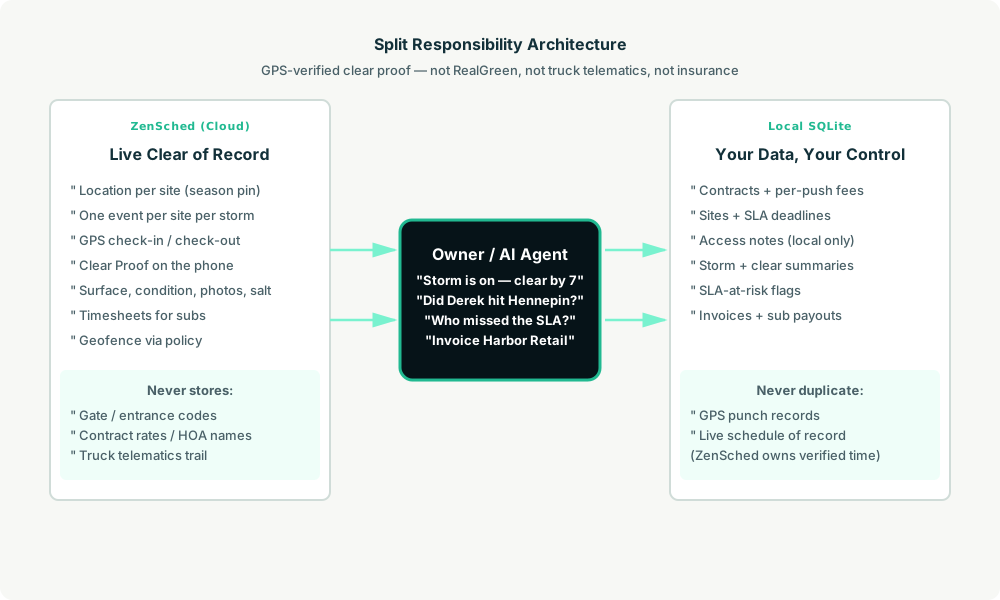
- ZenSched: Live site pin (one per contracted address, geocoded once per season), GPS-verified check-in and check-out (geofence enforced via policy, not per location), crew app + push, one Clear Proof form per clear (surface, condition, after-photos, salt applied). ZenSched never stores gate codes or per-push rates.
- Local SQLite database: Contracts, sites, storms, clears (one shift each), SLA deadlines, completed clear summaries, receivables, sub payouts. Links to ZenSched location, event, and shift IDs. After one metered form read, punches and clear summaries are cached locally.
The agent orchestrates both: it opens a storm from your site book, creates shifts on ZenSched labeled by address, and writes verified arrival plus Clear Proof answers back into SQLite for invoicing and the claim file.
Privacy: gate codes never cross
Everything sensitive lives only in local tables: contracts.contact_name, contracts.contact_phone, sites.access_notes (north entrance, hydrant, gate code). ZenSched receives the street address for the GPS pin and the Clear Proof answers — never a gate code in a location title, never an HOA name in an event name. If you ask the agent to put access notes into ZenSched, it should refuse.
The site address is geocoded (required for geofencing). After-photos live on ZenSched as part of the form.
Day-to-day workflow
A typical storm night looks like this:
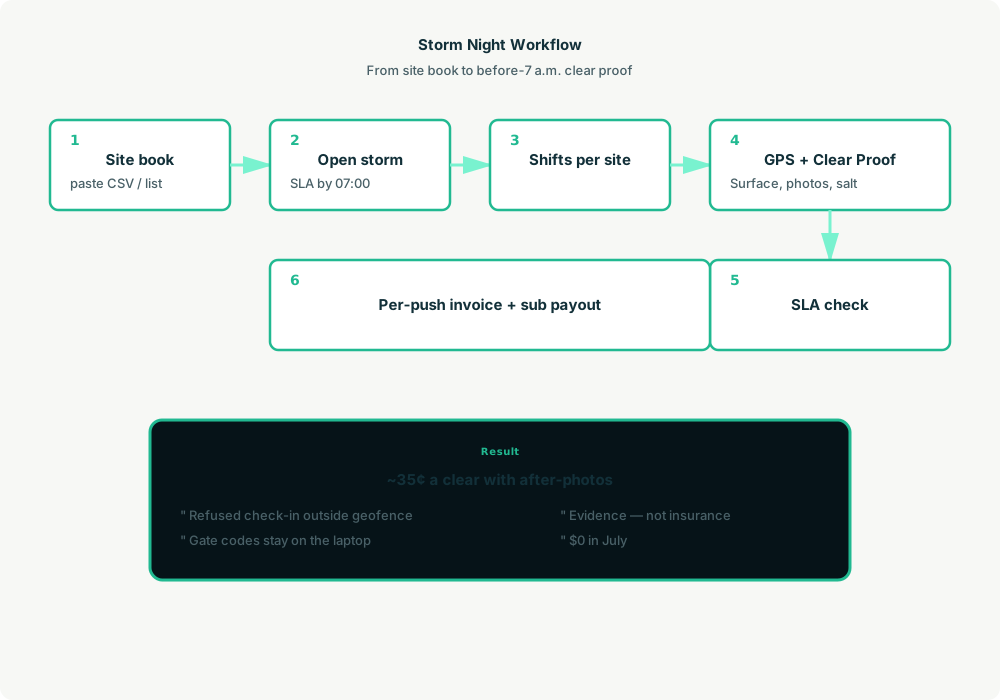
- You to agent (plain English): “Storm is on — 1 inch by midnight, clear every site by 07:00. Put Derek on Hennepin.”
- Agent reads SQLite: Active contracts and sites; opens a
stormsrow for tonight. - Agent creates shifts on ZenSched: One
location_createper new site ($0.03 geocode; returning sites reuse the pin), one event per site per storm day,form_createonce for the Clear Proof form,form_assign,shift_createper clear. Crew gets a push. - The operator does the work: Open the ZenSched app, GPS check-in at the pin, fill the Clear Proof (surface, condition, after-photos, salt), check-out.
- Operations: “Did Derek hit 2400 Hennepin before 7?” “Who missed the SLA?” Agent answers from
shift_statusandsla_at_riskafter one metered read. - Money: Per-push invoices and sub payouts from local clear summaries. Plain-text invoices under contract terms.
No dashboards. No asking you to run SQL. Talk to the agent.
Clear Proof form on the phone
The operator opens the ZenSched mobile app, checks in at the lot or driveway, then fills the Clear Proof before leaving:
- Surface (driveway / lot / walk / all)
- Condition (bare / packed / icy)
- After photos (up to 4, with optional
"stamp_photos": true) - Salt applied (yes / no / pretreated)
- Notes (no customer names or gate codes — those stay local)
A second push the same storm opens as a new storm row — not a duplicate clear on the first storm.
Setup summary
Getting started takes about 15 minutes:
- Install an MCP client: Claude Desktop, Cursor, or Muse Code.
- Connect ZenSched MCP: Add
https://mcp.zensched.com/mcpto your MCP config. - Connect easy-sqlite-mcp: Point
SQLITE_PATHat a localsnow-ice-ops.dbon an encrypted, backed-up folder. - Paste the reference skill: The zensched-snow-ice-kit includes
SKILL.md,schema.sql, and a quickstart. Load the schema once (one statement per execute). After-photo fields set"stamp_photos": trueso exported JPEGs carry readable date, time, and GPS when captured in-app. - Create your ZenSched account: Call
zensched_guide, thenaccount_createfor azsc_key. Invite crew at $0.25 each once. - Fund when needed: Metered GPS, geocode, and form reads draw from prepaid balance. The $5 activation deposit is credited to your account.
Large commercial lots and campus properties need a wider policy radius (policy_update) or a second brand for commercial vs driveway accounts — not org-wide remote_checkin, which turns GPS proof off for every site. Events cap at 60 days; this kit opens one event per site per storm day. Driveway vs commercial-lot = two brands, two policies when radius needs differ.
Worker app: Android on Google Play and iOS on the App Store.
For step-by-step details, see the ZenSched quickstart and the snow-ice kit.
Metering: what you pay for
ZenSched uses transparent per-action pricing (see pricing):
- GPS check-in/check-out: $0.10 each
- Address geocoding: $0.03 per new site (once per season)
- Worker invite: $0.25 per operator (once)
- Form submission reads: $0.05 basic / $0.15 with photos — read once, cache locally
- Processed timesheet export: $0.10 per worker per pay period
Worked example from the vertical pitch: one storm, 4 crews × 40 sites = 160 clears with after-photos every stop → $56/storm (~$0.35/clear). A 10-storm season on the same book → ~$560. A busy January (4 storms) → ~$224. April–October: $0.
Read the incumbent comparison honestly. On a busy four-storm month, photo ZenSched (~$224) is above RealGreen’s ~$199 quote and above GPS Insight’s ~$100 mid plan for four trucks. The sell is site-level punch + photos + sidewalk subs + $0 in July + English dispatch — not a price fight against year-round CRM or truck telematics. GPS Insight still wins the insurer’s vehicle breadcrumb; RealGreen still wins seasonal AR and production entry. Do not tell counsel “it’s in ZenSched” instead of your claim file.
What you get
- Geofenced check-in and check-out at the lot, with distance from the pin
- A Clear Proof form on the phone: surface, condition, after-photos, salt (optional burned-in stamp)
- “Did Derek hit 2400 Hennepin before 7?” from the agent in plain English
- SLA-at-risk view for sites not checked in before the deadline
- Per-push invoices and sub payouts from local clear summaries
- About 15 minutes to stand up; the agent is the storm desk
What you don’t get (be blunt)
- No truck telematics, plow-up/down sensors, or spreader telemetry
- No RWIS / weather feed or route optimizer
- No seasonal contract billing engine or property-manager portal
- Not insurance, not a lawyer, not a guaranteed slip-and-fall defense
- Not a replacement for RealGreen or Boss LM if that is your daily office
- Not a replacement for GPS Insight if the insurer requires vehicle breadcrumbs — use both
Who this is for (and who it’s not for)
Ideal for:
- 1–8 truck shops on group text + spreadsheet when the radar lights up
- Lawn/landscape shops adding a winter book without paying RealGreen all summer
- Operators who need a before-7 a.m. packet for the property manager and the claim file
- Sidewalk subs who were never on the truck puck
Not a replacement for:
- Shops whose daily work is estimating, seasonal AR, and production entry in Boss LM or RealGreen
- Fleets locked to GPS Insight / Samsara as telematics system of record — keep the puck; add ZenSched for the site packet
- Municipal road primes running AVL on state contracts
This is agent-first infrastructure. The operator talks to the agent, and the agent talks to ZenSched.
Get started
- Kit: github.com/zenschedmcp/zensched-snow-ice-kit
- Docs: zensched.com/docs/quickstart
- MCP:
https://mcp.zensched.com/mcp - Related: Agent-run lawn care routes · Agent-run portable sanitation routes · Agent-run property preservation inspections
Ready to build your own workflow?
Clone the reference kit and connect ZenSched to your AI agent.