Reference design
Agent-run mobile detailing: a ZenSched reference design
The client texts at 9:40. “Nobody came.” Sam is on the next driveway. The camera roll has before-and-afters from three cars, and Square still does not know which stock numbers on the Honda row got done. What if an AI assistant could put Sam on Hale’s Model Y every other Tuesday, GPS-check the van in at the driveway, capture package, add-ons, and before/after photos on a Job Report, and answer “how many of the Honda row are done” — without putting gate codes or package prices into a vendor cloud, and without pretending to be Jobber, Square, or a certified paint-thickness report?
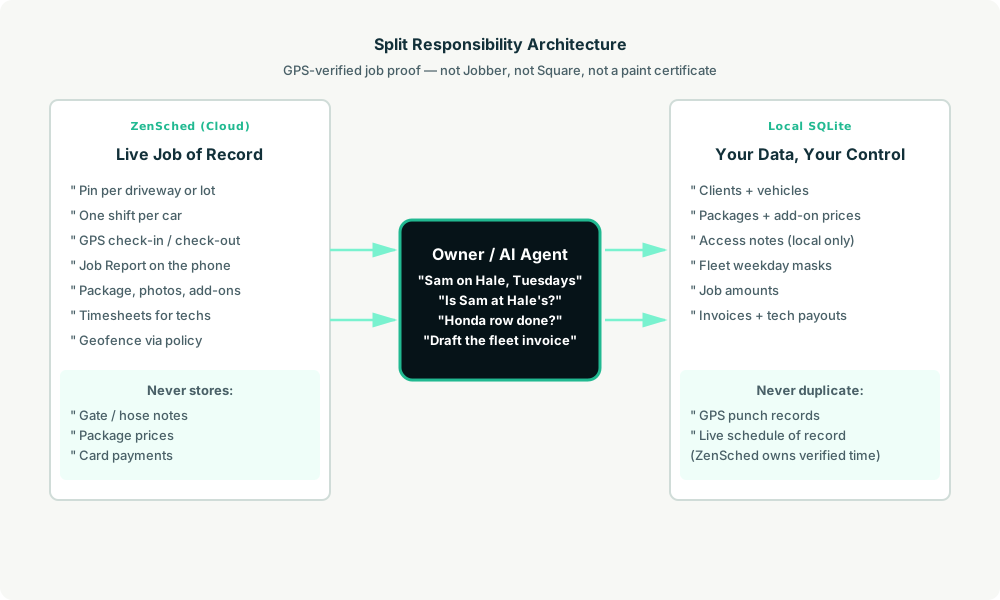
This reference design shows how a 1–5 van mobile detailing shop can deploy an AI agent using ZenSched as the live schedule of record (with a Job Report on the phone) and a local SQLite database for clients, vehicles, packages, fleet schedules, and invoices.
Honest framing: proof of the car, not a booking till
Read this before you clone the kit.
- The Job Report is an ops record, not a customer sign-off and not a paint certificate.
paint_meteris a number the detailer typed from their own gauge. ZenSched does not calibrate it, and this kit does not produce a coating warranty or a condition certificate. - It is not Jobber, Square, DetailPilot, or DetailerDrive. No online booking page, no deposits, no tap-to-pay, no “on my way” map, no ceramic lead engine. Keep Square as the till if that is how you get paid.
- Gate codes, hose notes, and client prices stay only in local SQLite (
sites.access_notes). ZenSched locations are a site label and street — not the gate code, not the package price. - There is no signature field on purpose. On ZenSched a signature replaces Submit — submitting the form must not look like the client signed the job.
- Android on Google Play; iOS on the App Store.
The kit’s SKILL.md makes that split a hard rule the AI will refuse to break.
The problem: “nobody came” and a camera roll
Solo vans and 2–5 tech shops already have a stack: Instagram DMs, Google Calendar, Square or Venmo, before/afters in WhatsApp. When a driveway client or a fleet manager asks for proof, the evidence is a text thread.
The week looks the same whether you detail the cars or dispatch two techs:
- Was Sam at Hale’s driveway, and which cars on the lot got done?
- What package, what add-ons, and can you show before and after?
- Recurring Tuesday versus a one-off fleet row — same form, one pin for the lot.
- Paying techs per car without reconstructing Friday from memory.
- Coverage when a van is down mid-week.
Not on that list: Instagram growth, buying ceramic leads, or a public booking widget.
The solution: split responsibility between ZenSched and local data
This architecture divides work cleanly:
- ZenSched: Live pin per driveway or fleet lot, GPS-verified check-in and check-out (geofence enforced via policy, not per site), detailer app + push, one Job Report per car (package, optional paint-meter reading, before/after photos, add-ons, on-site upsell). A fleet lot is one location and one rolling event; each car is a shift.
- Local SQLite database: Clients, vehicles, packages, recurring fleet masks, job amounts, invoices, contractor payouts. Links to ZenSched location, event, and shift IDs. After one metered form read, punches and Job Report summaries are cached locally.
The agent orchestrates both: it expands this week’s due fleet rows, creates shifts on ZenSched, and writes verified arrival plus Job Report answers back into SQLite for the invoice.
Privacy: gate codes never cross
Access notes and parking notes stay in sites.access_notes. ZenSched receives the site label and street address for the pin, plus the Job Report answers — never a gate code in a location title. If you ask the agent to put a code into ZenSched, it should refuse.
Day-to-day workflow
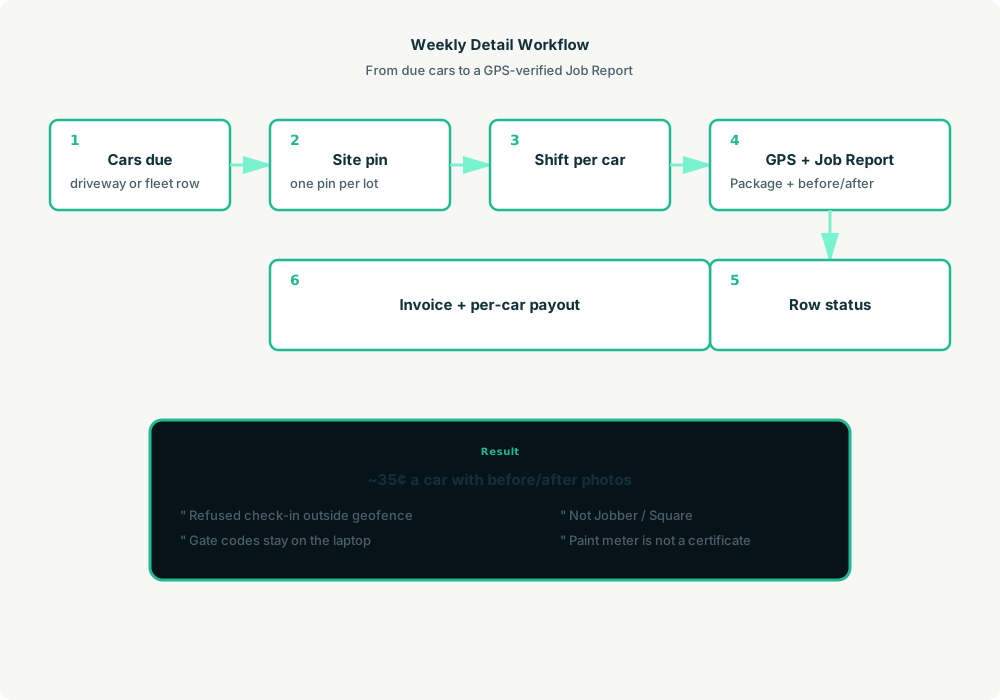
- You to agent: “Put Sam on Hale’s Model Y every other Tuesday 8–10.”
- Agent reads SQLite: Client, vehicle, package, and
fleet_due_this_weekfor lot work. - Agent creates shifts on ZenSched: One
location_createper new driveway or lot ($0.03), a rolling event for fleet sites (≤60 days) or a one-day event for a one-off,form_createonce for the Job Report,form_assign,shift_createper car. Sam gets a push. - The detailer does the work: GPS check-in at the pin, Job Report (package, photos, add-ons), check-out.
- Operations: “Is Sam at Hale’s?” “How many of the Honda row are done?” Agent answers after one metered read.
- Money: Invoices and per-car payouts from local job rows. Square still takes the card.
Job Report on the phone
- Package performed
- Paint-meter reading (optional — a field note, not a certificate)
- Before and after photos
- Add-ons and any on-site upsell
- Notes
After photos are required. A four-before / four-after card still bills once.
Setup summary
About 15 minutes:
- Install an MCP client: Claude Desktop, Cursor, or Muse Code.
- Connect ZenSched MCP at
https://mcp.zensched.com/mcp. - Point easy-sqlite-mcp at a local detailing database on an encrypted, backed-up folder.
- Paste the zensched-detailing-kit skill and load
schema.sqlone statement at a time. zensched_guide, thenaccount_createfor azsc_key. Invite detailers at $0.25 each.- Fund when needed. The $5 activation deposit is credited to the balance.
Apartment garages and villa compounds need a wider policy radius (policy_update), not org-wide remote_checkin. Fleet lots reuse one pin. One-off driveways get a single-day event.
Worker app: Android on Google Play and iOS on the App Store.
See the ZenSched quickstart and the detailing kit.
Metering
See pricing: GPS $0.10 per punch, geocode $0.03 per new site, invite $0.25, form reads $0.05 basic / $0.15 with photos (once ever).
Worked example: 2 techs × 6 cars/day × 21 days = 252 jobs with before/after photos → about $88/month, or ~$0.35 per car. A solo book at ~105 jobs is about $37/month. GPS-only proof is about $0.20 per car.
Read the comparison honestly. At 252 photo-logged jobs ZenSched is above Square Appointments Plus ($49) and under Jobber Connect ($149–$199). It is never cheaper than Square Free. Jobber and Square include quotes, booking, and card payments. The sell is enforced GPS plus a Job Report, not a discount versus the till. Do not call the paint-meter field a certificate.
What you get
- Geofenced check-in at the driveway or fleet lot
- A Job Report: package, photos, add-ons, optional paint-meter note
- “How many of the Honda row are done?” in plain English
- Per-car invoices and contractor payouts from local rows
- About 15 minutes to stand up
What you don’t get
- No booking page, deposits, or tap-to-pay
- No route optimizer or customer portal
- No ceramic lead gen
- No certified paint-thickness report
- Not a replacement for Jobber or Square if quoting and cards are the daily work
Who this is for
Ideal for: solo vans and 2–5 tech shops on DMs and a camera roll, recurring driveway plans, and small fleet or dealership make-ready rows. Operators who already talk to Claude, Cursor, or Muse.
Not for: bay studios whose product is the waiting room, or shops that need Jobber’s client hub as the system of record. Keep Square if it is the till.
Get started
- Kit: github.com/zenschedmcp/zensched-detailing-kit
- Docs: zensched.com/docs/quickstart
- MCP:
https://mcp.zensched.com/mcp - Related: Agent-run lawn routes · Agent-run HOA drives · Agent-run mobile locksmith calls
Ready to build your own workflow?
Clone the reference kit and connect ZenSched to your AI agent.