Reference design
Agent-run HOA compliance drives: a ZenSched reference design
The board packet is due Monday. A homeowner says nobody drove Oak Lane in September, and the photo looks like last year. Maria texted “done.” Smartwebs or AppFolio would have mailed the notice — if you were on those tools. You are on a spreadsheet and a camera roll. What if an AI assistant could turn a pasted lot list into this month’s drive, put a GPS check-in on the inspector’s phone at each lot, capture the finding and photos on a Violation Report, and hand you a board pack the same day — without putting homeowner names, phones, or gate codes into a vendor cloud, and without pretending to write the courtesy letter, open a hearing, or collect a fine?
This reference design shows how a solo or 2–4 person HOA / strata / condo compliance shop can deploy an AI agent using ZenSched as the live schedule of record (with a Violation Report on the phone) and a local SQLite database for associations, lots, waves, board-pack extracts, and invoices.
Honest framing: a drive log, not a notice engine
Read this before you clone the kit.
- The Violation Report is not a courtesy letter, a hearing packet, or a fine. Davis-Stirling, Florida Ch. 720, provincial condo Acts, and NSW strata by-laws live in the CAM’s notice tool or the attorney’s letter. This kit proves the inspector was at the lot and what they photographed. It does not mail anything.
- It is not Smartwebs, TownSq, AppFolio, Vantaca, or CINC. No resident portal, no ARC workflow, no dues ledger, no auto-notices. Keep the management system of record where it is.
- Homeowner names, phones, and gate / lockbox codes stay only in local SQLite (
lots.homeowner_name,lots.access_notes). ZenSched locations are labeled by lot and street —Lot 14 - Oak Lane— never the homeowner. - Photos in this kit do not carry a burned-in GPS stamp. The punch (time and distance from the pin) is the location proof. The board pack says that in plain language.
- There is no signature field on purpose. On ZenSched a signature replaces Submit — submitting the form must not look like signing a violation notice.
- Android on Google Play; iOS on the App Store.
- Not Strata Hub / SBBIS, and not a Florida milestone / SIRS inspection. Those are different licenses and different forms.
The kit’s SKILL.md makes that split a hard rule the AI will refuse to break.
The problem: “nobody came” and a camera roll
Independents and self-managed boards already have a stack: a lot spreadsheet, a golf-cart camera roll, WhatsApp to the manager, a Word board packet. CAMs on Smartwebs or AppFolio already have the notice engine. When a homeowner challenges the drive at a hearing, the evidence is IMG_4821 and a text.
The monthly loop is the same whether you drive one community or dispatch three inspectors:
- Did Maria actually roll Desert Ridge on Thursday?
- Which lots have a finding, and can you show the photos from that day?
- Which lots were clean, unable to view, or still unrolled?
- Hand the board a pack the same day — lot, punch, finding, photo URLs.
- Invoice the association or the CAM, not the homeowner.
Not on that list: generating statutory notices, collecting fines, or replacing the CAM’s accounting stack.
The solution: split responsibility between ZenSched and local data
This architecture divides work cleanly:
- ZenSched: Live pin per lot, GPS-verified check-in and check-out (geofence enforced via policy, not per lot), inspector app + push, one Violation Report per lot (violation categories, up to 4 photos, notes). ZenSched never stores homeowner names or gate codes.
- Local SQLite database: Associations, lots, inspection waves (≤59 days), visit summaries, board-pack export flags, invoices, sub payouts. Links to ZenSched location, event, and shift IDs. After one metered form read, punches and findings are cached locally.
The agent orchestrates both: it builds a wave from a pasted roster, creates shifts on ZenSched labeled by lot, and writes verified arrival plus Violation Report answers back into SQLite for the board pack and the invoice.
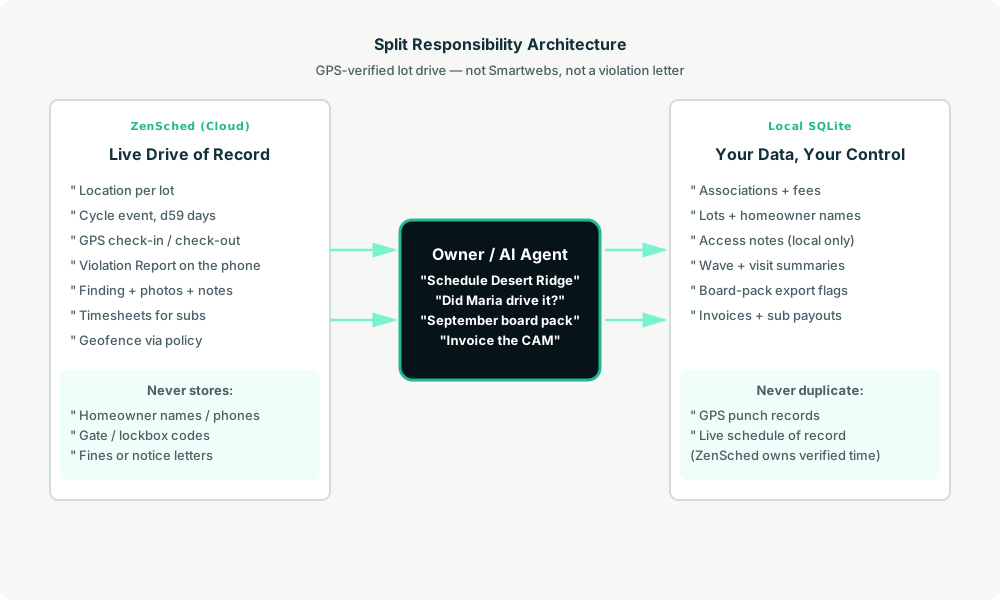
Privacy: homeowner names never cross
Everything sensitive lives only in local tables: lots.homeowner_name, lots.homeowner_phone, lots.access_notes. ZenSched receives the lot label and street address for the GPS pin and the Violation Report answers — never a homeowner surname in a location title, never a gate code in an event name. If you ask the agent to put a name or a code into ZenSched, it should refuse.
The lot address is geocoded (required for geofencing). Photos live on ZenSched as part of the form.
Day-to-day workflow
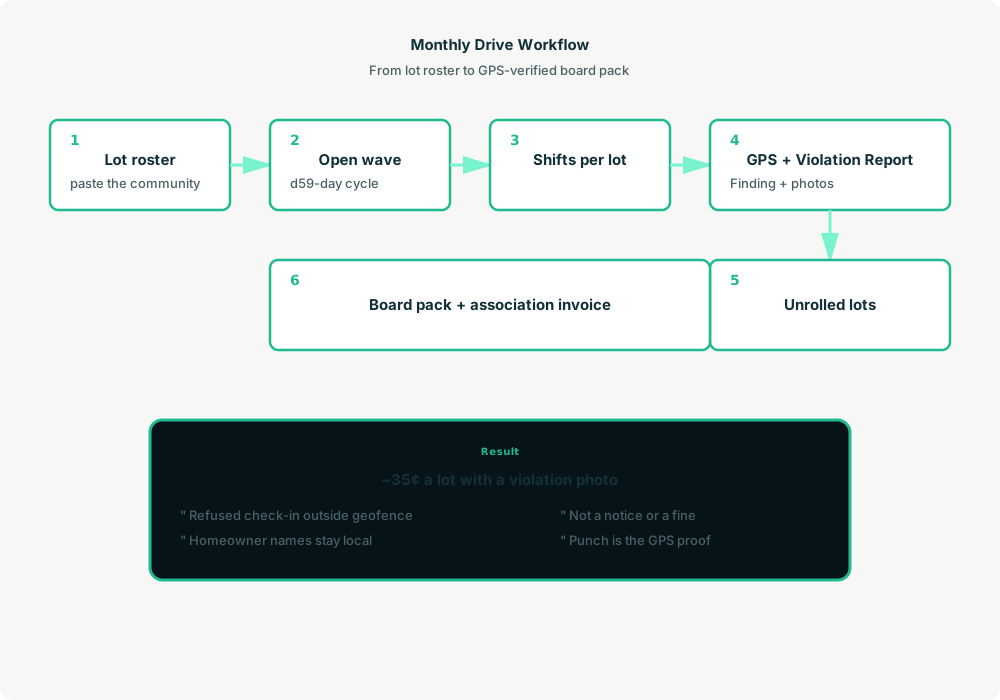
A typical monthly drive looks like this:
- You to agent (plain English): “Schedule September’s drive for Desert Ridge — Maria Thursday morning.”
- Agent reads SQLite: Association, lots, and the open wave (or creates one from a pasted roster).
- Agent creates shifts on ZenSched: One
location_createper new lot ($0.03 geocode; next month reuses the pin), one event per lot per ≤59-day cycle,form_createonce for the Violation Report,form_assign,shift_createper lot. Maria gets a push. - The inspector does the work: Open the ZenSched app, GPS check-in at the pin, fill the Violation Report (or mark None if the lot is clean), check-out.
- Operations: “Did Maria actually drive Desert Ridge yesterday?” “Which lots are still unrolled?” Agent answers from punches and
visits_flaggedafter one metered read. - Board pack and money: Plain-text pack the owner pastes into email or the CAM portal — lot, in/out, distance, finding, photo URLs. Invoice the association. Not a notice. Not a fine.
No dashboards. No asking you to run SQL. Talk to the agent.
Violation Report on the phone
The inspector opens the ZenSched mobile app, checks in at the lot, then fills the Violation Report before leaving:
- Violations (multi-select: trash, parking, paint, lawn, boat, other, or None)
- Photo evidence (up to 4, shown when the answer is not None)
- Notes (no homeowner name, no gate code)
A clean lot can be a punch plus “None” — that read bills the basic form rate, not the photo rate.
Setup summary
Getting started takes about 15 minutes:
- Install an MCP client: Claude Desktop, Cursor, or Muse Code.
- Connect ZenSched MCP: Add
https://mcp.zensched.com/mcpto your MCP config. - Connect easy-sqlite-mcp: Point
SQLITE_PATHat a localhoa-inspection-ops.dbon an encrypted, backed-up folder. - Paste the reference skill: The zensched-hoa-inspection-kit includes
SKILL.md,schema.sql, and a quickstart. Load the schema once (one statement per execute). - Create your ZenSched account: Call
zensched_guide, thenaccount_createfor azsc_key. Invite inspectors at $0.25 each once. - Fund when needed: Metered GPS, geocode, and form reads draw from prepaid balance. The $5 activation deposit is credited to your account.
Gated communities and large lots need a wider policy radius (policy_update), or a second brand — not org-wide remote_checkin, which turns GPS proof off for every lot. Events cap at 60 days; the kit opens one event per lot per ≤59-day cycle. Two monthly drives inside that window are two shifts on the same event.
Worker app: Android on Google Play and iOS on the App Store.
For step-by-step details, see the ZenSched quickstart and the HOA inspection kit.
Metering: what you pay for
ZenSched uses transparent per-action pricing (see pricing):
- GPS check-in/check-out: $0.10 each
- Address geocoding: $0.03 per new lot (once; next cycle reuses the pin)
- Worker invite: $0.25 per inspector (once)
- Form submission reads: $0.05 basic / $0.15 with photos — read once, cache locally
- Processed timesheet export: $0.10 per worker per pay period
Worked example from the kit: a completed visit is about $0.25 if the lot is clean (GPS in + GPS out + no-photo form read) or about $0.35 if there is a violation with photos. A 200-lot monthly drive photographed on every lot is about $70 after the first month (~$76 the month you geocode). Findings-only photos (GPS on every lot, form photos on ~15% of lots) land closer to $45. Quiet months between drives cost almost nothing.
Read the incumbent comparison honestly. TownSq’s violations add-on is $20/month/community. Smartwebs is quoted per door with a monthly minimum, and it already writes the notice. At 200 photo-logged lots ZenSched is a drive log, not a cheaper Smartwebs. Do not tell a hearing “the notice is in ZenSched.”
What you get
- Geofenced check-in and check-out at the lot, with distance from the pin
- A Violation Report on the phone: categories, photos, notes
- “Did Maria actually drive Desert Ridge yesterday?” from the agent in plain English
- A same-day board pack: lot, punches, finding, photo URLs
- Association invoices and sub payouts from local visit summaries
- About 15 minutes to stand up; the agent is the dispatcher
What you don’t get (be blunt)
- No violation letters, hearings, or fine collection
- No homeowner or board portal
- No ARC workflows, dues, or accounting
- No burned-in GPS stamp on the photo (the punch is the proof)
- No NSW Strata Hub / SBBIS filing
- Not a replacement for Smartwebs, TownSq, or AppFolio if the product you sell is the notice and the ledger
Who this is for (and who it’s not for)
Ideal for:
- Independent compliance inspectors on a spreadsheet and a camera roll
- Small CAM shops who need to know a contractor actually drove the community
- Self-managed boards whose volunteer inspector emails JPEGs
- Operators who already talk to Claude, Cursor, or Muse and want a GPS drive log without another portal seat
Not a replacement for:
- Regionals whose daily work is notices, hearings, and the resident portal in Smartwebs, Vantaca, or AppFolio
- NSW building-bond / SBBIS inspectors
- Florida milestone and SIRS structural inspections
This is agent-first infrastructure. The operator talks to the agent, and the agent talks to ZenSched.
Get started
- Kit: github.com/zenschedmcp/zensched-hoa-inspection-kit
- Docs: zensched.com/docs/quickstart
- MCP:
https://mcp.zensched.com/mcp - Related: Agent-run property preservation inspections · Agent-run snow and ice routes · Agent-run claims inspections
Ready to build your own workflow?
Clone the reference kit and connect ZenSched to your AI agent.