Reference design
Agent-run mobile locksmith calls: a ZenSched reference design
The lockout rings at 9:12 p.m. The customer is in a car park. Luis is eight minutes out. There is no Tuesday-at-9 slot. A text with an address is the whole dispatch system, and a chargeback six weeks later asks whether anyone was actually at 8802 S 7th. What if an AI assistant could book that call now, GPS-check Luis in at the pin, capture job type, whether an ID was checked, and a photo of the work on a Job Record — without storing the licence number, the key bitting, or the customer’s phone in a vendor cloud, and without pretending to be Workiz, Housecall Pro, or a licensed locksmith journal?
This reference design shows how a solo or 2–5 tech mobile locksmith shop can deploy an AI agent using ZenSched as the live schedule of record (with a Job Record on the phone) and a local SQLite database for calls, clients, fees, and payouts.
Honest framing: arrival proof, not a licence file
Read this before you clone the kit.
- The Job Record is not a state locksmith journal and not a work authorization. It records job type, whether an ID was checked (photo ID, registration, landlord, declined, not required), lock type, amount, and photos of the work. It does not satisfy a licence-board recordkeeping statute by itself.
- No customer ID numbers, ID images, or key bittings. Not in SQLite, not on ZenSched. If you ask the agent to “log the licence number,” it should refuse. The paper ticket or the board’s required file stays yours.
- It is not Workiz, Housecall Pro, ServiceTitan, or an answering service. No caller-ID, no card processing, no pricebook, no master-key software. Keep the phone system. This is the proof layer.
- Customer name, phone, and access notes stay only in local SQLite. ZenSched locations are labeled like
Job 0912 – Elmplus the street address — not the customer’s name. - There is no signature field on purpose. On ZenSched a signature replaces Submit. The card signature belongs on Square, not on this form.
- Android on Google Play; iOS on the App Store.
- A punch still needs a shift. “Book it now” creates the location, today’s event, and a shift, then Luis checks in. There is no punch-without-shift tool yet.
The kit’s SKILL.md makes that split a hard rule the AI will refuse to break.
The problem: the call that did not exist ten minutes ago
Most 1–3 van shops still dispatch the way the trade press has described for years: Google or the answering service takes the address, the owner texts the nearest tech, the tech texts a photo of the door. That timestamped text is not a refused check-in from two miles away.
The night looks the same whether you run the van or send a sub:
- Book the lockout that just rang, without a pre-built week.
- Prove the tech arrived, and when, for the chargeback and the property manager.
- Record that an ID was checked — without uploading the ID.
- Know the sub opened the door, not that they marked complete from a diner.
- Bill the trip fee when the customer was gone.
Not on that list: Google LSA management, a pricebook, or master-key design.
The solution: split responsibility between ZenSched and local data
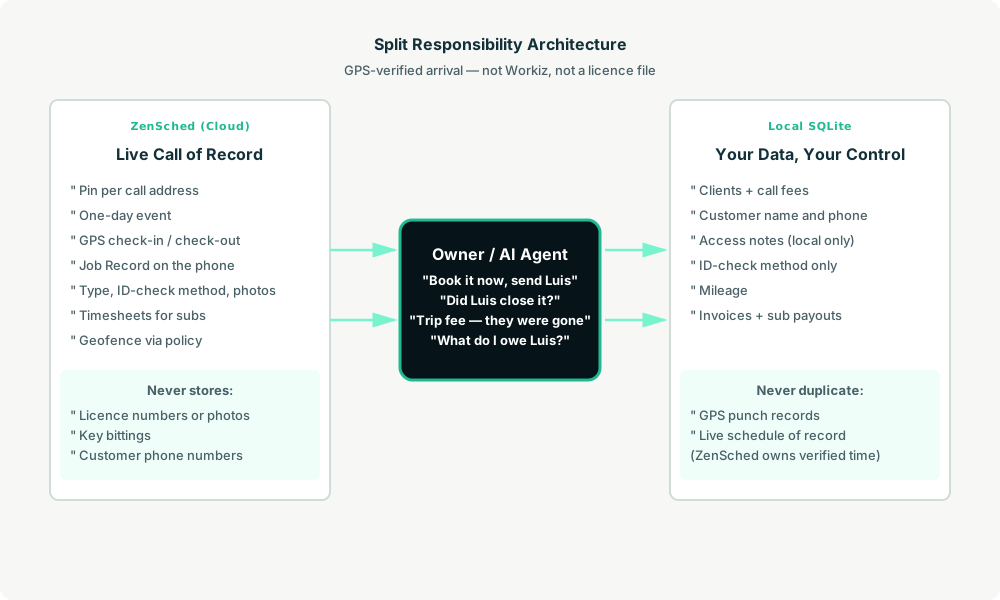
- ZenSched: A pin per call (geocoded from the address the caller gave), a one-day event, GPS-verified check-in and check-out (geofence via policy), tech app + push, one Job Record (job type, ID-checked method, lock type, amount, up to two work photos, notes).
- Local SQLite: Clients, customer name and phone, access notes, fees, mileage, invoices, sub payouts. Links to ZenSched IDs. After one metered form read, punches and Job Record summaries are cached locally.
The agent orchestrates both. “Luis, 8802 S 7th, lockout, now” becomes a call row, a location, today’s event, and a shift that starts now.
Privacy: the licence never crosses
calls.customer_name, customer_phone, and access_notes stay local. The Job Record stores an ID-check method, never a number. Work photos are the door, the lock, the hardware — not the customer’s ID. If a note comes back with a licence number, the agent keeps it off anything sent back to ZenSched and tells you.
Day-to-day workflow
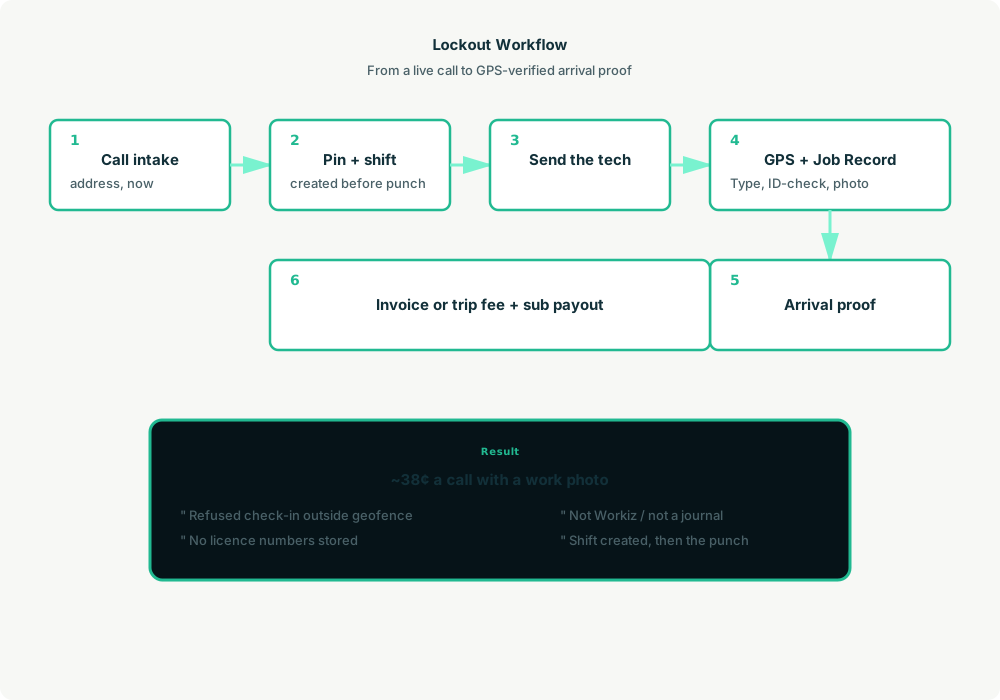
- You to agent: “Luis is eight minutes from a lockout at 8802 S 7th Ave. Book it now, send Luis.”
- Agent writes SQLite: A call row. Customer detail stays there.
- Agent creates the shift on ZenSched:
location_create($0.03), one-dayevent_create,form_assign,shift_createstarting now. Luis gets a push. - The tech does the work: GPS check-in at the pin, Job Record, photo of the work, check-out.
- Operations: “Did Luis close that lockout?” Agent answers from
shift_statusafter one metered read. - Money: Trip fees, property-manager invoices, and sub payouts from local call rows. Plain text you send. No card processing here.
Job Record on the phone
- Job type (lockout, rekey, install, auto, safe, other)
- ID checked (type or yes/no — never a number)
- Lock type
- Amount collected
- Work photos (up to 2)
- Notes
Setup summary
About 15 minutes:
- Install an MCP client: Claude Desktop, Cursor, or Muse Code.
- Connect ZenSched MCP at
https://mcp.zensched.com/mcp. - Point easy-sqlite-mcp at a local locksmith database on an encrypted, backed-up folder.
- Paste the zensched-locksmith-kit skill and load
schema.sqlone statement at a time. zensched_guide, thenaccount_createfor azsc_key. Invite techs at $0.25 each.- Fund when needed. The $5 activation deposit is credited to the balance.
Garages and campuses need a wider policy radius, or a second brand — not org-wide remote_checkin. checkin_slack_min is what lets a shift created a minute ago still accept the punch. Each call is its own one-day event.
Worker app: Android on Google Play and iOS on the App Store.
See the ZenSched quickstart and the locksmith kit.
Metering
See pricing: geocode $0.03 per new address, GPS $0.10 per punch, invite $0.25, form reads $0.05 basic / $0.15 with photos (once ever).
Worked example: 2 techs × 12 calls/day × 22 days = 264 jobs, almost every one a new address, with work photos → about $100/month, or ~$0.38 per call (geocode + GPS in + GPS out + photo read). A solo at 176 calls is about $67/month. One recovered chargeback covers more than a month.
Read the comparison honestly. At 264 photo-logged calls ZenSched is above Kickserv’s entry price and under Jobber Connect ($199) and a reported Workiz Standard quote ($175–$225). It is well under a 2-tech ServiceTitan seat. Workiz and Housecall Pro still win caller-ID and on-site cards. Do not tell a licence board the journal is in ZenSched.
What you get
- Geofenced check-in at the address on the call
- A Job Record: job type, ID-check method, lock type, amount, work photos
- “Book it now” from a pasted address
- Trip-fee and chargeback evidence: time, distance, photo of the work
- Sub payouts from local call rows
- About 15 minutes to stand up
What you don’t get
- No answering service, caller-ID, or card processing
- No pricebook or master-key software
- No storage of ID numbers, ID photos, or key codes
- No punch without a shift (the agent creates the shift first)
- Not a licensed locksmith journal
- Not a replacement for Workiz or Housecall Pro if the phone and the till are the daily work
Who this is for
Ideal for: solo vans and 2–3 tech shops still dispatching from a text, and owners who send 1099 subs on lockouts that did not exist an hour ago. Operators who already talk to Claude, Cursor, or Muse.
Not for: 15-van access-control integrators on ServiceTitan, or shops whose product is the phone system and on-site payments. Keep those. Add this only if you want the arrival proof.
Get started
- Kit: github.com/zenschedmcp/zensched-locksmith-kit
- Docs: zensched.com/docs/quickstart
- MCP:
https://mcp.zensched.com/mcp - Related: Agent-run mobile detailing · Agent-run mobile notaries · Agent-run process serving
Ready to build your own workflow?
Clone the reference kit and connect ZenSched to your AI agent.