Reference design
Agent-run EPC assessments: a ZenSched reference design
Harborne Homes emailed at 16:20. Domestic EPC Thursday 09:00, 14 Oak Road, keys with the neighbour, £70. The occupant name and mobile live in your inbox. RdSAP Go gets the boiler photos tonight. The branch still asks: were you at Oak this morning, and where are the loft shots? What if an AI assistant could paste that booking into a phone schedule, GPS-check the assessor at the door, capture an Assessment Record with elevation and loft photos, and draft the agent invoice — without putting occupant names, key-safe codes, or RRNs into a vendor cloud, and without pretending to lodge on the official register?
This reference design shows how a solo UK Domestic Energy Assessor (DEA), an Ireland BER assessor, or a 2–6 person shop dispatching subcontractors can deploy an AI agent using ZenSched as the live visit of record (with an Assessment Record on the phone) and a local SQLite database for agencies, properties, assessments, access notes, invoices, and sub payouts.
Honest framing: proof-of-visit, not the register
Read this before you clone the kit.
- ZenSched is not the official EPC / BER register and not a lodgement system. It does not calculate RdSAP / SAP / DEAP ratings, does not obtain an RRN or BER number, and does not submit to Landmark, the Scottish EPC Register, or SEAI. You still lodge in Elmhurst, Quidos, Stroma, DEAP, or the scheme software you already pay for.
- The Assessment Record is not a lodged certificate. The optional A–G field is a working note from the visit, not the register band. Do not tell an agent or auditor “the EPC is on ZenSched.”
- It is not RdSAP Go or Quidos replacement. Scheme apps win on the legal calculation and lodgement. ZenSched wins when the agent who pays per certificate wants GPS attendance proof and a same-day evidence pack beside your existing scheme workflow.
- Occupant names, phones, key-safe codes, UPRN, accreditation numbers, and RRNs after lodgement stay only in local SQLite. ZenSched locations and event titles use the street —
EPC 14 Oak Lane— never the occupant. - Evidence photos go to ZenSched (US-hosted). Put that in your agency agreement; Ireland assessors will ask about GDPR first.
- No signature field on purpose. On ZenSched a signature replaces Submit — submitting the form must not look like a lodged attestation.
- Android on Google Play; iOS on App Store. UK and Ireland assessors skew iPhone-heavy.
The kit’s SKILL.md makes that split a hard rule the AI will refuse to break.
The problem: agent proof and a camera roll
Small assessor shops already have a stack: Elmhurst RdSAP Go or Quidos for the legal certificate, plus agent WhatsApp, a diary, and a camera roll of boiler / loft / elevation shots “in case of audit.” The weekly loop is the same whether you walk four properties yourself or dispatch six assessors:
- Was the assessor at 14 Oak at 09:14, not reconstructing the day from WhatsApp?
- Where are the evidence photos the agent wants the same day?
- Bill the agency per certificate, bedroom uplifts, and no-access abort fees.
- Cover Tuesday when Priya is off without losing the branch slot.
- Survive a scheme QA or agent complaint without rebuilding the visit from
IMG_4821.
Not on that list: consumer SEO, a booking widget, or replacing RdSAP data entry.
The solution: split responsibility between ZenSched and local data
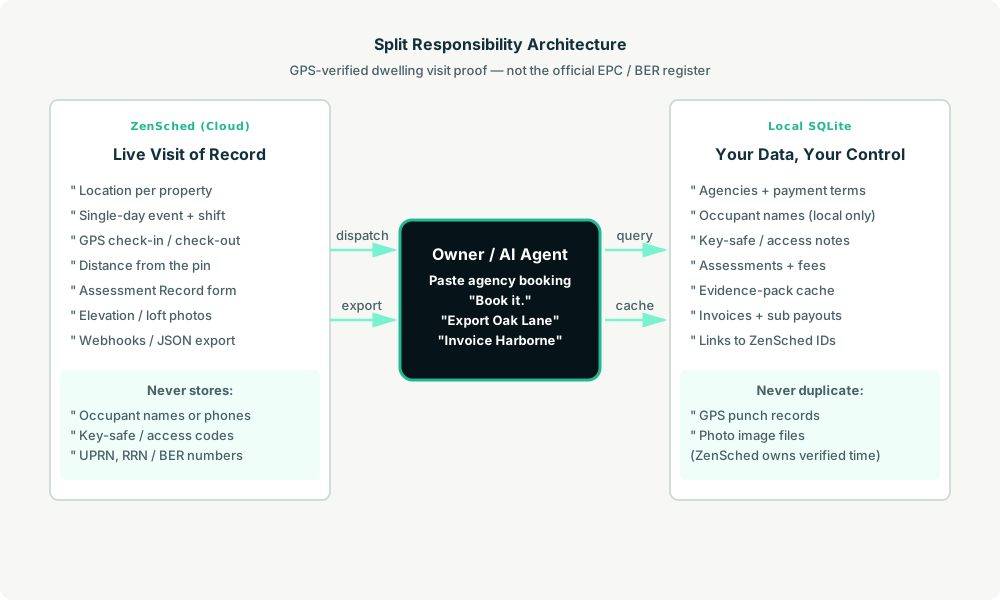
- ZenSched: Live pin per property, GPS-verified check-in and check-out (geofence enforced via policy, not per location), assessor app + push, one Assessment Record per visit (property type, working A–G note, up to 4 evidence photos, visit outcome). One single-day event per certificate visit — no 60-day roll the owner has to think about.
- Local SQLite database: Agencies and payment terms, properties and access notes, assessments with occupant contact local only, invoices, sub payouts. Links to ZenSched location, event, shift, and submission IDs. After one metered form read, punches and photo URLs are cached for evidence packs and invoicing.
The agent orchestrates both: it parses a pasted agency booking into a local assessment, creates a same-day shift on ZenSched titled with the street only, and writes verified arrival plus the Assessment Record back for the agent pack and the invoice.
Privacy: occupier and register data never cross
The street address has to go to ZenSched so the geofence works. Everything that identifies the occupier or opens the door — occupant name, phone, key-safe code, UPRN, accreditation number, RRN after you lodge — stays in local tables. If you ask the agent to put a name or access code in a ZenSched field, it should refuse.
Day-to-day workflow
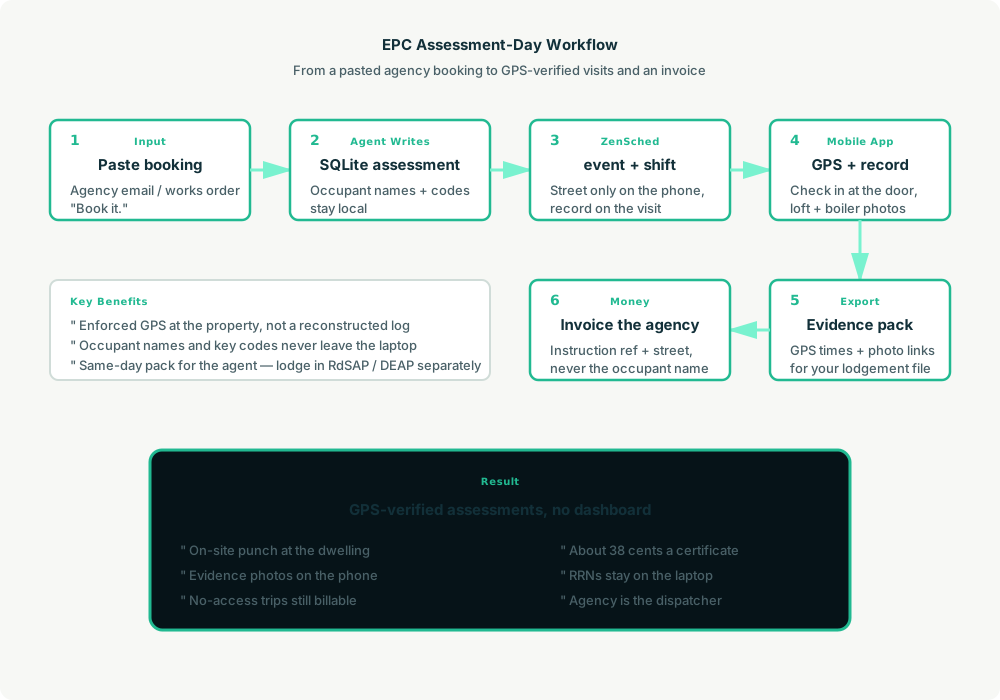
- You to agent (plain English): Paste the agency booking email. “Book it.”
- Agent writes SQLite: Upserts the agency and property, keeps occupant and access notes local, opens an assessment row (
EPC-2026-0001). - Agent creates the window on ZenSched: One
location_createif the property is new ($0.03 geocode), one single-day event titled with the street,form_assignfor the Assessment Record, oneshift_create. The assessor gets a push. - The assessor does the work: Open the ZenSched app, GPS check-in at the property, walk the dwelling, fill the Assessment Record (type, photos, outcome), check out.
- Export: “Export the Oak Lane pack.” Agent pulls punches (free) and the report (metered once) — GPS times plus photo links for your lodgement file, not lodgement itself.
- Money: “Invoice Harborne Homes.” Plain-text invoice under that agency’s terms, instruction ref and street, never the occupant name. Official RdSAP / DEAP calculation stays in scheme software.
No dashboards. No asking you to run SQL. Paste the booking, then talk to the agent.
Assessment Record on the phone
The assessor opens the ZenSched mobile app, checks in at the property, then fills the Assessment Record before leaving:
- Property type (flat, semi, terrace, etc.)
- Working A–G note (optional — not the register band)
- Evidence photos (elevations, boiler, loft, windows — up to 4)
- Visit outcome (completed, no access, incomplete)
- Notes
No occupier name, RRN, or signature on the form. Official calculation and register lodgement still happen in Elmhurst, Quidos, or DEAP.
Setup summary
Getting started takes about 15 minutes:
- Install an MCP client: Claude Desktop, Cursor, or Muse Code.
- Connect ZenSched MCP: Add
https://mcp.zensched.com/mcpto your MCP config. - Connect easy-sqlite-mcp: Point
SQLITE_PATHat a localepc-assess.dbon an encrypted, backed-up folder. - Paste the reference skill: The zensched-epc-assess-kit includes
SKILL.md,schema.sql, and a quickstart. Load the schema once (one statement per execute). - Create your ZenSched account: Call
zensched_guide, thenaccount_createfor azsc_key. Invite assessors at $0.25 each once. - Fund when needed: Metered GPS, geocode, and form reads draw from prepaid balance. The $5 activation deposit is credited to your account. Balance is USD on Stripe.
Tower blocks and mews need a wider policy radius (policy_update, 100–200 m is typical) — not org-wide remote_checkin for every suburban semi. Each certificate visit is one single-day event; a re-assessment in two years reuses the location pin and opens a new event.
Worker app: Android on Google Play and iOS on the App Store.
For step-by-step details, see the ZenSched quickstart and the epc-assess kit.
Metering: what you pay for
ZenSched uses transparent per-action pricing (see pricing):
- GPS check-in/check-out: $0.10 each (about $0.20 per visit)
- Address geocoding: $0.03 per new property (once)
- Worker invite: $0.25 per assessor (once)
- Form submission reads: $0.05 basic / $0.15 with photos — read once, cache locally
- Processed timesheet export: $0.10 per worker per pay period (optional)
Worked example from the vertical pitch: solo assessor, 80 certificates/month, Assessment Record with photos on every visit, geocode on every new property.
| Pattern | Approx. monthly | Per certificate |
|---|---|---|
| GPS + Assessment Record with photos (kit default) | about $30 | about $0.38 |
| GPS + geocode only | about $18 | about $0.23 |
Read the incumbent comparison honestly. ZenSched at 80 certificates is a layer on top of Elmhurst / Quidos / DEAP — not a substitute and not cheaper than WhatsApp plus a diary. RdSAP Go at £1 per assessment is the official field calculator; Quidos monthly bands buy inclusive lodgements. The case is agent-facing attendance proof plus AI dispatch, not discount scheme software.
What you get
- Geofenced check-in at the property (refuses punch from the next suburb)
- Assessment Record: property type, evidence photos, visit outcome
- Local agency book with per-certificate fees and no-access abort rules
- Evidence pack export for your lodgement file
- AI dispatch from a pasted agency email
- About 15 minutes to stand up
- Pay per certificate, no seats
What you don’t get
- No official EPC / BER register lodgement
- No RdSAP / SAP / DEAP calculation or certificate PDF
- No RRN / BER number from ZenSched
- No agent or landlord portal
- No branded invoice PDF (kit drafts plain-text invoices)
- Not a replacement for RdSAP Go when that is already your scheme workflow
Who this is for
Ideal for: Solo DEAs and 2–6 assessor shops on agent panels, owners who want GPS proof the branch can forward the same day, assessors who already lodge in scheme software and want AI dispatch beside it.
Not for: National EPC factories locked to internal portals, shops that capture every audit photo only inside RdSAP Go with no agent proof gap, or owners who need register lodgement from the phone app.
Get started
- Kit: github.com/zenschedmcp/zensched-epc-assess-kit
- Docs: zensched.com/docs/quickstart
- MCP:
https://mcp.zensched.com/mcp - Related: Agent-run tenant inventory · Agent-run insurance claim inspections · Agent-run mobile notaries
Ready to build your own workflow?
Clone the reference kit and connect ZenSched to your AI agent.