Reference design
Agent-run tenant inventory: a ZenSched reference design
Northcote emailed at 16:40. Check-out Thursday 10:00, 12 Oak Lane. Tenant name, mobile, key-safe code, instruction NCL-8841, £120. That lives in your inbox, a booking spreadsheet, and last month’s camera roll. The report you owe the agent is still a Word file. If a clerk you sent never reached the door, you find out when the outgoing tenant texts. What if an AI assistant could take that pasted instruction, put a GPS check-in on the clerk’s phone at that property, collect an Inventory Report with room photos, and draft the agent pack — without putting tenant names or key-safe codes into a vendor cloud?
This reference design shows how a solo UK or Ireland inventory clerk, or a 2–6 clerk firm dispatching subcontractors, can deploy an AI agent using ZenSched as the live schedule of record (with an Inventory Report on the phone) and a local SQLite database for clients, properties, tenants, access notes, invoices, and sub payouts.
Honest framing: this is not InventoryBase
Read this before you clone the kit.
- It is not a branded PDF inventory. InventoryBase, Inventory Hive, HelloReport, and Kaptur sell the room-by-room report the agent files. This kit does not. The Inventory Report on the phone is an operational photo form. The export is plain text plus photo links you paste into your report or email.
- It is not a TDS, DPS, or mydeposits e-file tool. It does not submit to a tenancy-deposit scheme, does not produce a statutory inventory in a scheme’s format, and does not decide a deduction. You (or the agent) file however you file today.
- No tenant e-sign. There is no signature field. On ZenSched a signature field replaces the Submit button.
- Optional burned-in photo stamp (opt-in per field). Set
"stamp_photos": trueon compliance photo fields in the kit’sform_create/form_updatepayload. After upload, the server burns readable date, time, and GPS onto the JPEG from capture metadata (default off). Each image also storescapture_lat/capture_lng,capture_ts, andcapture_sourceon the record. Gallery picks without EXIF may stamp date/time only. The GPS check-in punch is separate — it is whether the clerk was inside the geofence. Not a substitute for a statutory inventory, TDS/DPS e-file, or tenant e-sign. - Tenant names stay on your computer. Names, phones, key-safe codes, and scheme IDs live only in local SQLite. Location name and event title are the visit type plus the street —
Check-out 12 Oak Lane— never the tenant. The form header says so again. - Meter fields are notes. Electricity / gas / water readings are a textarea the clerk fills when they mark meters read. This is not a legal meter template.
The kit’s SKILL.md makes that split a hard rule. That is privacy discipline, not a deposit-scheme product. Do not sell this as cheaper InventoryBase. The wedge is paper, Dropbox, and an enforced GPS punch.
The problem: reconstructed visits and someone else’s PDF
Inventory clerks already have a stack: InventoryBase Solo from £35 ex-VAT if the product is the branded PDF; Inventory Hive if the agent wants tenant e-sign; otherwise Word, a camera roll, Dropbox, WhatsApp, and a booking spreadsheet. Many solos still live in the second pile. The weekly loop is the same whether you walk three properties yourself or dispatch five clerks:
- Never miss a check-in, check-out, or mid-term the agent just emailed.
- Prove you were at that door, not reconstructing the afternoon from photos.
- Hand the agent a usable pack the same day — rooms, cleanliness, operational meter notes, keys, damage photos.
- Get paid. Per-inventory invoices, bedroom uplifts, wasted-journey fees, net 14/30. Tenants are not the customer in England and Wales.
- If you use subs, know who arrived.
Not on that list: becoming a deposit scheme, or replacing the PDF the agent already buys.
The solution: split responsibility between ZenSched and local data
This architecture divides work cleanly:
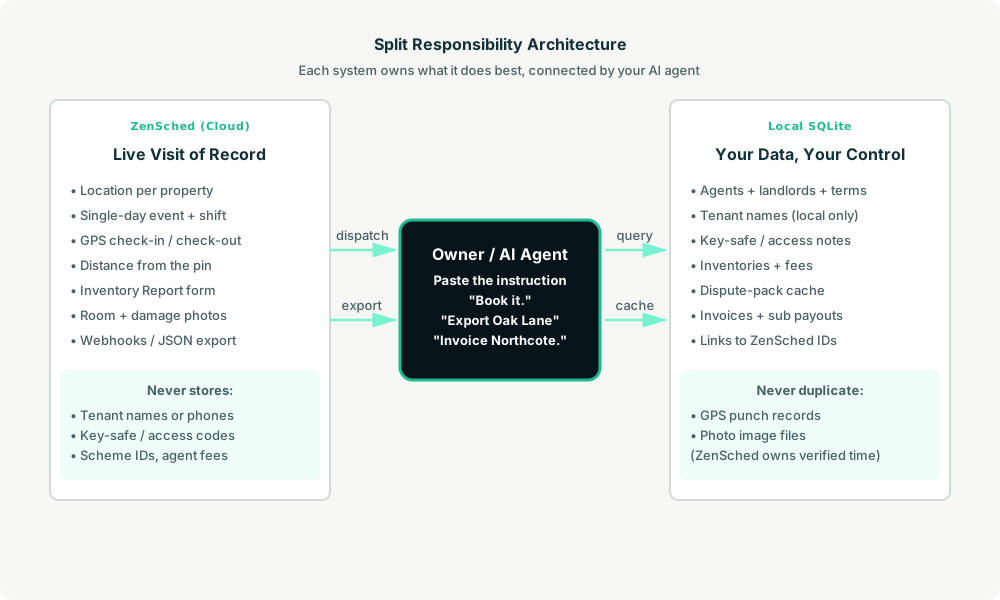
- ZenSched: Live property pin, GPS-verified check-in and check-out (geofence enforced), clerk app + push, one Inventory Report (rooms covered, cleanliness, required room photos, meters, keys, a damage flag with notes and photos on the phone when the answer is yes). ZenSched never stores tenant names, phones, key-safe codes, or scheme IDs.
- Local SQLite database: Clients and terms, properties and access notes, inventories (tenant contact local only), report cache, invoices, sub payouts. Links to ZenSched location, event, and shift IDs. After one metered form read, punches and photo URLs are cached so “export the check-out for 12 Oak Lane” is free later.
The agent orchestrates both: it parses a pasted instruction into a local inventory, creates a single-day event and shift on ZenSched titled with the street only, and writes verified arrival plus the report back into SQLite for the dispute pack and the invoice.
Privacy: names and codes never cross
The street address has to go to ZenSched so the geofence works. The label is the visit type plus the street (Check-out 12 Oak Lane, Check-in 44 Merton Road). Everything that identifies the tenant or opens the door stays in local inventories / properties.access_notes. If you ask the agent to put a name or a key-safe code in a ZenSched field — including cancellation reasons subs can see — it should refuse.
show_if follow-ups work on the phone: meter readings stay hidden until the clerk marks meters read; damage notes and photos stay hidden until they mark damage yes. There is no web worker UI.
Day-to-day workflow
A typical inventory day looks like this:
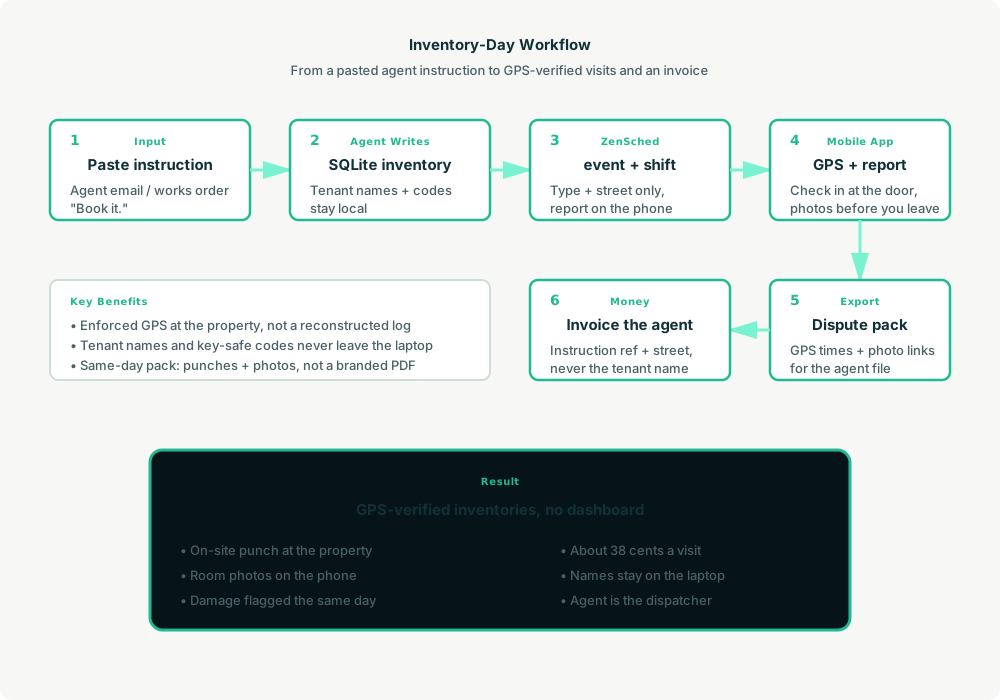
- You to agent (plain English): Paste the letting-agent instruction. “Book it.”
- Agent writes SQLite: Upserts the client and property, keeps the tenant name and key-safe code local, opens an inventory row (
INVY-2026-0001). - Agent creates the window on ZenSched: One
location_createif the property is new, one single-day event titledCheck-out 12 Oak Lane,form_assignfor the Inventory Report, oneshift_create. The clerk gets a push. - The clerk does the work: Open the ZenSched app, GPS check-in at the property, walk the rooms, fill the Inventory Report (rooms, cleanliness, photos, meters, keys, damage), check out.
- Export?: “Export the check-out for 12 Oak Lane.” Agent pulls punches (free) and the report (metered once) and writes the dispute pack — check-in/out times, photo links, and each photo’s capture coordinates when the phone had them.
- Money: “Invoice Northcote.” “Who owes me money?” Plain-text invoice under that client’s terms, instruction ref and street, never the tenant name.
No dashboards. No asking you to run SQL. Paste the instruction, then talk to the agent.
Inventory Report on the phone
Here’s what the report looks like on a real shift. The clerk opens the ZenSched mobile app (iOS App Store | Google Play), checks in at the property, then fills the form before they leave.
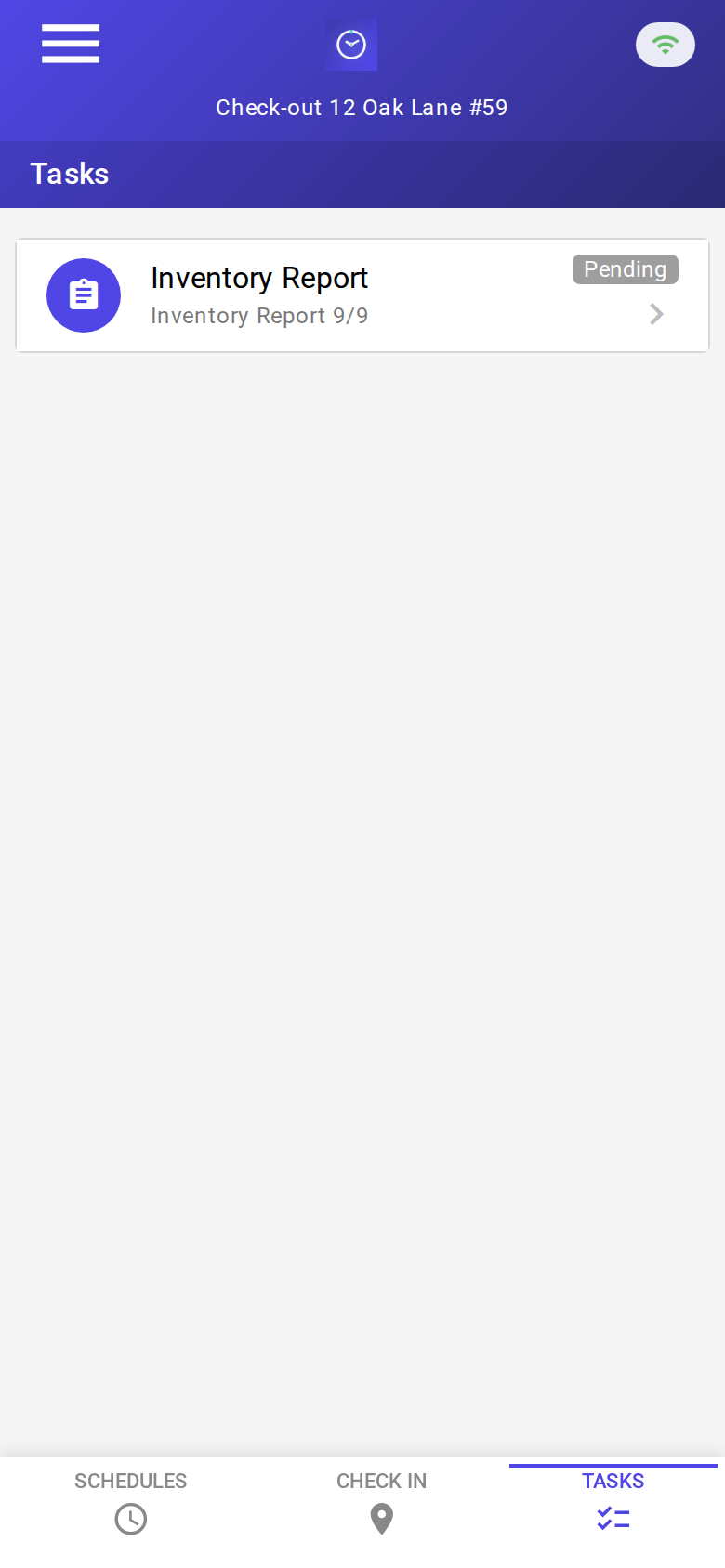
The Tasks tab with a pending Inventory Report. Check-in is GPS-verified at the property before the form is the work.
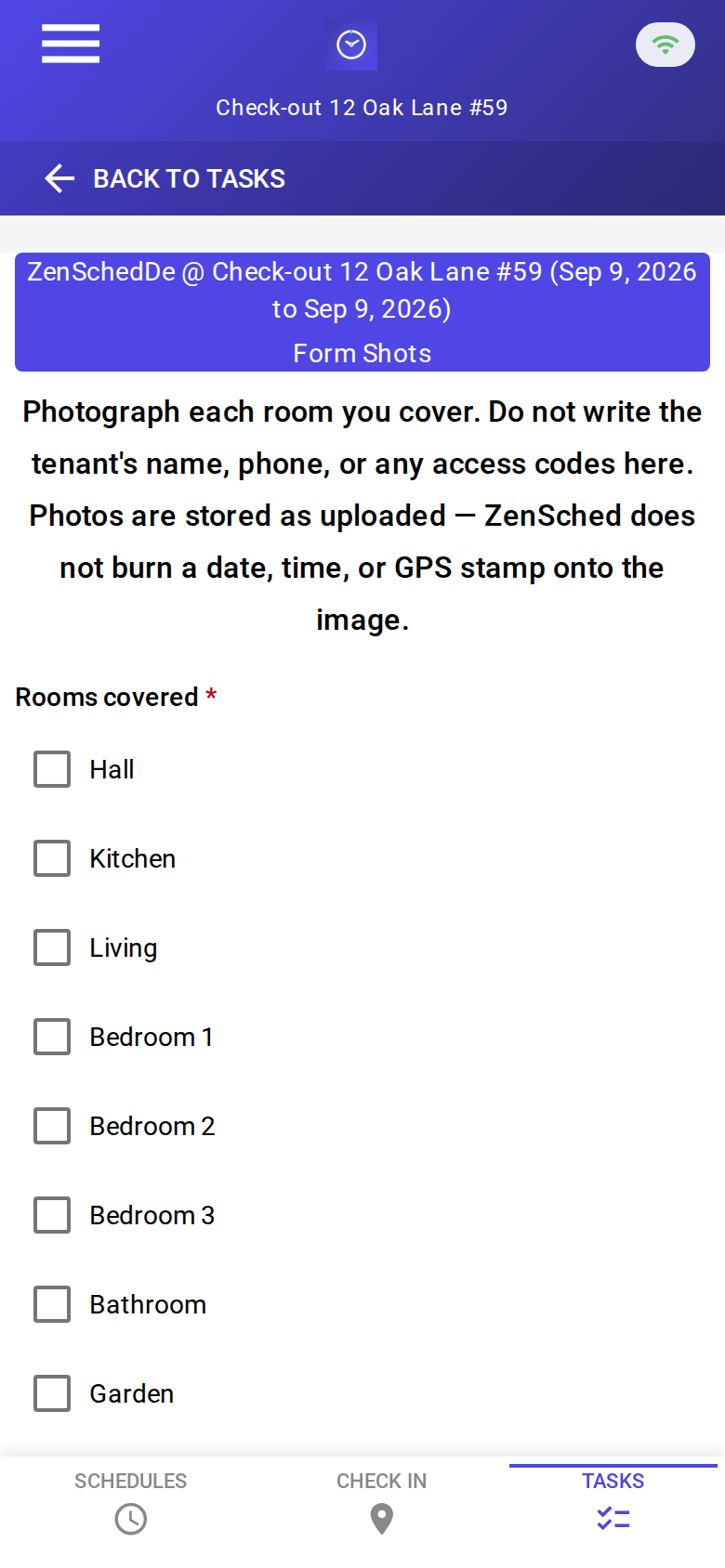
The blank report: rooms covered, cleanliness, photos, meters, keys, damage. The header says not to write the tenant’s name, phone, or access codes. No signature pad.

A completed check-out: rooms walked, cleanliness Fair, photos attached, meters noted, damage flagged. About 38 cents with GPS in, GPS out, and the photo read.
Setup summary
Getting started takes about 15 minutes:
- Install an MCP client: Claude Desktop, Cursor, or Muse Code.
- Connect ZenSched MCP: Add
https://mcp.zensched.com/mcpto your MCP config. Muse uses a different file shape — see the Muse snippet in the quickstart. - Connect easy-sqlite-mcp: Point
SQLITE_PATHat a localinventory-ops.dbon an encrypted, backed-up folder (this file holds tenant names and key-safe codes — treat it like a key box). - Paste the reference skill: The zensched-inventory-clerk-kit includes
SKILL.md,schema.sql, and a quickstart. Load the schema once (one statement per execute). - Create your ZenSched account: Call
zensched_guide, thenaccount_createfor azsc_key (no email required). Invite yourself as a worker in solo mode — you are who checks in. Subs get their own invite. - Fund when needed: Free tools under daily quota; metered GPS, geocode, worker invites, and form reads draw from prepaid balance. The $5 activation deposit is credited to your account.
Worker app: Android on Google Play and iOS on the App Store.
For step-by-step details, see the ZenSched quickstart and the inventory clerk kit.
Metering: what you pay for
ZenSched uses transparent per-action pricing (see pricing):
- Free MCP calls under daily quota for basic operations
- GPS check-in/check-out: $0.10 each (metered verification)
- Address geocoding: $0.03 per new property (once; a check-out reuses the check-in pin)
- Worker invite: $0.25 per clerk (once), including yourself
- Form submission reads: $0.05 basic / $0.15 with photos — read once, cache locally. The photo meter is per submission, not per image. Room photos are required, so plan on $0.15.
Worked example from the vertical pitch: about $0.38 a visit (GPS in + GPS out + photo form + a new-property geocode). Eighty visits a month is $30.40. A repeat property drops the geocode and lands near $0.35. On a £120 fee that is a fraction of a percent. A quiet month costs almost nothing. A second clerk is $0.25 to invite, then what they punch.
Read the incumbent comparison honestly. Against InventoryBase Solo at £35 ex-VAT, ZenSched is cheaper on meters at 80 visits a month. Those subscriptions buy the branded PDF and the agent portal — the invoiceable artifact. Above about 124 inventories a month, InventoryBase Solo is the cheaper software bill and they still sell the PDF. Do not sell this as discount InventoryBase. Sell GPS-at-the-door and same-day evidence to people still on paper and Dropbox, or as a companion layer next to a report tool they will not drop.
What you get
- Geofenced check-in and check-out at the property, with distance from the pin
- An Inventory Report on the phone: rooms, cleanliness, photos, meters, keys, damage follow-ups
- A same-day dispute pack — punch times, photo links, and capture coordinates on each image when present — from the agent
- Invoices and sub payouts on the laptop from verified visits
- About 15 minutes to stand up; the agent is the dispatcher
What you don’t get (be blunt)
- No branded PDF and no agent portal
- No TDS / DPS / mydeposits e-file
- No tenant e-sign and no signature pad
- Photo stamp is opt-in (
"stamp_photos": trueon photo fields at form setup; gallery picks without EXIF may show date/time only) - Tenant names and key-safe codes are not stored on ZenSched — you still tell the clerk how to get in
- Meter readings are notes, not a legal template
remote_checkinis a last resort and turns GPS proof off for the whole policy
Who this is for (and who it’s not for)
Ideal for:
- Solo UK / Ireland clerks still on Word, camera roll, and Dropbox
- 2–6 clerk firms that need enforced attendance on subcontractors
- Operators who already talk to Claude, Cursor, or Muse and want a pasted instruction to become a phone shift
Not a replacement for:
- InventoryBase / Inventory Hive / HelloReport / Kaptur when the product is the branded PDF
- In-house agent clerks who already have a CRM and a report tool
- A deposit-scheme filing product
This is agent-first infrastructure. The operator talks to the agent, and the agent talks to ZenSched.
Get started
- Kit: github.com/zenschedmcp/zensched-inventory-clerk-kit
- Docs: zensched.com/docs/quickstart
- MCP:
https://mcp.zensched.com/mcp - Related: Agent-run lawn care · Agent-run pet care · Agent-run home care · Agent-run mobile notary · Agent-run process serving · Agent-run mystery shopping · Agent-run STR turnover · Agent-run vacant-property inspections
Ready to build your own workflow?
Clone the reference kit and connect ZenSched to your AI agent.