Reference design
Agent-run STR turnover: a ZenSched reference design
It’s 11:20. The 4pm guest is already on the highway. The cleaner who was supposed to start at 11 has not checked in. The host’s Turno account is not yours, last week’s photos are in three WhatsApp threads, and the lockbox code for Palm 12B is in a note you would rather not paste into another vendor. What if an AI assistant could take this week’s pasted checkouts, put a GPS check-in on the cleaner’s phone at that unit, collect a Turnover Report with guest-ready photos, and draft “Palm 12B is ready” — without putting lockbox codes, wifi passwords, or host phones into a vendor cloud?
This reference design shows how a solo STR cleaner or a 2–10 person crew serving many hosts can deploy an AI agent using ZenSched as the live schedule of record (with a Turnover Report on the phone) and a local SQLite database for hosts, units, access notes, restock, invoices, and cleaner pay.
Honest framing: this is not Turno
Read this before you clone the kit.
- ZenSched does not sync Airbnb, Vrbo, Hospitable, Turno, or any calendar. You paste the week’s checkouts (or your AI reads an iCal URL you give it). If a guest extends, you tell the agent and it moves the shift. There is no iCal import on the platform.
- There is no host portal. Hosts do not log in. Proof is the Turnover Report. You forward photo links and punch times by text or email.
- No payments. Invoices are plain text. The kit tells you what is owed and records that you paid. It does not charge cards or pay cleaners.
- Lockbox codes stay on your computer. Door codes, wifi passwords, alarm codes, and the host’s personal phone live only in local SQLite. The kit forbids putting any of them into ZenSched fields — location names, event titles, notes, cancellation reasons, or the form. The report header says so again. Cleaners get codes from you, on a channel you choose. ZenSched sees
Marisol - Palm St 12B, the street address for the pin, and the report. - Not a marketplace. You bring the cleaners. One app invite each.
The kit’s SKILL.md makes that split a hard rule. That is privacy discipline, not a lockbox manager.
The problem: same-day windows and someone else’s app
Turnover crews already have a stack: Turno if the host owns the account; Properly or Breezeway if the PM does; ResortCleaning or Rinsebase if the crew pays; otherwise WhatsApp, iCal screenshots, and a Notes app of codes. In the host-owned tools you are a teammate. When the host leaves, the history leaves with them. A crew with 25 hosts lives in 25 logins.
The weekly loop is the same whether you clean 12 units yourself or dispatch five people:
- Never miss a same-day turnover. Knowing at 11:20 that the 11:00 punch did not happen is the whole game.
- Prove the unit was guest-ready before the next check-in. Timestamped photos beat a “you didn’t clean it” text.
- Flag damage and left items before the next guest walks in.
- Restock and linen counts across hosts, without a fifth app.
- Pay cleaners and invoice hosts from what actually happened.
Not on that list: finding new hosts.
The solution: split responsibility between ZenSched and local data
This architecture divides work cleanly:
- ZenSched: Live unit pin, GPS-verified check-in and check-out (geofence enforced), cleaner app + push, one Turnover Report (rooms done, guest-ready, photos, damage and left-item follow-ups on the phone when the answer is yes, restock, linen, notes). ZenSched never stores lockbox codes, wifi, alarm codes, or host phones.
- Local SQLite database: Hosts and units (rates, timezone, access notes), cleaner roster and pay type, this week’s turnovers, restock and damage cache, invoices, pay runs. Links to ZenSched location, event, and shift IDs. After one metered form read, punches and photo URLs are cached so “is Palm 12B ready?” is free later.
The agent orchestrates both: it parses a pasted checkout list into local turnovers, creates events and shifts on ZenSched, and writes verified arrival plus the report back into SQLite for host texts, invoices, and pay.
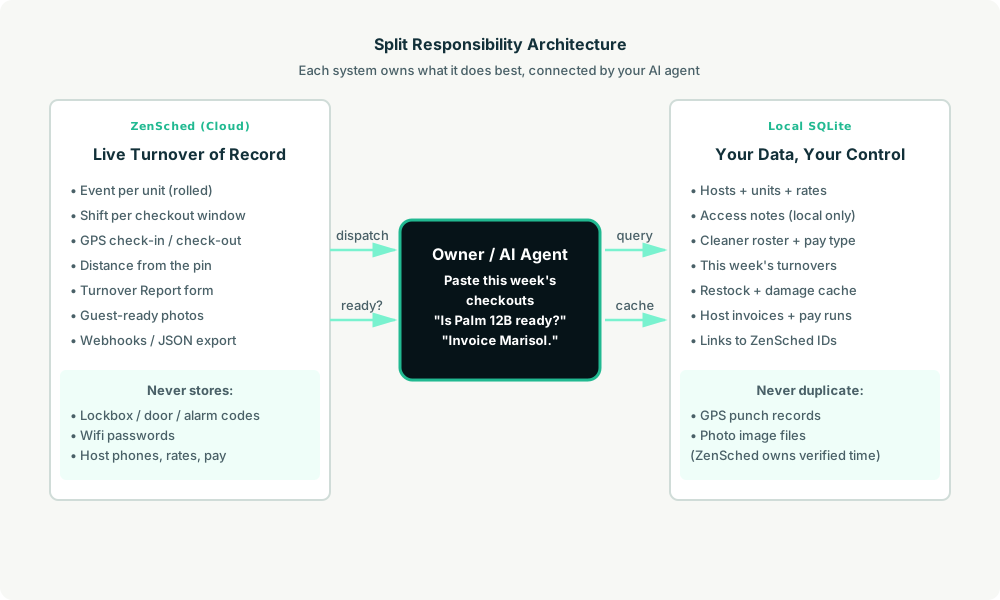
Privacy: codes never cross
The street address has to go to ZenSched so the geofence works. The unit label is the host’s first name plus the short unit name (Marisol - Palm St 12B). Everything that opens the door stays in units.access_notes on your disk. If you ask the agent to put a code in a ZenSched field, it should refuse.
show_if follow-ups work on the phone: damage notes and left-item notes stay hidden until the cleaner answers yes. There is no web worker UI.
Day-to-day workflow
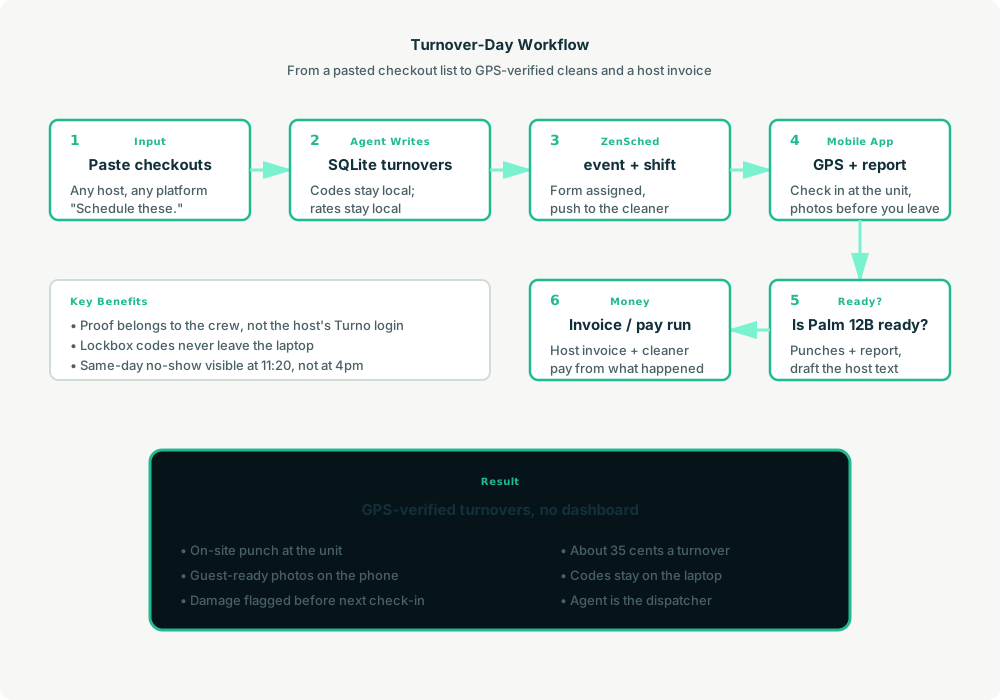
A typical turnover day looks like this:
- You to agent (plain English): Paste this week’s checkouts. “Schedule these.”
- Agent writes SQLite: Upserts hosts and units, keeps codes local, opens turnover rows from checkout / next check-in times.
- Agent creates the windows on ZenSched: One
location_createif the unit is new, one event per unit (rolled every 60 days),form_assignfor the Turnover Report, oneshift_createper same-day window. The cleaner gets a push. - The cleaner does the work: Open the ZenSched app, GPS check-in at the unit, clean, fill the Turnover Report (rooms, guest-ready photos, restock, linen), check out. Damage follow-ups appear on the phone only if they mark damage yes.
- Ready?: “Is Palm 12B ready? Draft Marisol’s text.” Agent pulls punches (free) and the report (metered once) and writes the reply with photo links.
- Money: “Invoice Marisol.” “Pay run.” Plain-text invoice and cleaner pay from verified turnovers.
No dashboards. No asking you to run SQL. Paste the list, then talk to the agent.
Turnover Report on the phone
Here’s what the report looks like on a real shift. The cleaner opens the ZenSched mobile app (iOS App Store | Google Play), checks in at the unit, then fills the form before they leave.
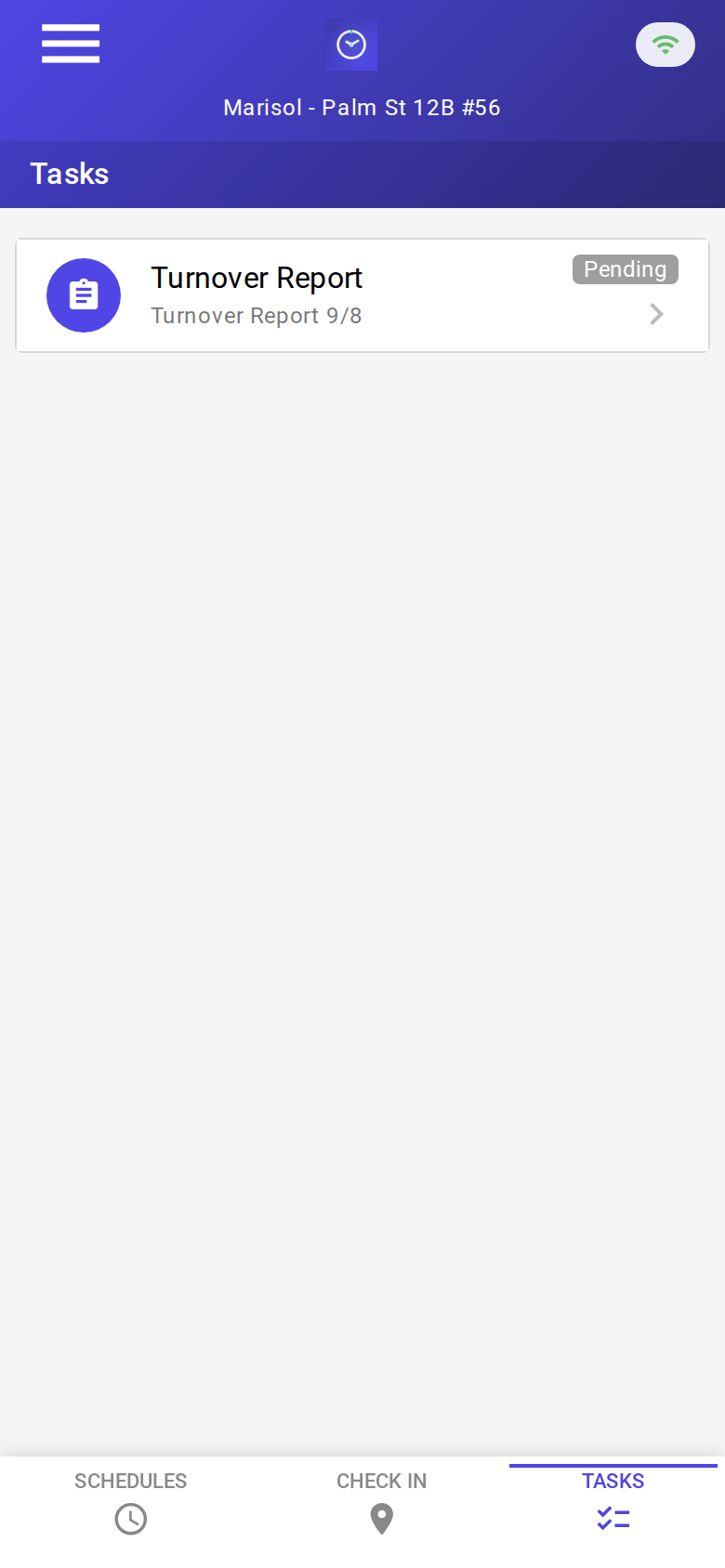
The Tasks tab with a pending Turnover Report. Check-in is GPS-verified at the unit before the form is the work.
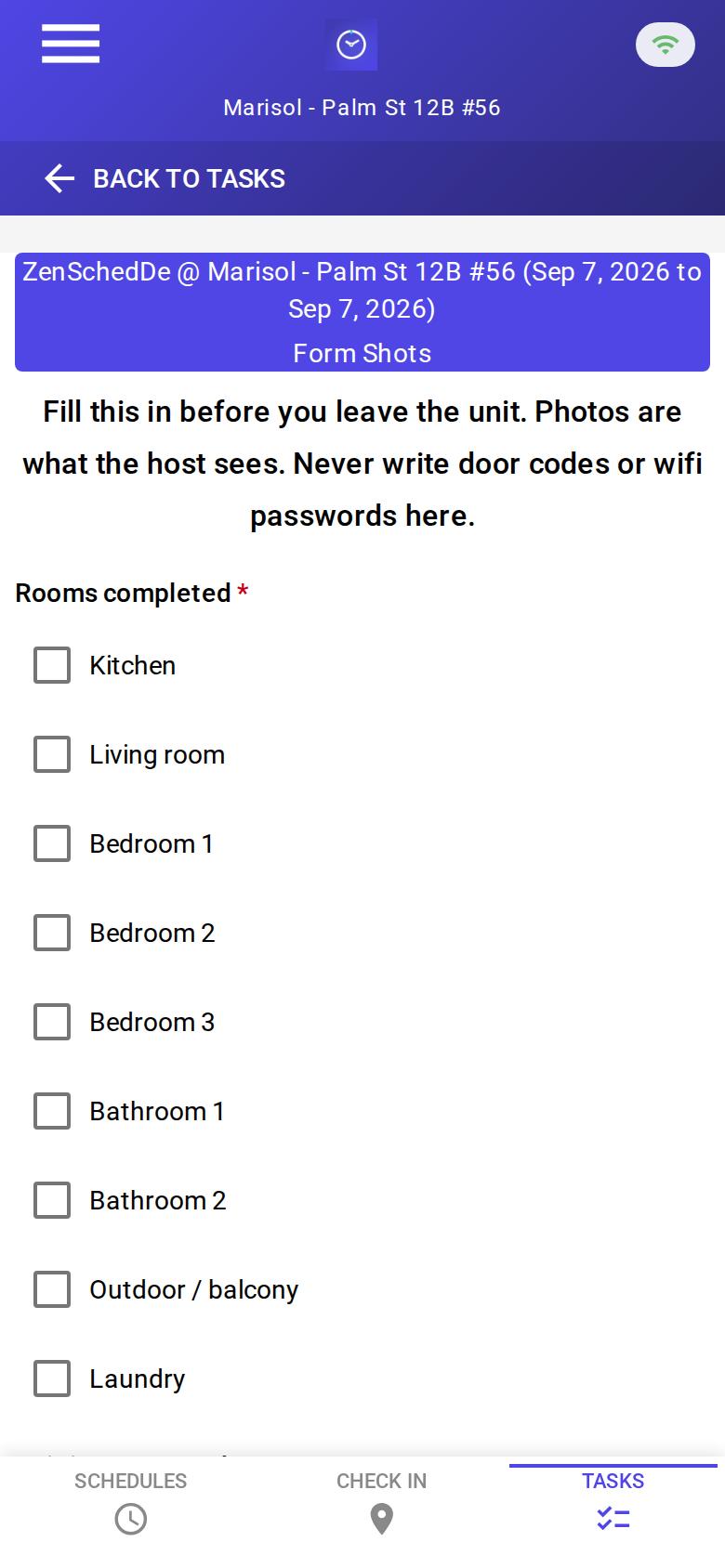
The blank report: rooms completed, guest-ready, photos, damage, left items, restock, linen. The header says not to write door codes or wifi passwords. No signature pad.
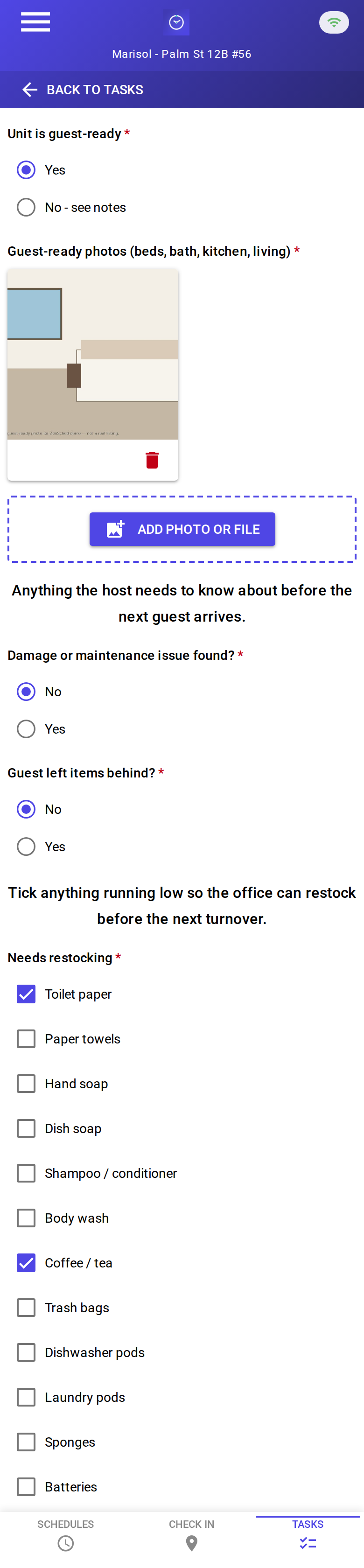
A completed clean: guest-ready, photo attached, restock toilet paper and coffee, two linen sets. About 35 cents with GPS in, GPS out, and the photo read.
Setup summary
Getting started takes about 15 minutes:
- Install an MCP client: Claude Desktop or Cursor both support MCP.
- Connect ZenSched MCP: Add
https://mcp.zensched.com/mcpto your MCP config. - Connect easy-sqlite-mcp: Point
SQLITE_PATHat a localturnover-ops.dbon an encrypted, backed-up folder (this file holds lockbox codes — treat it like a key box). - Paste the reference skill: The zensched-str-turnover-kit includes
SKILL.md,schema.sql, and a quickstart. Load the schema once (one statement per execute). Compliance photo fields in the kit set"stamp_photos": trueso exported JPEGs carry readable date, time, and GPS (opt-in per field; gallery picks without EXIF may show date/time only). - Create your ZenSched account: Call
zensched_guide, thenaccount_createfor azsc_key (no email required). Invite cleaners as workers — they are who check in. - Fund when needed: Free tools under daily quota; metered GPS, geocode, worker invites, and form reads draw from prepaid balance. The $5 activation deposit is credited to your account.
Worker app: Android on Google Play and iOS on the App Store.
For step-by-step details, see the ZenSched quickstart and the STR turnover kit.
Metering: what you pay for
ZenSched uses transparent per-action pricing (see pricing):
- Free MCP calls under daily quota for basic operations
- GPS check-in/check-out: $0.10 each (metered verification)
- Address geocoding: $0.03 per new unit (once)
- Pin refine (optional): $0.10 when you ask ZenSched to move a mailbox geocode onto the building
- Worker invite: $0.25 per cleaner (once)
- Form submission reads: $0.05 basic / $0.15 with photos — read once, cache locally. The photo meter is per submission, not per image.
Worked example from the vertical pitch: 480 turnovers a month → $168.00 with a photo report every time (about 35 cents a turnover once units and cleaners are on the account). On a $120 fee that is 0.29%. GPS-only is 20 cents. A slow week costs almost nothing.
Read the incumbent comparison honestly. Against Turno at $10/property when the host brings their own crew, or Properly / Breezeway per-property fees, ZenSched is cheaper at any realistic turn frequency — and the bill is the crew’s, not 25 host decisions. Against Rinsebase’s flat crew price, ZenSched is more expensive above about 170 turnovers a month; the case there is the AI dispatcher, exportable proof, and an enforced geofence, not a discount. A host with three units and a trusted cleaner should stay on Turno’s free tier.
What you get
- Geofenced check-in and check-out at the unit, with distance from the pin
- A Turnover Report on the phone: rooms, guest-ready photos, damage and left-item follow-ups, restock, linen
- Mid-morning “who has not arrived” from the agent
- Your own proof pack — independent of the host’s Turno / Hospitable login
- Invoices and cleaner pay on the laptop from verified turnovers
- About 15 minutes to stand up; the agent is the dispatcher
What you don’t get (be blunt)
- No Airbnb / Vrbo / iCal sync
- No host portal and no shareable guest-ready link
- No payments, no marketplace, no linen inventory beyond counts on the form
- No reference photos per task
- Lockbox codes are not stored on ZenSched — you still text the cleaner the code
remote_checkinis a last resort and turns GPS proof off for the whole policy
Who this is for (and who it’s not for)
Ideal for:
- Solo cleaners and 2–10 person crews serving many hosts on many platforms
- Operators reconstructing the week from WhatsApp and iCal screenshots
- Operators who already talk to Claude or ChatGPT and want the checkout list to become phone shifts
Not a replacement for:
- Turno’s free tier for a host with one trusted cleaner
- Breezeway / a PMS for a 100-unit property manager
- A cleaner marketplace
This is agent-first infrastructure. The operator talks to the agent, and the agent talks to ZenSched.
Get started
- Kit: github.com/zenschedmcp/zensched-str-turnover-kit
- Docs: zensched.com/docs/quickstart
- MCP:
https://mcp.zensched.com/mcp - Related: Agent-run lawn care · Agent-run pet care · Agent-run home care · Agent-run mobile notary · Agent-run process serving · Agent-run mystery shopping · Agent-run tenant inventory · Agent-run vacant-property inspections
Ready to build your own workflow?
Clone the reference kit and connect ZenSched to your AI agent.