Reference design
Agent-run fire extinguisher & emergency-light testing: a ZenSched reference design
The facilities manager calls Monday. “Was your tech in Building C last week, and did they walk every extinguisher?” The corridor tag still shows last year’s punch. Inspect Point is $198 for two techs whether the van showed up or not. What if an AI assistant could roll this month’s building list, GPS-check the tech in at the pin, capture pass/fail and tag photos on a Device Inspection form for each unit, and answer “which buildings are due this month” — without putting lockbox codes or licence numbers into a vendor cloud, and without pretending to file with the AHJ or replace the tag on the cylinder?
This reference design shows how a 1–6 technician portable fire-equipment shop can deploy an AI agent using ZenSched as the live schedule of record (with a Device Inspection form on the phone) and a local SQLite database for clients, buildings, devices, visit records, and invoices.
Honest framing: visit proof, not an AHJ certificate
Read this before you clone the kit.
- Device Inspection is not an NFPA 10, BS 5306-3, BS 5266-1, AS 1851, or AS 2293.2 filing. The building owner must keep the official logbook and the physical service tag on the unit. This kit proves the tech was at the building and what they marked on each tag — it does not submit to a fire marshal portal or render a BAFE-shaped certificate PDF.
- It is not Inspect Point or FireManager. No NFPA template library, no deficiency-to-quote engine, no AHJ e-file. Keep those if certificates are your daily product.
- Lockbox codes, fire-panel codes, and licence numbers stay only in local SQLite (
buildings.access_notes,technicians.license_no). ZenSched locations are a building label and street — never a code or licence number. - Photos have no burned-in GPS stamp. The punch (time and distance from the pin) is the location proof.
- One form submission per device — tag, type, pass/fail/serviced, optional tag photo. A 20-device walk bills per device on form reads; GPS is once per building visit.
- There is no signature field on purpose. On ZenSched a signature replaces Submit.
- Android on Google Play; iOS on the App Store.
The kit’s SKILL.md makes that split a hard rule the AI will refuse to break.
The problem: “nobody came” and last year’s tag
Small fire-equipment shops already have a stack: paper tags on the cylinder, a van clipboard, photos in a group text, Google Calendar, QuickBooks. When a property manager or fire marshal asks for proof, the evidence is a reconstructed week.
The monthly loop is the same whether you walk corridors yourself or dispatch three techs:
- Was Sam at Harborview and did every device get walked?
- Which units failed recharge or battery, and can you show a photo?
- Which buildings are due this month across the contract book?
- Paying techs per building or per device without paper tickets every Friday.
- Coverage when a van is down mid-week.
Not on that list: sprinkler design, AHJ e-file, or a tenant portal.
The solution: split responsibility between ZenSched and local data
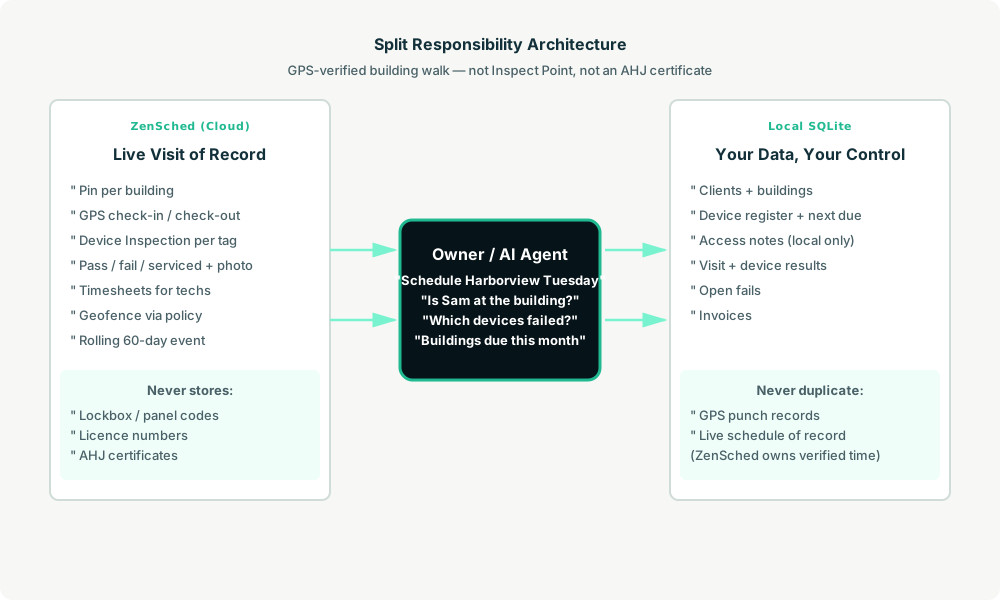
- ZenSched: Live pin per building, GPS-verified check-in and check-out (geofence enforced via policy), tech app + push, one Device Inspection form per device (tag, type, result, tag photo, fail notes). One building visit, one shift, many device submissions.
- Local SQLite database: Clients, buildings, device register (serial, type, floor, next due), inspection visits, device results, invoices. Links to ZenSched location, event, and shift IDs. After one metered form read per device, summaries are cached locally.
The agent orchestrates both: it schedules building walks from the contract list, creates shifts on ZenSched, and writes verified arrival plus Device Inspection answers back into SQLite for the client pack and the invoice.
Privacy: access codes never cross
Lockbox codes, fire-panel codes, and after-hours contacts stay in buildings.access_notes. Licence numbers stay in technicians.license_no. If you ask the agent to put either into ZenSched, it should refuse. Techs get codes from you by whatever channel you choose.
Day-to-day workflow
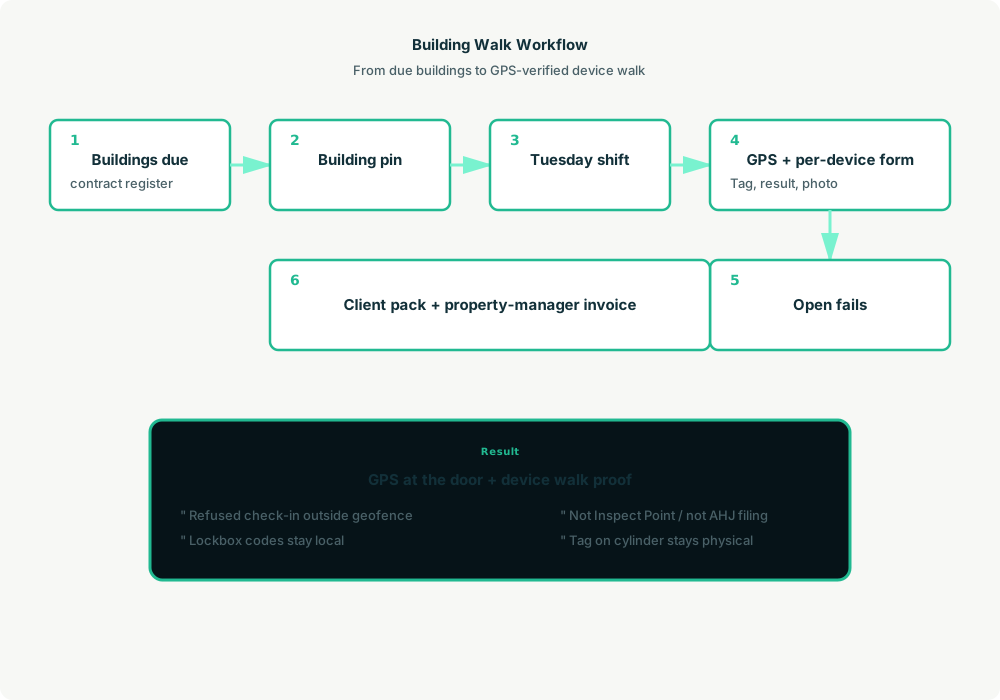
- You to agent: “Schedule Sam at Harborview Tuesday 8–11, annual extinguishers and monthly lights.”
- Agent reads SQLite: Buildings due, devices on each floor.
- Agent creates the shift on ZenSched:
location_createonce per building ($0.03), rolling event (≤60 days),form_createonce for Device Inspection,form_assign,shift_create. Sam gets a push. - The tech does the work: GPS check-in at the pin, one Device Inspection submission per tag (pass/fail/serviced, photo), check-out.
- Operations: “Is Sam at Harborview?” “Which devices failed at Riverside?” Agent answers after metered reads are cached locally.
- Client pack and money: Plain-text summary you paste into email — building, punches, one line per device, photo URLs. Not an AHJ filing. Invoice the property manager from local rows.
Device Inspection on the phone
One submission per device:
- Device tag (typed exactly as on the unit)
- Device type (extinguisher, emergency light, exit sign, hose)
- Result (pass / fail / serviced)
- Tag photo (optional)
- Fail notes (when result is fail)
Emergency-light duration tests reuse the same form with the appropriate service type in the visit workflow.
Setup summary
About 15 minutes:
- Install an MCP client: Claude Desktop, Cursor, or Muse Code.
- Connect ZenSched MCP at
https://mcp.zensched.com/mcp. - Point easy-sqlite-mcp at a local fire-safety database on an encrypted, backed-up folder.
- Paste the zensched-fire-safety-kit skill and load
schema.sqlone statement at a time. zensched_guide, thenaccount_createfor azsc_key. Invite techs at $0.25 each.- Fund when needed. The $5 activation deposit is credited to the balance.
Hospitals and campuses need a wider policy radius or a second brand — not org-wide remote_checkin. Events cap at 60 days; the kit rolls a new event per building when the window expires.
Worker app: Android on Google Play and iOS on the App Store.
See the ZenSched quickstart and the fire-safety kit.
Metering
See pricing:
- GPS check-in/check-out: $0.10 each (about $0.20 per building visit)
- Geocode: $0.03 per new building
- Form reads: $0.05 basic / $0.15 with photos — once per device submission
- Worker invite: $0.25
Worked example: 2 techs × 4 buildings/day × 21 days = 168 building visits. A 12-device building with a photo on every device is about $2.20 (GPS $0.20 + 12 × $0.15). At ~20 devices per building across the month, photo-every-device math lands near $500+ — that loses to Inspect Point. GPS-only proof per building is about $34/month for 168 visits. Use photo forms on fails and spot-checks, not blindly on all 3,000+ device rows, unless the property manager pays for that density.
Read the comparison honestly. At building-level GPS + selective photos, ZenSched undercuts reported Inspect Point Silver (~$198 for two techs). It is not a certificate replacement. Do not tell a fire marshal “it’s in ZenSched.”
What you get
- Geofenced check-in at the building
- Device Inspection per tag: result, photo, fail notes
- Local device register with next-due dates
- Client pack: punches, device lines, photo URLs
- About 15 minutes to stand up
What you don’t get
- No AHJ / NFPA / BS / AS certificate PDF
- No replacement for the physical tag on the cylinder
- No Inspect Point deficiency quoting
- No barcode asset platform
- Not a replacement for Inspect Point if certificates are the product
Who this is for
Ideal for: 1–6 tech independents on paper tags and a clipboard, Cintas/Kidde alumni with a licence and a van, operators who want GPS proof and AI dispatch without a 2-tech-minimum SaaS seat.
Not for: Multi-trade contractors already on Inspect Point as system of record, or shops whose deliverable is the AHJ-shaped PDF.
Get started
- Kit: github.com/zenschedmcp/zensched-fire-safety-kit
- Docs: zensched.com/docs/quickstart
- MCP:
https://mcp.zensched.com/mcp - Related: Agent-run HOA compliance drives · Agent-run property preservation inspections · Agent-run claims inspections
Ready to build your own workflow?
Clone the reference kit and connect ZenSched to your AI agent.