Reference design
Agent-run radon testing: a ZenSched reference design
The realtor texts Thursday morning: were closed-house conditions held at 1420 S Pearl, and did someone actually retrieve the monitor? Your CRM printout has the pCi/L. The buyer’s attorney wants proof both visits happened and the device stayed in the basement rec room. What if an AI assistant could schedule place Tuesday and retrieve Thursday, GPS-check the tester at both doors, capture a Place Record and Retrieve Record with device photos, and tell you which monitors are still in the field — without putting lockbox codes or NRPP license numbers into a vendor cloud, and without pretending to be your MAH-2023 certified report?
This reference design shows how a solo NRPP or C-NRPP tester, a 2–4 person measurement shop, or a home inspector who added radon can deploy an AI agent using ZenSched as the live visit of record (with Place and Retrieve Records on the phone) and a local SQLite database for clients, properties, tests, closed-house log extracts, and invoices.
Honest framing: field log, not the official report
Read this before you clone the kit.
- ZenSched is not an ANSI/AARST MAH-2023 measurement report, not a certified radon PDF, and not NRPP / NRSB / C-NRPP lodgement. The pCi/L on the Retrieve Record is a field note the tester typed — not the number from your Sun Nuclear, Radalink, or lab PDF.
- It is not Radalink, RadStar, or Spectora replacement. Hardware clouds and inspector OS tools win on the certified CRM number and the inspection report. ZenSched wins when GPS at place + GPS at retrieve + a closed-house log is what the realtor or attorney wants to see beside your licensed PDF.
- Closed-house is self-reported. The Place Record asks whether conditions looked closed at deploy. GPS proves the tester was at the address; it does not prove windows stayed shut for 48 hours.
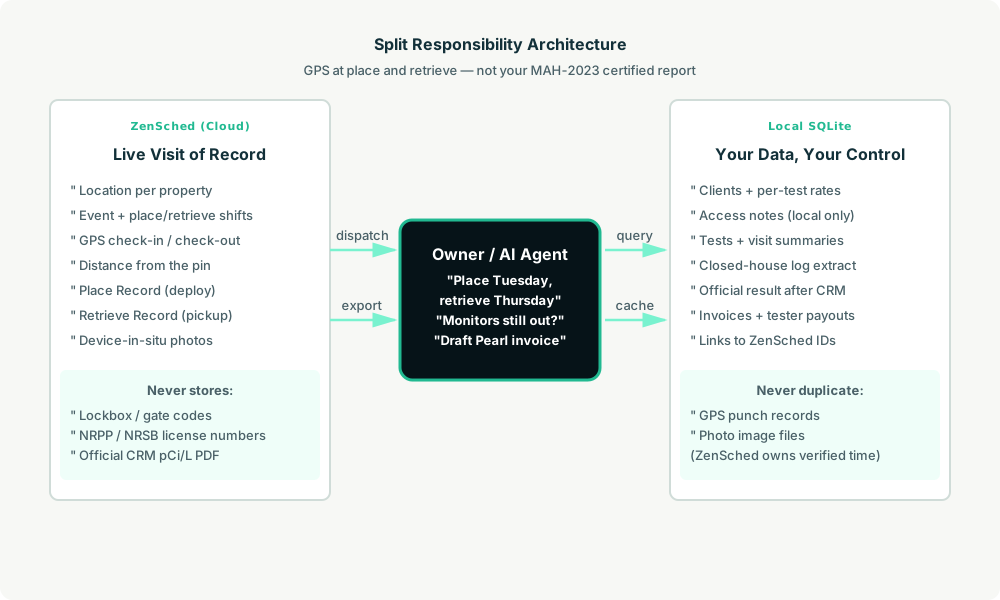
- Lockbox codes, alarm words, device serials, NRPP numbers, and client contact stay only in local SQLite. ZenSched locations use property code + street —
P-1 - 4412 Maple Street— never the client name. - Device photos go to ZenSched (US-hosted). Canadian shops should note PIPEDA before outreach.
- No signature field on purpose. On ZenSched a signature replaces Submit — submitting the form must not look like a certified measurement attestation.
- Android on Google Play; iOS on App Store. Home inspectors and testers skew iPhone-heavy.
The kit’s SKILL.md makes that split a hard rule the AI will refuse to break.
The problem: void tests and “the windows were open”
Small radon shops already have a stack: Radalink or RadStar for the certified CRM PDF, Spectora or HomeGauge if they write home inspections, plus Google Calendar, a paper closed-building checklist, and a phone photo of the monitor on the basement carpet. The weekly loop is the same whether you place four tests yourself or dispatch two techs:
- Did you place at 1420 S Pearl Tuesday and retrieve Thursday — not reconstruct from texts?
- Was the house closed, and can you show device-in-situ photos for both visits?
- Which CRM is in which basement right now?
- Pay the retrieve tech without rebuilding Thursday from memory.
- Survive a disputed 6.2 pCi/L when the seller ran the attic fan.
Not on that list: mitigation design, route optimization, or a booking widget.
The solution: split responsibility between ZenSched and local data
- ZenSched: Live pin per property, GPS-verified check-in and check-out on both place and retrieve shifts (geofence enforced via policy), tester app + push, Place Record at deploy (device photo, closed-house Yes/No), Retrieve Record at pickup (pCi/L field note, device photo). One event per short-term test (48–96 hours, under the 60-day cap).
- Local SQLite database: Clients and rates, properties and access notes, testers and license numbers, tests with visit summaries and closed-house log extracts, invoices. Links to ZenSched location, event, shift, and submission IDs. Official CRM / lab results stay local after you file them.
The agent orchestrates both: it reads due place and retrieve stops from SQLite, creates shifts on ZenSched, and writes verified punches plus form answers back for the file and the invoice.
Privacy: access codes and license numbers never cross
The street address has to go to ZenSched so the geofence works. Gate codes, lockbox numbers, NRPP/NRSB numbers, device serials, and client names stay in local tables. If you ask the agent to put a code or serial in a ZenSched field, it should refuse.
Day-to-day workflow
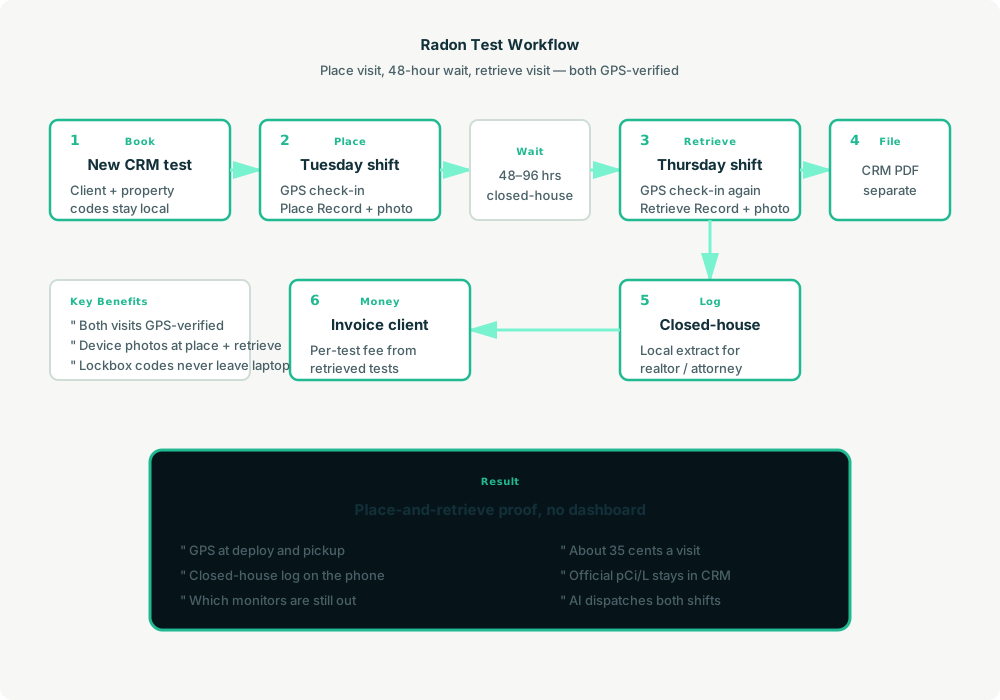
- You to agent (plain English): “Add client Priya Nguyen, 1420 S Pearl, 48-hour CRM test, $195, lockbox on the railing.”
- Agent writes SQLite: Upserts client and property, keeps access notes local, opens a test row.
- Agent creates place and retrieve on ZenSched: One
location_createif new ($0.03 geocode), one event for the test window, twoshift_createcalls (place Tuesday, retrieve Thursday), both forms assigned. - The tester does the work: GPS check-in at place, Place Record with device photo and closed-house observation, check out. Two days later: GPS check-in at retrieve, Retrieve Record with pCi/L note and device-still-there photo, check out.
- Pull results: “Record this week’s visits.” Agent matches punches and form reads (metered once), saves summaries locally, flags closed-house No or high readings.
- Money: “Which monitors are still in the field?” and “Draft Priya’s invoice.” Plain-text invoice — official MAH-2023 / CRM report stays in your licensed PDF.
No dashboards. No asking you to run SQL. Talk to the agent.
Place and Retrieve Records on the phone
Place Record (deploy): device photo, closed-house Yes/No, notes.
Retrieve Record (pickup): pCi/L field note (not the certified CRM result), device photo, notes.
No occupant signature. Official calculation and the licensed PDF still come from Radalink, RadStar, Sun Nuclear software, or your lab.
Long-term Canada tests (91+ days) need two events on the same location because events cap at 60 days — the kit rolls retrieve onto a new event; do not sell a 48-hour log as a Health Canada remediation decision.
Setup summary
Getting started takes about 15 minutes:
- Install an MCP client: Claude Desktop, Cursor, or Muse Code.
- Connect ZenSched MCP: Add
https://mcp.zensched.com/mcpto your MCP config. - Connect easy-sqlite-mcp: Point
SQLITE_PATHat a localradon.dbon an encrypted, backed-up folder. - Paste the reference skill: The zensched-radon-kit includes
SKILL.md,schema.sql, and a quickstart. Load the schema once (one statement per execute). - Create your ZenSched account: Call
zensched_guide, thenaccount_createfor azsc_key. Invite testers at $0.25 each once. - Fund when needed: Metered GPS, geocode, and form reads draw from prepaid balance. The $5 activation deposit is credited to your account.
Apartment complexes need a wider policy radius (policy_update, 100–200 m) — not org-wide remote_checkin for every single-family retrieve.
Worker app: Android on Google Play and iOS on the App Store.
For step-by-step details, see the ZenSched quickstart and the radon kit.
Metering: what you pay for
ZenSched uses transparent per-action pricing (see pricing):
- GPS check-in/check-out: $0.10 each (about $0.20 per visit)
- Address geocoding: $0.03 per new property (once)
- Worker invite: $0.25 per tester (once)
- Form submission reads: $0.05 basic / $0.15 with photos — read once, cache locally
Worked example from the vertical pitch: solo tester, 80 tests/month = 160 visits (place + retrieve), photo forms on every visit.
| Pattern | Approx. monthly | Per visit |
|---|---|---|
| GPS + Place + Retrieve Records with photos | about $58 | about $0.35 |
| GPS + geocode only | about $34 | about $0.20 |
Per completed test (two visits + geocode): about $0.73. Read the incumbent comparison honestly. At 160 visits, ZenSched is under a solo Spectora seat ($109) for pure attendance proof — but Spectora includes the inspection report and booking ZenSched does not. Radalink and RadStar are the certified number; do not say we replace a $2,500 AirCat lease.
What you get
- Geofenced check-in at place and retrieve
- Place Record + Retrieve Record with device photos
- Local closed-house log extract for your file
- “Which monitors are still out?” from SQLite
- AI dispatch for both visits from plain English
- Pay per visit, no seats
What you don’t get
- No official MAH-2023 / NRPP / C-NRPP certified report
- No pCi/L from the CRM device (no Bluetooth sync)
- No lab chain-of-custody or calibration QA plan
- No branded PDF for the realtor
- No mitigation design or fan commission
- Not a replacement for Radalink when that is already your official report
Who this is for
Ideal for: Dedicated measurement shops and home inspectors who want GPS proof on both visits, owners tired of reconstructing retrieve day from WhatsApp, shops that already have a CRM PDF and need the closed-house trail beside it.
Not for: Radalink-locked fleets where the lease is the whole workflow, shops whose only job is a branded result PDF, or Canadian owners who need the 91-day Health Canada remediation result from a 48-hour log.
Get started
- Kit: github.com/zenschedmcp/zensched-radon-kit
- Docs: zensched.com/docs/quickstart
- MCP:
https://mcp.zensched.com/mcp - Related: Agent-run insurance claim inspections · Agent-run EPC assessments · Agent-run water-damage dry-out monitoring
Ready to build your own workflow?
Clone the reference kit and connect ZenSched to your AI agent.